
How do we know where our time goes? How do we ensure that every minute you spend contributes to achieving our goals? This is where time tracking apps come in as smart partners on our journey toward productivity and self-awareness. These apps are not just tools for logging hours; they are mirrors that reflect the reality of how we use time and help us make more conscious decisions. In
What are time tracking apps
Time tracking apps are digital tools designed to help us measure and analyze how we spend time on different activities and tasks. These apps go beyond the concept of a traditional clock, as they provide deep insights into our daily habits and help us identify wasted time and improve our efficiency.
Criteria for choosing time tracking apps
When comparing available time tracking apps, we find that some criteria stand out as essential and non-negotiable, while other criteria gain relative importance depending on user needs. While apps vary in ease of use and device compatibility, full free access, tracking accuracy, and comprehensive reporting capabilities remain the cornerstone of choosing the optimal app.
| Criterion | Importance level | Role in user experience | Available alternative |
|---|---|---|---|
| Free version | ⭐⭐⭐⭐⭐ | Determines accessibility of the app for users | Paid versions only |
| Tracking accuracy | ⭐⭐⭐⭐⭐ | The core of the app’s primary function | Manual time estimation |
| Reporting capabilities | ⭐⭐⭐⭐⭐ | Provides analytical value and precise insights for users | Apps with limited reports |
| App popularity | ⭐⭐⭐⭐ | An indicator of app reliability and quality | Less popular apps |
| Ease of use | ⭐⭐⭐⭐ | Affects continued use of the app | More complex apps |
| Updates and support | ⭐⭐⭐ | Ensures continued support and improvement | Apps no longer under development |
| Device compatibility | ⭐⭐⭐ | Determines the range of supported devices | Limited-device apps |
| Ad-free | ⭐⭐ | Affects smoothness and comfort of use | Ad-supported apps |
What are the best 10 time tracking apps?
Time tracking apps represent the culmination of the experiences of millions of users around the world and offer multiple solutions that suit all styles and needs. These apps have been ranked based on the comprehensiveness of their features, tracking accuracy, ease of use, and user ratings, to offer you diverse options that suit different lifestyles and work patterns. Below is a list of the top 10 free time tracking apps:
- Clockify (Clockify)
- Toggl Track (Toggl Track)
- RescueTime (RescueTime)
- Hours Tracker (Hours Tracker)
- SaveMyTime (SaveMyTime)
- Forest (Forest)
- TickTick (TickTick)
- ClickUp (ClickUp)
- Todoist (Todoist)
- My Hours (My Hours)
Clockify app (Clockify)
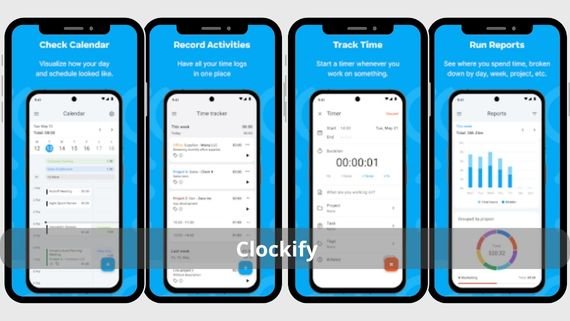
Clockify is a free and powerful time tracking app for teams and individuals alike. It stands out with its ability to track time across different projects, generate detailed reports, and sync data across all devices. Below are the key features of the Clockify app:
- Unlimited tracking of projects and activities for free
- Comprehensive reports on time and productivity
- Synchronization across all devices and platforms
- Team management and member time tracking
- Export data in multiple formats (PDF, CSV, Excel)
- Add task tags for better analysis
- Support for location-based tracking
- Simple and easy-to-use user interface
Try the ⏱️ Clockify Time Tracker app now to track your time smartly!
Toggl Track app (Toggl Track)
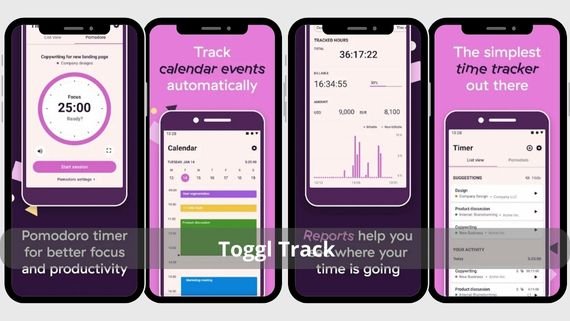
Toggl Track is a simple yet powerful time tracking app, distinguished by its elegant interface and ease of use. It allows you to start tracking time with one click, add task details, and create detailed reports. Below are the key features of the Toggl Track app:
- One-click time tracking with a simple interface
- Interactive and customizable reports
- Integration with more than 100 other apps
- Location logging for tracking
- Automatic data saving and synchronization
- Ability to add task tags
- Offline time tracking support
- Daily, weekly, and monthly reports
- Project and client management
- Reminders to track time when forgotten
Save your time with ⏰ Toggl Track Time Tracker and log your tasks easily!
RescueTime app (RescueTime)
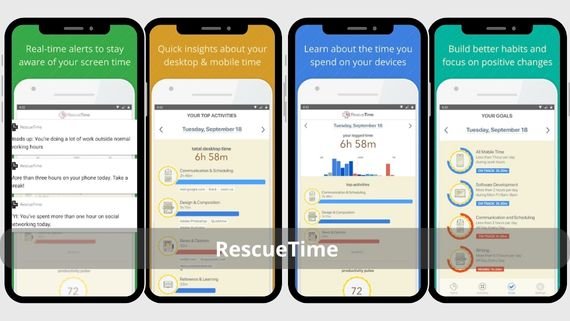
RescueTime is a unique app that automatically tracks your time in the background without requiring your intervention. It analyzes how you spend time on different apps and websites and provides detailed reports. Below are the key features of the RescueTime app:
- Runs in the background without user intervention
- Detailed productivity and focus reports
- Ability to set time usage goals
- Automatic blocking of distracting websites
- Daily and weekly activity summaries
- Categorization of apps by productivity
- Ability to pause tracking temporarily
- Reports on time spent on each app
- Alerts when exceeding set limits
- Google Calendar integration support
Boost your productivity daily with 📈 RescueTime Productivity Tracker and track your time smartly!
Hours Tracker app (Hours Tracker)
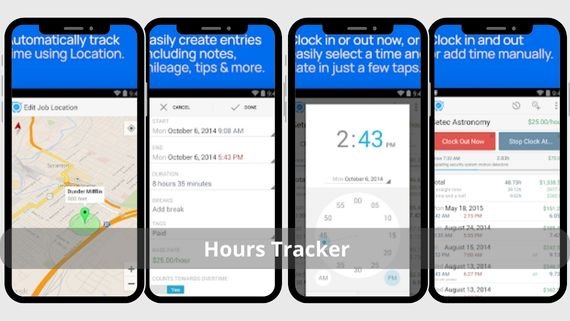
Hours Tracker is an app specialized in tracking work hours and income for employees and contractors. It stands out with its ability to calculate wages automatically, manage multiple jobs, and track vacations and sick leave. Below are the key features of the Hours Tracker app:
- Automatic income calculation based on work hours
- Manage more than one job in one place
- Record vacations and sick leave
- Easy data export for taxes
- Reminders to log time when starting work
- Support for paid and unpaid leave
- Overtime and extra hours calculation
- Ability to add notes for each work period
- Detailed reports on work hours
- Offline work support
Organize your time precisely with ⏱️ Hours Tracker and log your hours easily!
SaveMyTime app (SaveMyTime)
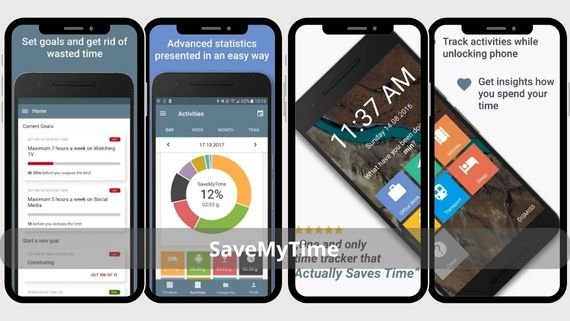
SaveMyTime is an innovative app that replaces the lock screen and asks you to specify your current activity when you unlock your phone. This way, it automatically tracks all your activities throughout the day. Below are the key features of the SaveMyTime app:
- Asks about your activity automatically when unlocking the phone
- Automatic categorization of activities by category
- Full analysis of day, week, and month
- Runs in the background without disturbing the user
- Visual representation of time with charts
- Ability to add custom activities
- Productivity and focus reports
- Google Calendar integration support
- Ability to export data in multiple formats
- Simple and attractive user interface
Save your time smartly with ⏰ SaveMyTime and track your tasks easily!
Forest app (Forest)
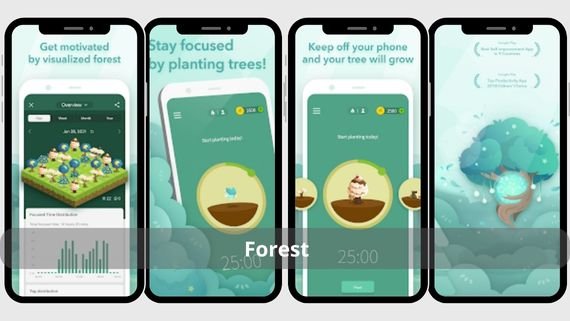
Forest is a unique app that combines time tracking with increased focus through a simple game. When you want to focus on a task, you plant a virtual tree that grows over time. If you leave the app, the tree dies. Below are the key features of the Forest app:
- Plant virtual trees when focusing on tasks
- Tree growth continues with sustained focus
- Track daily and weekly focus time
- Convert points into planting real trees worldwide
- Block distracting apps during focus sessions
- Ability to sync progress across devices
- Detailed statistics on focus habits
- Support focus mode with friends
- Reminders for focus sessions
- Beautiful and motivating user interface
Increase your focus and be more productive with 🌳 Forest: Focus & Productivity and take care of your time wisely!
TickTick app (TickTick)

TickTick is an all-in-one app that combines task management and time tracking in one place. It features a built-in Pomodoro timer, advanced task lists, a calendar, and achievement reports. Below are the key features of the TickTick app:
- Advanced task lists and integrated calendar
- Built-in Pomodoro timer to boost productivity
- Detailed reports on achievements and time
- Smart reminders for tasks and appointments
- Synchronization across all devices and platforms
- Ability to add attachments to tasks
- Support for collaboration with team members
- Task prioritization
- Ability to repeat tasks regularly
- Simple and organized user interface
Organize your tasks easily with 🗓️ TickTick and start your day efficiently!
ClickUp app (ClickUp)
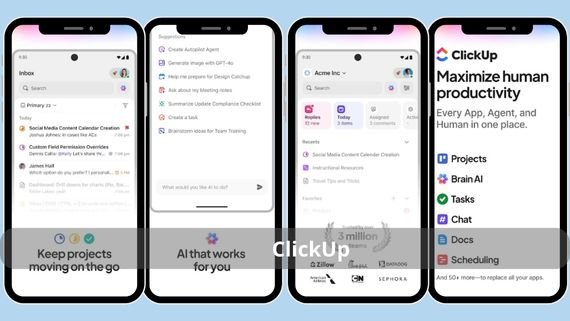
ClickUp is a comprehensive work platform that includes powerful time tracking features. It allows you to track time directly from tasks, create detailed reports, and manage projects and teams efficiently. Below are the key features of the ClickUp app:
- Track time directly from tasks
- Comprehensive project management tools
- Detailed reports on time and productivity
- Advanced collaboration tools for teams
- Integration with hundreds of other apps
- Ability to create subtasks
- Support for Kanban boards for tasks
- Ability to add notes and attachments
- Customize workflows as needed
- Customizable user interface
Organize all your work with 🚀 ClickUp and boost your productivity easily!
Harvest app (Harvest)
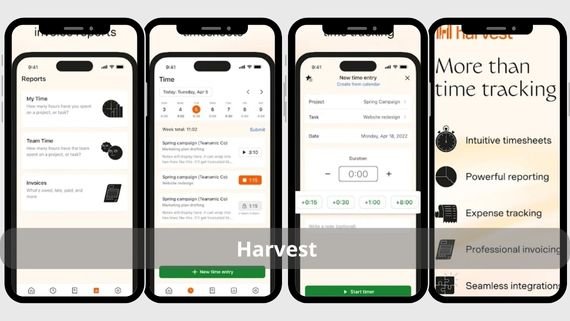
Harvest is a professional solution for time tracking that focuses on accurately turning hours into invoices. It combines the simplicity of time logging with the power of advanced invoicing, making it the ideal choice for freelancers and small businesses. Below are the key features of the Harvest app:
- Accurate logging of minutes and hours
- Convert logged time directly into invoices
- Comprehensive reports on productivity and revenue
- Integration with more than 50 other apps
- Add project expenses directly
- Access data from any device via synchronization
- Offline time tracking support
- Multi-currency invoicing support
- Ability to send reminders to clients
- Professional and easy-to-use user interface
Track your time and invoice your work easily with 💼 Harvest and boost your productivity!
My Hours app (My Hours)

My Hours is a simple and effective app for tracking time on projects and tasks. It stands out with its clean interface and ease of use, with the ability to create simple reports and export data. Below are the key features of the My Hours app:
- Clean and easy-to-use interface
- Track time on different projects
- Basic reports on time and productivity
- Export data in multiple formats (PDF, CSV)
- Device synchronization for access from anywhere
- Ability to add task tags
- Support for location-based tracking
- Ability to add notes for each tracking period
- Automatic daily and weekly reports
- Offline work support
Organize your work hours easily with ⏱️ My Hours and log your time accurately!
Choosing the best time tracking app
With the many time tracking apps available on the Google Play Store, choosing the right app becomes difficult. The most suitable choice depends on several factors such as the nature of work, team size, level of detail required in reports, and integration with other apps. Below is a comparison table to help you choose the most suitable app for your needs:
| App | Advantages | Disadvantages |
|---|---|---|
|
|
|
|
|
|
|
|
|
|
|
|
|
|
|
|
|
|
|
|
|
|
|
|
|
|
|
|
|
|
|
|
|
|
|
|
|
|
|
|









Choosing the right time tracking app is an important step toward achieving productivity and self-awareness. The goal is not only to track time, but to use this data to make better decisions and achieve an ideal balance between work and life.