
Project management apps are the digital backbone that connects team members, goals, and deadlines. These platforms do not just organize tasks, they create a living system for strategic planning, assigning responsibilities, tracking progress, and enabling effective communication. They are the digital environment where creativity thrives and visions turn into tangible achievements, making them essential for any team aiming for excellence.
Criteria for Choosing Project Management Apps
When choosing a suitable project management app, it is not enough to look at the number of features only, you should focus on how well the app fits the team’s workflow and requirements. A successful app combines flexibility with strong collaboration, and keeps up with project changes without complexity. Achieving a smart balance between ease of use and deep analytical reporting reflects directly on the quality of management decisions. In modern and hybrid work environments, mobile support and high security have become essential to ensure continuity and protect data.
| Criterion | Importance level | Its role in project management | If it is missing |
|---|---|---|---|
| Customization flexibility | Very high | Allows adapting the app to the nature of each project | Fixed solutions that do not fit all projects |
| Collaboration tools | Very high | Improves communication and increases team productivity | Individual work and scattered tasks |
| Integration with other tools | High | Makes it easier to connect with email, storage, and calendar | Separate systems that reduce efficiency |
| Ease of use | Medium – high | Reduces learning time and makes team adoption easier | Slow usage and resistance to change |
| Reports and analytics | High | Supports data-driven decision making | Limited view of project performance |
| Mobile support | High | Ensures managing the project from anywhere | Reliance on desktop devices only |
| Security and data protection | Very high | Maintains the confidentiality of project information | Risk of breaches and data loss |
| Availability of a free version | Medium | Helps small teams get started | Immediate commitment to paid solutions |
What Are the Best 10 Project Management Apps
Project management apps represent the new generation of project management tools, combining power, flexibility, and innovation. They were selected based on their unique capabilities to meet diverse needs and provide unconventional solutions to modern project management challenges. Among the best project management apps:
- Basecamp (Basecamp)
- Jira (Jira)
- Smartsheet (Smartsheet)
- Podio (Podio)
- MeisterTask (MeisterTask)
- Redbooth (Redbooth)
- Taiga (Taiga)
- Freedcamp (Freedcamp)
- Hitask (Hitask)
- Zoho Sprints (Zoho Sprints)
Basecamp App (Basecamp)

Basecamp redefines the concept of project management with a simple and effective approach. This legendary app focuses on simplifying team collaboration and organizing projects without unnecessary complications. Below are the key features of the Basecamp app:
- Unifying communications, tasks, and files in one place
- Visual project planning through clear timelines
- Live chat with the team to discuss details
- Smart notifications customized for tasks and deadlines
- Cloud storage for easy file sharing
- Ability to create task lists and assign them to team members
- Support for comments and discussions on every task
- Ability to link files and documents to tasks
- Periodic reports on project progress
Organize your projects and collaborate with your team easily via Basecamp 🏕️ A simple and effective project management app!
Jira App (Jira)
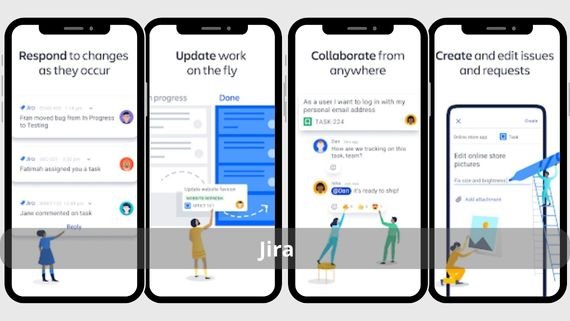
Jira is the dominant force in the world of software development and technical project management. This professional app is designed specifically for teams that follow Agile and Scrum methodologies. Below are the key features of the Jira app:
- Kanban boards for visual tracking of tasks and progress
- Comprehensive management of technical issues and bug tracking
- Advanced performance analytics through Agile reports
- Seamless integration with various development tools
- Automation of complex and customized workflows
- Ability to create user stories and sub-tasks
- Support for sprint planning and velocity tracking
- Ability to customize task fields based on project needs
- Support for custom dashboards
- A professional interface suited to technical work environments
Track your team’s progress and support workflows intelligently with Jira Cloud 📈 The best tool for managing tasks and projects!
Smartsheet App (Smartsheet)

Smartsheet turns traditional spreadsheets into a powerful project management platform. This innovative app combines the flexibility of spreadsheets with the power of project management tools. Below are the key features of the Smartsheet app:
- Transforming traditional sheets into smart project management tools
- Workflow automation and repeated processes
- Interactive dashboards and advanced reports
- Seamless integration with Microsoft and Google tools
- Efficient resource tracking and allocation
- Ability to create timelines and Gantt charts
- Support for managing complex, multi-stage tasks
- Ability to share reports and data easily
- Support for real-time collaborative work
- A customizable user interface to match needs
Deliver your projects professionally and collaborate with your team flexibly via Smartsheet 📊 A powerful tool for managing projects and teams!
Podio App (Podio)
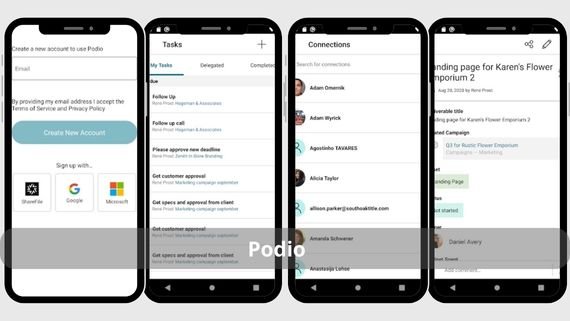
Podio is a flexible work platform that lets you build custom apps for project management without coding. This unique app combines task management, databases, and collaboration tools. Below are the key features of the Podio app:
- Creating custom apps without needing programming
- Flexible, customizable data management
- Automating complex processes and workflows
- Advanced collaboration tools for teams
- Integration with hundreds of other apps and services
- Ability to create custom forms for tasks and projects
- Support for Kanban boards for task management
- Ability to create custom reports and statistics
- Support for chats and discussions within tasks
- A fully customizable user interface
Customize your work and collaborate with your team with high flexibility via Podio 🔧 A smart platform for organizing projects and collaboration!
MeisterTask App (MeisterTask)

MeisterTask combines simplicity and power in an elegant user interface inspired by the Kanban methodology. This app stands out for its ability to turn mind maps into actionable tasks. Below are the key features of the MeisterTask app:
- Visual task boards inspired by Kanban
- Turning mind maps into actionable tasks
- Automating recurring and routine tasks
- Real-time team collaboration
- Seamless integration with MindMeister tools
- Ability to create smart automation rules
- Support for comments and attachments on tasks
- Ability to track time on tasks
- Support for smart notifications and reminders
- An attractive and easy-to-use user interface
Organize your tasks and track your team’s progress easily via MeisterTask ✅ An elegant app for managing tasks intelligently!
Redbooth App (Redbooth)
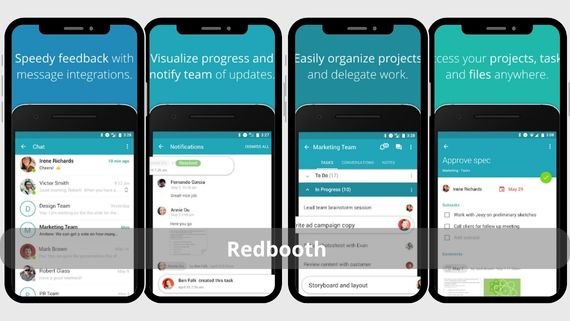
Redbooth is a project management app that focuses on simplicity and effectiveness at the same time. It stands out for its ability to track time, manage tasks, and streamline team communication. Below are the key features of the Redbooth app:
- Visual project planning through interactive timelines
- Accurate and efficient task time tracking
- Effective communication inside tasks through team chats
- Tracking project completion through progress reports
- Integration with other productivity tools
- Ability to create and break down sub-tasks
- Support for attaching files and documents to tasks
- Ability to set task priorities
- Support for notifications and reminders
- A simple and organized user interface
Arrange your team’s tasks and complete your projects efficiently with Redbooth 🚀 A project management and collaboration app!
Taiga App (Taiga)

Taiga is an open-source platform designed specifically for teams that follow Agile methodologies. This app combines project management, bug tracking, and collaboration tools. Below are the key features of the Taiga app:
- Full support for Scrum and Kanban
- Comprehensive issue management and bug tracking
- Visual organization of tasks through multiple boards
- Managing project releases and controlling them
- Full customization thanks to being open source
- Ability to create user stories and tasks
- Support for sprint planning and progress tracking
- Ability to customize workflows to match team needs
- Support for reports and statistics on team performance
- A professional user interface suitable for technical teams
Manage your projects in an agile and flexible way with Taiga 🧩 An effective tool for organizing tasks and teams!
Freedcamp App (Freedcamp)

Freedcamp offers a powerful free solution for project management that combines basic and advanced features. This app stands out for its ability to meet the needs of small and medium projects. Below are the key features of the Freedcamp app:
- Generous free features suitable for startups
- Organizing tasks and projects efficiently
- Scheduling appointments and events through a shared calendar
- Storing and sharing files easily
- Tracking project expenses and budgets
- Ability to create and customize task lists
- Support for Kanban boards for task management
- Ability to create discussions and comment on tasks
- Support for reports on project progress
- A simple and easy-to-use user interface
Organize your tasks and collaborate with your team easily via Freedcamp 📋 A flexible app for managing tasks and projects!
Hitask App (Hitask)
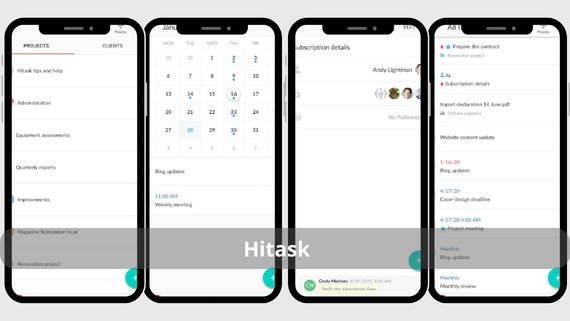
Hitask is a simple but effective app for managing tasks and projects. It stands out for simplifying complex project management through an intuitive user interface. Below are the key features of the Hitask app:
- An easy interface suitable for all users
- Accurate and efficient task time tracking
- Effective organization of tasks and projects
- Tracking task completion through progress reports
- Sharing tasks with the team and assigning them
- Ability to create multiple task lists
- Calendar support for scheduling tasks
- Ability to attach files to tasks
- Support for notifications and reminders
- A simple and organized user interface
Simplify your tasks and collaborate with your team intelligently via HiTask 🧠 A practical app for managing group tasks!
Zoho Sprints App (Zoho Sprints)

Zoho Sprints is an app specialized in project management using the Scrum methodology. This app provides powerful tools for sprint planning, progress tracking, and task management. Below are the key features of the Zoho Sprints app:
- Efficient sprint planning and tracking
- Integrated Scrum tools for project management
- Analyzing team performance through velocity reports
- Seamless integration with the Zoho ecosystem
- Automating Scrum processes and workflows
- Ability to create user stories and tasks
- Support for custom dashboards
- Ability to track time on tasks
- Support for reports on sprint progress
- A professional user interface suitable for technical teams
Manage your projects in an agile way and track the team’s progress with Zoho Sprints 🌀 A powerful app for managing sprints and tasks!
How Do I Choose the Best Project Management App
With many project management apps available on Google Play, choosing the right app becomes difficult. The best choice depends on several factors such as team size, project type, work methodology, and available budget. Below is a comparison table to help you choose the app that best fits your needs:
| App name | Features | Drawbacks |
|---|---|---|
| Basecamp | Simplified collaboration, simple interface, cloud storage | Limited advanced analytical reporting |
| Jira | Agile and Scrum support, bug tracking, advanced reports | Complex for beginners, requires technical experience |
| Smartsheet | Smart sheets, automation, integration with Microsoft and Google | Complex interface, steep learning curve |
| Podio | Build custom apps, flexible databases, automation | Requires time for customization, complex for new users |
| MeisterTask | Kanban interface, mind map conversion, automation | Limited advanced features for large projects |
| Redbooth | Timelines, time tracking, team chats | Limited integration with other apps |
| Taiga | Agile and Scrum support, open source, bug tracking | User interface is somewhat outdated |
| Freedcamp | Generous free version, task management, shared calendar | Ads in the free version |
| Hitask | Simple interface, time tracking, task management | Limited advanced features for large projects |
| Zoho Sprints | Sprint management, velocity reports, Zoho integration | Specialized in Scrum only, limited other features |
Choosing the right project management app is an important step toward success in project management. Each app on this list offers unique features that fit different work styles and teams. We recommend trying several apps to pick the best fit for your team’s needs and the nature of your projects, and using the advanced features they offer to achieve the highest levels of efficiency and organization.