
Learning languages, programming, and math has become easier with smart educational apps that offer interactive and enjoyable content. The top 10 free and paid educational apps combine learning and gamification, and support artificial intelligence to personalize lessons to your level. From Khan Academy Kids for children to Anki for advanced memorization, these tools fit all ages and learning goals. Here on Rumman net, we tested and analyzed a wide range of apps and platforms that rely on the latest AI and interactive learning technologies, and the differences between them, to choose the most suitable app for your learning needs accurately.
What are the best 10 free and paid educational apps for 2026?
Options vary between platforms for language learning and others that simplify math and programming for kids. Here is a carefully selected list of the most powerful tools that help students and teachers get the most out of modern technology:
- Khan Academy Kids app (Khan Academy Kids).
- Duolingo app (Duolingo).
- Scratch app (Scratch).
- Google Classroom app (Google Classroom).
- Photomath app (Photomath).
- Quizlet app (Quizlet).
- Kahoot app (Kahoot).
- Anki app (Anki).
- Memrise app (Memrise).
- Endless Alphabet app (Endless Alphabet).
Khan Academy Kids app (Khan Academy Kids)
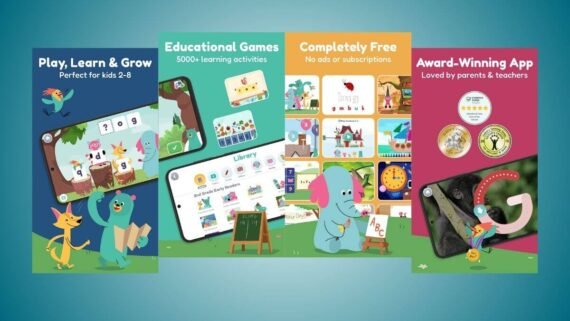
Khan Academy is a comprehensive educational platform that is completely free, designed for children aged 2 to 8. The program aims to build a strong foundation in reading, writing, math, and social skills through lovable cartoon characters and fun interactive activities. Khan Academy Kids is completely ad-free, making it a very safe environment for a child to learn independently without distraction.
- A storybook library with audio and interactive stories to strengthen reading skills.
- A personalized learning path that adapts intelligently to the child’s level and progress.
- Fun early math games to teach counting, addition, and geometric shapes.
- Creative activities for drawing, coloring, and developing artistic expression.
- A precise tracking dashboard for teachers and parents to monitor the child’s development.
| App name | Khan Academy Kids (Khan Academy Kids) |
|---|---|
| Main function | Comprehensive learning for children (reading, math, skills) |
| Operating systems | Android / iOS |
| Price | Completely free |
| Does it support artificial intelligence | No (it relies on adaptive algorithms) |
| Ease of use level | Very easy |
| Is it suitable for beginners or professionals | Beginners only (for children) |
| Download link | Download Khan Academy Kids |
Duolingo app (Duolingo)
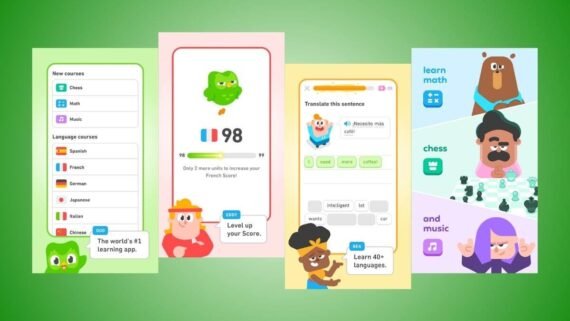
Duolingo is the most famous language learning app in the world, as it uses gamification to make studying fun and game-like. Duolingo offers short, effective lessons in more than 40 languages, along with new courses in math and music. Duolingo suits all ages and uses artificial intelligence to personalize lessons based on the learner’s performance and pace.
- The skill tree is an organized map to unlock new language levels and progress smoothly.
- Duolingo Stories are short dialogues to improve listening and reading skills from real life.
- The hearts and rewards system provides ongoing motivation through XP points and keeping enthusiasm.
- Math and music courses are new curricula to teach basics in an interactive way.
- Spaced repetition technology is a smart algorithm to review words before you forget them.
| App name | Duolingo (Duolingo) |
|---|---|
| Main function | Learning languages, math, and music |
| Operating systems | Android / iOS / Web |
| Price | Free (there is a paid Super plan) |
| Does it support artificial intelligence | Yes |
| Ease of use level | Very easy |
| Is it suitable for beginners or professionals | For beginners and professionals |
| Download link | Download Duolingo |
Scratch app (Scratch)
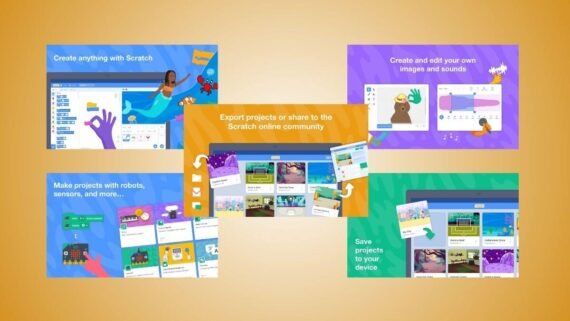
The Scratch Foundation designed this platform to enable children and beginners to enter the world of programming in a visual, easy way. Scratch uses a “drag and drop” system for code blocks, allowing users to create interactive stories, games, and animations without needing to write complex code. Scratch develops logical thinking, creativity, and problem-solving skills in young students.
- The code blocks editor is a visual interface to assemble commands like LEGO easily.
- A library of sprites and backgrounds with ready-made graphics and sound effects for instant use.
- The Scratch community is a platform to share projects, explore others’ work, and learn from it.
- Offline mode enables coding without an internet connection through the app.
- Built-in tutorials provide step-by-step explanations for first projects and basics.
| App name | Scratch (Scratch) |
|---|---|
| Main function | Teaching visual programming for children |
| Operating systems | Android / Chromebook / Windows / Mac |
| Price | Completely free |
| Does it support artificial intelligence | No |
| Ease of use level | Easy to medium |
| Is it suitable for beginners or professionals | Beginners only |
| Download link | Download Scratch |
Google Classroom app (Google Classroom)
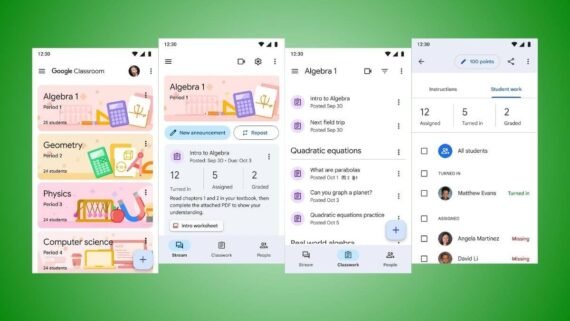
Google Classroom is the core tool for managing virtual classrooms, connecting teachers and students to simplify distance or blended learning. Google Classroom lets you create classes, distribute assignments, and provide feedback and grades in one organized place. The Google Classroom app stands out for its deep integration with other Google services like Drive and Docs, making it the most suitable choice for schools and educational institutions.
- The Stream is a space for communication, announcements, and class discussions easily.
- Classwork is a tool to create and assign tasks and quizzes and set deadlines.
- Workspace integration provides direct linking with Google Docs, Slides, and Forms for quizzes.
- The gradebook is a system to track student performance and record grades easily and efficiently.
- Instant notifications alert students about new assignments and critical deadlines.
| App name | Google Classroom (Google Classroom) |
|---|---|
| Main function | Managing classes and assignments |
| Operating systems | Android / iOS / Web |
| Price | Free (within the education package) |
| Does it support artificial intelligence | No (organizational tools) |
| Ease of use level | Easy to medium |
| Is it suitable for beginners or professionals | For beginners and professionals |
| Download link | Download Google Classroom |
Photomath app (Photomath)
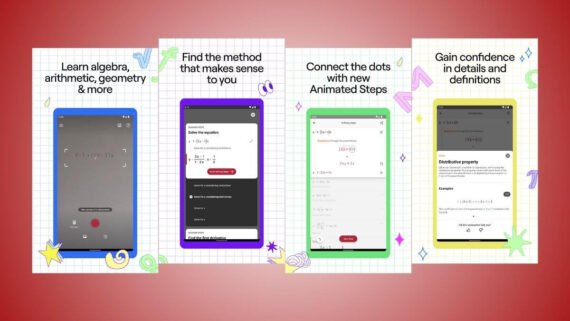
Photomath is the number one personal assistant for students in math, using the phone camera to scan handwritten or printed math problems and solve them instantly. Photomath does not just show the final result, it provides a detailed explanation for every step of the solution, helping the student learn the method and grasp the concepts. The Photomath app covers a wide range of topics, from basic arithmetic to calculus.
- The smart scanner is OCR technology for accurate recognition of handwritten equations.
- Step-by-step solution breaks the problem down to explain the math logic clearly.
- Interactive graphs provide a visual representation of functions and equations for deeper insight.
- A scientific calculator is an advanced tool to edit equations and solve them manually with ease.
- Animated explanations are explanatory videos for some concepts (in the paid version).
| App name | Photomath (Photomath) |
|---|---|
| Main function | Solving and explaining math problems |
| Operating systems | Android / iOS |
| Price | Free (there is a paid Plus plan) |
| Does it support artificial intelligence | Yes |
| Ease of use level | Very easy |
| Is it suitable for beginners or professionals | For beginners and professionals |
| Download link | Download Photomath |
Quizlet app (Quizlet)
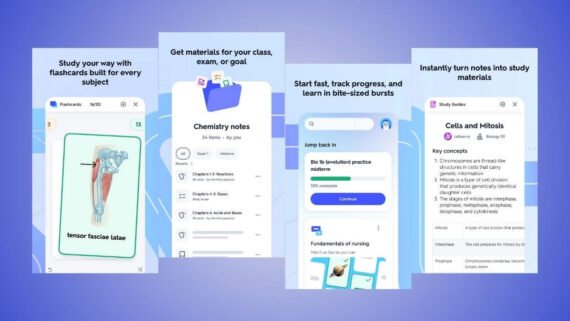
Quizlet is a leading global study platform built around flashcards to simplify information and speed up memorization. Millions of students use the Quizlet app to create their own study sets or browse millions of ready-made cards created by others. Quizlet offers multiple study and self-testing modes, making it ideal for exam prep and learning new terms.
- Flashcards are the core tool for quick review and effective memorization.
- Learn mode is a smart system that adapts to your answers to focus on weak points.
- Practice tests generate varied questions to simulate the real exam atmosphere.
- Matching games are a fun, fast way to link terms to their definitions.
- Magic Notes is an AI feature that turns text notes into cards and questions.
| App name | Quizlet (Quizlet) |
|---|---|
| Main function | Studying and reviewing with flashcards |
| Operating systems | Android / iOS / Web |
| Price | Free (there is a paid Plus plan) |
| Does it support artificial intelligence | Yes |
| Ease of use level | Very easy |
| Is it suitable for beginners or professionals | For beginners and professionals |
| Download link | Download Quizlet |
Kahoot app (Kahoot)
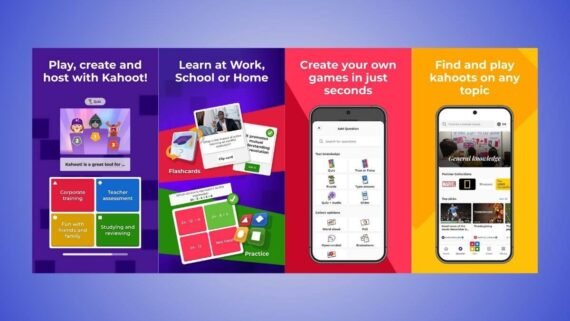
The Kahoot app turns learning into a competitive, exciting game show, making it one of the top 10 educational apps. It is used to create short interactive quizzes that students join through their phones. Kahoot is best for teachers who want to raise interaction in class, or for students who want fun group review. The Kahoot app stands out with its colorful design, energetic music, and points system that sparks positive competition.
- The quiz creator includes easy tools to design multiple-choice and true/false questions.
- Live hosting mode manages the game in real time in class or via video.
- Self-paced challenges allow sending quizzes as homework for solo play.
- The Kahoot library contains millions of ready-made games across different subjects.
- Reports and analytics provide instant statistics on student performance and difficult questions.
| App name | Kahoot (Kahoot) |
|---|---|
| Main function | Game-based learning and quizzes |
| Operating systems | Android / iOS / Web |
| Price | Free (paid plans for teachers and companies) |
| Does it support artificial intelligence | Yes (for question generation) |
| Ease of use level | Very easy |
| Is it suitable for beginners or professionals | For beginners and professionals |
| Download link | Download Kahoot |
Anki app (Anki)
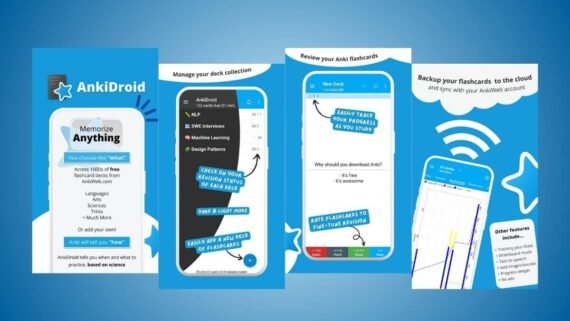
The Anki app is known as the strongest tool for long-term memorization, as it relies on advanced spaced repetition algorithms. AnkiDroid is widely used by medical students and language learners to memorize huge amounts of information efficiently. The Anki app allows full customization of cards, including adding images, audio, and even LaTeX math equations, making it extremely flexible.
- The spaced repetition system schedules smart reviews based on the brain’s natural forgetting curve.
- Cloud sync saves progress and cards across all devices for free.
- Add-ons are a library of plugins to expand program functions (mainly for desktop).
- Custom card types let you design templates that match the kind of information you want to memorize.
- Detailed statistics provide precise charts that show study load and retention rates.
| App name | Anki (Anki) / AnkiDroid |
|---|---|
| Main function | Advanced memorization with spaced repetition |
| Operating systems | Android (free) / Windows / iOS (paid) |
| Price | Free (iOS version is paid) |
| Does it support artificial intelligence | No (it relies on statistical algorithms) |
| Ease of use level | Medium to complex |
| Is it suitable for beginners or professionals | Mainly for professionals |
| Download link | Download Anki |
Memrise app (Memrise)
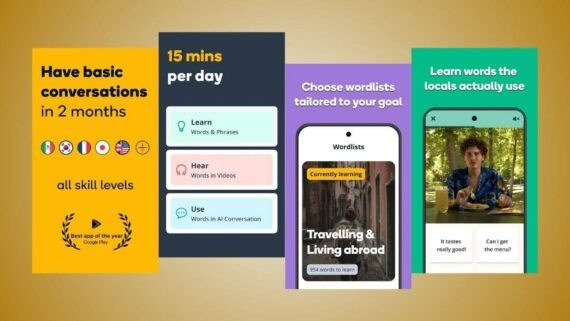
The Memrise app focuses on learning living languages and vocabulary through immersion in videos of native speakers and real-world content. Memrise differs from others by focusing on slang and everyday phrases instead of robotic sentences, using memory and mental association techniques. The Memrise app provides a rich visual and audio learning experience that helps learners acquire correct pronunciation and understand context.
- Learn with Locals clips include thousands of short street videos with native speakers.
- AI conversations use a chatbot (MemBot) to practice speaking without pressure.
- Review difficult words identifies vocabulary you get wrong and repeats it intelligently.
- Instant translation feature uses the camera to recognize objects and translate them into the target language.
- Fast learning offers intensive training rounds to boost recall speed.
| App name | Memrise (Memrise) |
|---|---|
| Main function | Learning languages through video and immersion |
| Operating systems | Android / iOS / Web |
| Price | Free (there is a paid Pro plan) |
| Does it support artificial intelligence | Yes |
| Ease of use level | Very easy |
| Is it suitable for beginners or professionals | For beginners and professionals |
| Download link | Download Memrise |
Endless Alphabet app (Endless Alphabet)
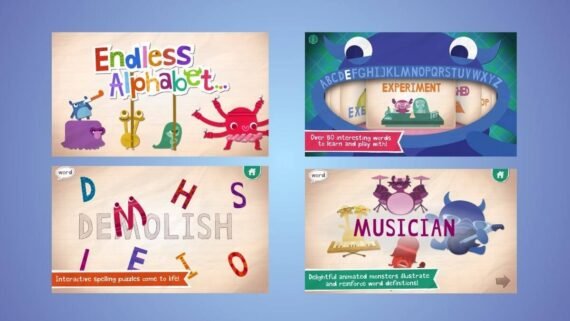
The Endless Alphabet app is a charming interactive app designed specifically for preschool children to teach them the English alphabet and build their first vocabulary. Endless Alphabet uses cute cartoon monsters and funny animations to explain word meanings after the child assembles the letters. The Endless Alphabet app offers a pressure-free experience, with no grades or timers, allowing the child to explore and learn with complete freedom.
- Talking letter puzzles are voice-interactive puzzles when touching and dragging letters.
- Introductory animations are a short cartoon scene that explains each word’s meaning after it is assembled.
- Monster characters are colorful, fun learning companions to capture the child’s attention.
- A child-safe interface is a simple design free of ads and external links.
- Varied words are a huge set of vocabulary that keeps expanding (in the full version).
| App name | Endless Alphabet (Endless Alphabet) |
|---|---|
| Main function | Teaching English letters and vocabulary for children |
| Operating systems | Android / iOS |
| Price | Paid (limited trial) |
| Does it support artificial intelligence | No |
| Ease of use level | Very easy |
| Is it suitable for beginners or professionals | Beginners only (children) |
| Download link | Download Endless Alphabet |
What is the difference between the best free and paid educational apps?
The following table provides a comprehensive comparison to help you discover the strengths and weaknesses of each platform before downloading:
| App | Key advantages | Key disadvantages |
|---|---|---|
| Khan Academy Kids Khan Academy Kids | Completely free, safe for kids, comprehensive educational content | Does not fully support Arabic, for young ages only |
| Duolingo Duolingo | Fun like games, free, supports artificial intelligence | Relies on direct translation, ads in the free version |
| Scratch Scratch | Develops logical creativity, free and open source, huge community | May be complex for some at first, the interface is somewhat old |
| Google Classroom Google Classroom | Excellent assignment organization, integration with Google services, free | Needs a constant internet connection, not a content creation platform |
| Photomath Photomath | Instant and accurate solving, step explanations, supports handwriting | Advanced features are paid, may reduce student self-reliance |
| Quizlet Quizlet | Excellent for memorization and review, huge ready-made content, AI tools | Some study modes have become paid, annoying ads for free users |
| Kahoot Kahoot | Very interactive and fun, motivates competition, easy to use | Full features require a subscription, needs a shared display screen |
| Anki Anki / AnkiDroid | Best memorization algorithm, flexible and customizable, free on Android | Difficult interface for beginners, the official iPhone version is very expensive |
| Memrise Memrise | Real-life videos, focus on conversation, fun | The free version is limited, the focus is more on vocabulary than grammar rules |
| Endless Alphabet Endless Alphabet | Very attractive graphics, interactive letter learning, no pressure | The app is paid (not completely free), limited number of words |
With the rising role of artificial intelligence in 2025 and by 2026, platforms like Duolingo and Quizlet have started to offer a personalized learning experience that outperforms traditional methods, as AI analyzes your weak points and focuses on them automatically, which noticeably raises learning efficiency compared to random memorization.
For everyone looking to learn and grow academically, we presented the top 10 educational apps, whether free or paid. For young children, Khan Academy Kids remains the safe, trusted choice, while Duolingo and Memrise top the language apps list for their effectiveness. For serious students, combine Google Classroom with Anki or Quizlet to achieve outstanding academic results. Choose what fits your learning goals and enjoy a modern, effective learning journey.