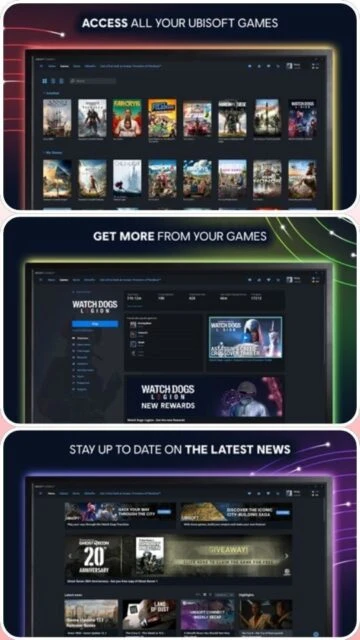
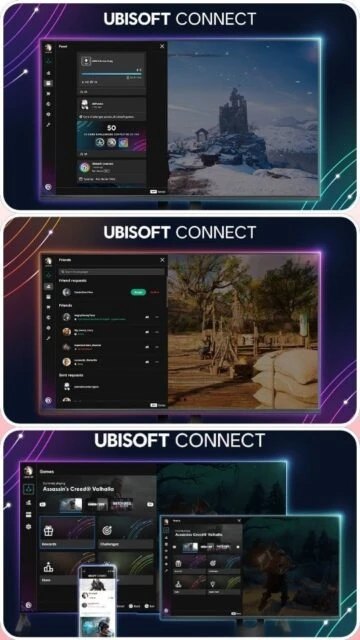
Ubisoft Connect is the official gaming platform by Ubisoft that consolidates all your Ubisoft games, friends, achievements, and progress in one centralized location. It allows cross-platform play and progression across PC, PlayStation, Xbox, Nintendo Switch, and mobile devices. The platform includes a built-in rewards program where players earn points by completing challenges and leveling up, which can be redeemed for exclusive in-game content, cosmetics, and collectibles. Ubisoft+ subscription service provides unlimited access to a library of hundreds of games from Ubisoft's catalog.
System Requirements
Operating System:Windows 7 SP1 64-bit or later
Processor:2 GHz Dual-Core processor
RAM:2 GB
Disk Space:5 GB
Additional Requirements:DirectX 11 compatible graphics card, internet connection
Features Of Ubisoft Connect
Cross-platform progression and save synchronization
Built-in rewards program with achievement tracking
Ubisoft+ subscription service with day-one game access
Integrated social features and friend management
In-game overlay with chat and streaming capabilities
Multiple language support across interface
Cross-play functionality with console accounts
Game library management and download optimization
Pros & Cons
Pros
Excellent cross-platform progression system
Vibrant rewards program with tangible benefits
Comprehensive social features for community engagement
Day-one access to major releases with Ubisoft+
Seamless integration with major consoles
User-friendly interface design
Regular updates and new content additions
Cons
Customer support can be slow and unresponsive
Frequent login issues reported by users
Account security concerns reported
Performance issues on lower-end systems
Limited game library outside Ubisoft titles
Overlay can impact game performance
Changelog
Version 168.0.0 (September 2025):
- Improved stability and performance
- Enhanced user interface responsiveness
- Fixed login persistence issues
Version 166.0.0 (July 2025):
- Added new social features
- Improved game library loading speed
- Enhanced notification system
Frequently Asked Questions
How do I link my console account to Ubisoft Connect?
Visit ubisoft.com, log into your account, go to profile settings, and select 'Connected Accounts' to link PlayStation, Xbox, or Nintendo accounts. You can then sync your games and progress.
What is Ubisoft+ and is it worth the subscription?
Ubisoft+ is a subscription service providing unlimited access to hundreds of Ubisoft games including day-one releases in premium editions. It costs around $17.99 monthly and includes exclusive cosmetics and benefits for subscribers.
Why do I keep getting logged out of Ubisoft Connect?
Login issues are commonly reported. Try clearing your browser cache, disabling browser extensions, and ensuring your account has two-factor authentication enabled. Contact support if issues persist.
Can I play Ubisoft games on multiple platforms with one account?
Yes, with cross-progression enabled, your save games and progress sync across PC, PlayStation, Xbox, and mobile. Cloud saves ensure continuity when switching between platforms.
How do I earn and redeem Ubisoft Connect rewards?
Play games and complete challenges to earn points. Open the rewards section in your profile to see available items, then redeem points for cosmetics, battle pass items, or exclusive content.
What should I do if my Ubisoft account was hacked?
Immediately change your password, enable two-factor authentication, and contact Ubisoft Support with proof of ownership. Account recovery can be slow, so act quickly and keep documentation of your purchases.
Ubisoft Connect is a comprehensive gaming platform that serves as the central hub for all your Ubisoft games, friends, and benefits in one unified location. This guide covers installation, setup, platform availability, integrations, comparisons with alternatives, keyboard shortcuts, and performance optimization tips to enhance your gaming experience.
Installation & Setup
Visit the official Ubisoft website and download the Ubisoft Connect installer
Locate the downloaded file in your Downloads folder and double-click to launch the installer
Accept the license agreement and choose your preferred installation directory
Click Install and wait for the setup to complete
Launch Ubisoft Connect and log in with your Ubisoft account or create a new one
Link your console accounts (PlayStation, Xbox, Nintendo) for cross-progression
Start downloading and playing your games from the library
Platform Availability
Platform
Support
Features
Windows PC
Full Support
Complete library, store access, cross-progression, rewards
macOS
Limited
Account management, cloud saves
PlayStation
Full Support
Cross-platform play, progression sync
Xbox
Full Support
Cross-platform play, progression sync
Mobile (iOS/Android)
Full Support
Account management, multiplayer chat
Integration Ecosystem
Steam – Link your Steam account to import Ubisoft titles and manage them within Steam
Epic Games Store – Connect your Epic account for cross-platform benefits and shared friends lists
Ubisoft+ – Subscribe to access hundreds of Ubisoft games including day-one releases and premium editions
Discord – Rich presence integration to show friends what game you are playing
PlayStation Network – Full integration for cross-save and cross-progression
Xbox Live – Complete synchronization of achievements and game progress
Ubisoft Connect vs Alternatives
Feature
Ubisoft Connect
Steam
Epic Games
Cross-Platform Play
Yes
Limited
Limited
Cross-Progression
Yes
Per-game basis
Per-game basis
Game Library
Ubisoft titles
Multi-publisher
Multi-publisher
Subscription Service
Ubisoft+
No
PlayStation Plus
Social Features
Extensive
Advanced
Basic
Rewards Program
Yes
Yes (limited)
No
Keyboard Shortcuts
Alt + Tab – Switch between windows
Ctrl + L – Open Library view
Ctrl + S – Access Store
F11 – Toggle fullscreen mode
Ctrl + P – Open Profile menu
Ctrl + O – Access Overlay during gameplay
Ctrl + M – Mute/Unmute overlay notifications
Performance Tips
Disable the overlay while gaming to reduce performance impact and improve frame rates
Close unnecessary background applications to free up system resources
Update your graphics drivers regularly for optimal game performance
Set your preferred graphics quality in individual game settings, not launcher settings
Use a wired internet connection for faster downloads and better online stability
Clear the launcher cache periodically by deleting temporary files from AppData
Enable hardware acceleration in the launcher settings if your GPU supports it
User reviews and ratings for Ubisoft Connect
See what users think about Ubisoft Connect. Read honest reviews and ratings from real users.
2.8
★★★★★
4 reviews
Great Games, Frustrating Platform
by GamerJohn
★★★★★
2025-11-28
Love the Ubisoft games but the launcher is problematic. Frequent login issues and customer support is unhelpful. The cross-platform features are excellent when they work properly.
Solid Game Library with Support Issues
by NeonShade
★★★★★
2025-10-15
Good selection of games and the rewards system is engaging. However, security concerns and slow support response times are major drawbacks. Cross-progression works well when functional.
Account Issues Keep Happening
by FrustratedGamer
★★★★★
2025-09-22
Constantly getting logged out despite security measures. Lost access to my account and support took weeks to respond. Games are good but the platform needs major improvements.
Ubisoft+ Makes It Worth It
by ProSubscriber
★★★★★
2025-08-10
Platform has its issues but Ubisoft+ subscription provides excellent value with day-one releases. Rewards program is better than competitors. Just keep security settings strong.
Write a Review
Ubisoft Connect Screenshots & Photos
Browse through screenshots and photos of Ubisoft Connect to see how it looks and works.
Ubisoft Connect Videos
Watch videos to see how this software works and learn about its features.

 50
50