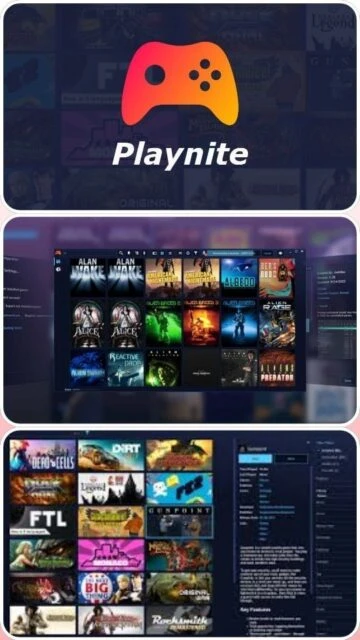
Playnite is an open-source video game library manager with one simple goal: to provide a unified interface for all of your games. It automatically imports games from popular libraries like Steam, Epic, Origin, GOG, Battle.net, Ubisoft Connect, and many others, including emulated console games.
The application is designed to be highly customizable, allowing users to write scripts, create themes, and develop plugins to extend functionality. Unlike proprietary launchers, Playnite respects user privacy, requiring no account creation and storing all data locally on your machine.
System Requirements
Operating System:Windows 7, 8, 10, 11 (64-bit)
Processor:Intel Core 2 Duo or AMD Athlon 64 X2
RAM:2 GB
Disk Space:500 MB
Additional Requirements:.NET Framework 4.6.2
Features Of Playnite
Universal Library Import: Connects 10+ major launchers
Fullscreen Mode: Controller-ready interface for TV use
Emulation Support: Auto-detects and configures emulators
Extension Support: Hundreds of community-made plugins
Portable Architecture: Run directly from USB drives
Play Time Tracking: Unified counters across all platforms
Metadata Loader: Fetches covers, backgrounds, and icons
Pros & Cons
Pros
Completely free and open-source forever
Lightweight with minimal system resource usage
Does not require a proprietary account
Supports virtually every game launcher and emulator
Active community developing new extensions daily
Cons
Requires 3rd party launchers to be installed to play
Fullscreen mode themes can be complex to edit
No built-in cloud sync for save games (local only)
Automatic emulator setup can occasionally fail
Changelog
Version 10.37 (June 2025):
- Added JGenesis emulator profile
- Fixed background music not restoring after game exit
- Improved reliability of library updates from Epic Games
- Resolved focus issues in Fullscreen mode
- Updated IGDB metadata fetcher API compatibility
Frequently Asked Questions
Does Playnite replace Steam?
No, it acts as a frontend. You still need Steam installed to launch Steam games, but Playnite manages the library organization.
Is Playnite safe to use?
Yes, it is open-source (MIT License) and the code is publicly auditable on GitHub. It does not collect personal user data.
Can I use it on a TV?
Yes, Playnite features a 'Fullscreen Mode' specifically designed for controllers and large screens, similar to Steam Big Picture.
Does it support console games?
Yes, via emulation. You can import ROMs and link them to emulators like RetroArch or PCSX2 within Playnite.
Playnite serves as the ultimate command center for PC gamers who have libraries scattered across multiple launchers. Instead of juggling five different clients, this open-source tool aggregates every game you own into a single, cohesive dashboard. It supports emulation, offers extensive metadata customization, and runs entirely offline without account mandates.
Installation & Setup
Download the installer (Standard or Portable) from the official site.
Run the setup wizard; choose “Portable” if installing to an external drive.
Launch Playnite and complete the “First Time Configuration” wizard.
Select libraries to import (Steam, Epic, Xbox, GOG, etc.) and authenticate.
Allow metadata to download automatically for cover art and descriptions.
Platform Availability
Platform
Support
Features
Windows 10/11
Native
Full Desktop & Fullscreen Mode
Windows 7/8
Legacy
Basic Functionality (No updates)
Linux
Planned (v11)
Experimental / Wine compatible
Integration Ecosystem
Store Libraries – Native import for Steam, Epic, GOG, EA App, Ubisoft Connect, Battle.net.
Emulation – Seamless import for RetroArch, Dolphin, PCSX2, and 50+ other emulators.
Metadata Sources – IGDB, Wikipedia, and SteamGridDB for high-res assets.

 39
39