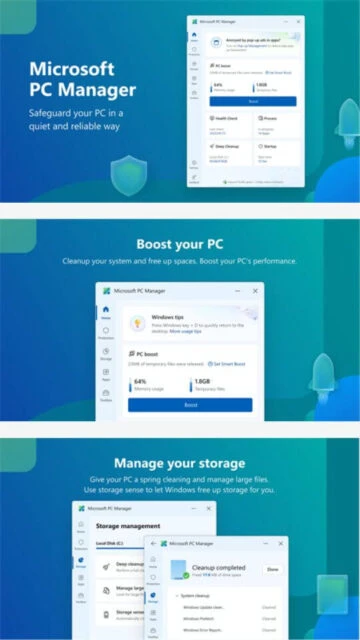
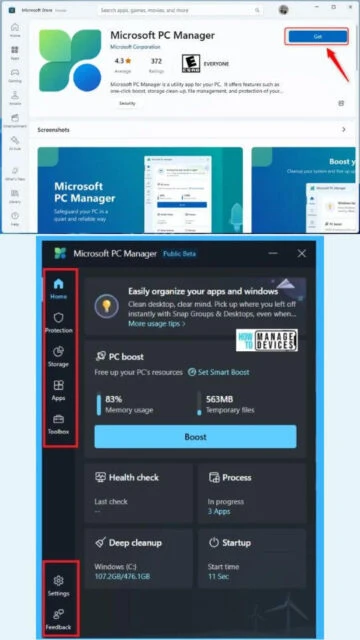
Microsoft PC Manager offers a simple, non-intrusive way to protect your personal computer and optimize its performance. Born from the need to provide a unified interface for existing Windows maintenance tools, it aggregates disk cleanup, virus scanning, and memory boosting into one modern app. Unlike aggressive third-party boosters, it follows Microsoft's strict safety guidelines to ensure no critical system files are ever harmed during cleanup operations.
System Requirements
Operating System:Windows 10 (Version 1809 or later) or Windows 11
Processor:1 GHz or faster
RAM:4 GB
Disk Space:500 MB
Additional Requirements:Internet connection required for updates and cloud protection
Features Of Microsoft PC Manager
One-click system boost to free up RAM
Integrated deep scan with Windows Defender
Large file management and cleanup
Storage sense integration for deep cleaning
Pop-up management to block ad windows
Browser protection utility
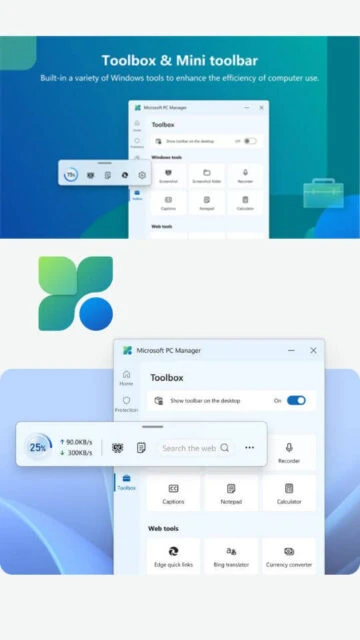
Floating desktop toolbar for quick access
Process management to kill unused apps
Startup app optimization
Windows Update management integration
Pros & Cons
Pros
Official tool verified by Microsoft
Completely free with no premium upsells
Low system resource usage
Seamless design matches Windows 11 UI
Safe cleaning that respects system stability
Aggregates scattered Windows settings
Cons
Fewer advanced options than third-party tools
Requires internet for some features
Limited customization of cleaning rules
Mainly a frontend for existing Windows tools
Cannot schedule automatic cleanups
Changelog
Version 3.18.11.0 (December 2, 2025):
- Enhanced large file detection algorithms
- Fixed UI scaling issues on high-DPI monitors
- Improved startup time optimization logic
- Added new widgets to the floating toolbar
- General performance and stability fixes
Frequently Asked Questions
Is this included in Windows by default?
No, it is currently a standalone download from the Microsoft Store or the official website, though it integrates deeply with the OS.
Does it replace my antivirus?
No, it works alongside Microsoft Defender (your built-in antivirus) to provide an easier interface for scanning and health checks.
Is it safe to use the 'Boost' button?
Yes, the Boost function safely releases memory from inactive background processes and clears temporary caches without crashing active apps.
What is Microsoft PC Manager?
Microsoft PC Manager is a desktop security tool designed to boost your PC’s performance while keeping it safe. It serves as a centralized dashboard that integrates seamlessly with Windows Defender and the OS memory management to offer a smooth, native maintenance experience.
Unmatched Power
This tool provides a unique ‘One-Click Boost’ that instantly clears RAM and temporary files without closing active apps. It combines Windows Security scans, Windows Update management, and large file cleanup into a single, quiet interface that doesn’t slow down your system with heavy background processes.
Who Should Use It?
PC Manager is essential for Windows 10 and 11 users who want a safe, official, and ad-free way to maintain system health without relying on third-party optimization tools that may compromise security.
User reviews and ratings for Microsoft PC Manager
See what users think about Microsoft PC Manager. Read honest reviews and ratings from real users.
4.4
★★★★★
3 reviews
Finally a clean official tool
by Jordan K.
★★★★★
2025-12-04
I love that I don't have to download sketchy cleaners anymore. It's simple, looks great on Windows 11, and the boost button actually makes my game lag disappear.
Good but basic
by TechDad85
★★★★★
2025-11-20
It is very convenient for quick cleanups. It doesn't have the granular control of power user tools, but for my parents' PC, it is absolutely perfect.
Solid performance boost
by Maria G.
★★★★★
2025-10-30
The startup manager helped me cut my boot time significantly. I wish it had a dark mode toggle directly in the main window, but otherwise great.
Write a Review
Microsoft PC Manager Screenshots & Photos
Browse through screenshots and photos of Microsoft PC Manager to see how it looks and works.
Microsoft PC Manager Videos
Watch videos to see how this software works and learn about its features.

 47
47