Cemu stands out in the console emulation scene as a highly optimized Wii U emulator focused on performance, accuracy, and deep graphics customization. It targets players wanting higher resolutions, framerates, and mods than original hardware while keeping configuration relatively approachable. This guide explains how to install Cemu correctly, who benefits most from it, how platforms and integrations differ, and how to tune performance, accessibility, and maintenance for a stable long-term setup.
How to Install Cemu
The Cemu installation process is lightweight yet requires careful folder organization for games, updates, and shader caches. Users typically work with a portable-style extracted folder rather than a traditional installer, simplifying backups and migration between drives or PCs.
- Download Cemu Package – Visit the official Cemu website and open the Downloads page, then grab the latest stable Windows x64 archive matching your system, saving the compressed file to a fast local drive.
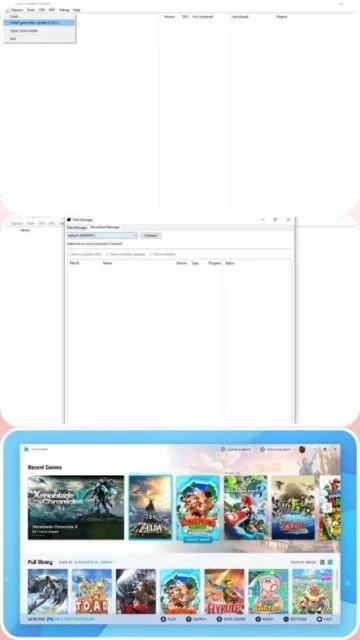
- Extract Emulator Files – Use a tool like 7-Zip to extract the downloaded archive into a dedicated folder outside Program Files, ensuring Cemu has full write permissions for configuration files, shader caches, saves, and DLC content.
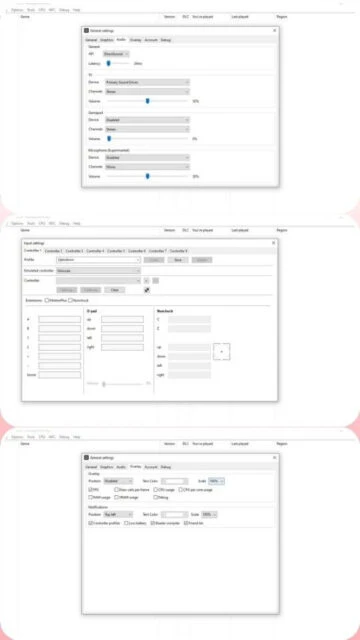
- Configure Paths and Settings – Launch Cemu.exe once, then configure game paths, MLC01 location, graphics packs, input profiles, and controller emulation so titles, updates, and DLC can be detected and stored consistently.
- First Launch and Activation – Open a Wii U title from the game list, confirm keys and graphics packs work, then enable shader precompilation or cache usage to minimize stutter during subsequent sessions.
Who Should Use Cemu
Cemu is best suited to players with capable PCs who want higher resolution, enhanced graphics, and mod support for Wii U libraries while accepting some configuration overhead and ongoing compatibility fine-tuning.
- PC Enthusiast Gamers – Users with modern GPUs who want 4K rendering, higher framerates, and advanced visual tweaks for Wii U exclusives.
- Modders and Tweakers – Players interested in custom graphics packs, gameplay mods, and shader experimentation beyond original console capabilities.
- Preservation-focused Users – Users archiving game libraries with an emphasis on long-term playability and improved performance on desktop hardware.
- NOT ideal for – Players expecting plug-and-play console simplicity or running on very low-end systems without a dedicated GPU.
Cemu Platform Compatibility
Cemu historically targeted Windows first, and modern builds emphasize 64-bit operating systems with OpenGL or Vulkan-capable GPUs, while unofficial ports and wrappers broaden reach but may introduce extra complexity and limitations.
| Platform |
Min. Version |
Unique Features |
Limitations |
| Windows |
Windows 7 64-bit |
Native builds, full Vulkan/OpenGL support, best performance and compatibility overall |
No 32-bit support, relies on modern GPU drivers and updated runtime libraries |
| macOS |
macOS 11 via compatibility |
Can run through Wine or similar layers, leveraging powerful Apple Silicon hardware |
No official native build, setup is complex and may reduce performance or stability |
| Linux |
Modern 64-bit distro |
Runs under Wine or Proton, integrates with popular gaming launchers and tools |
Lacks native Linux release, requires extra configuration for input and drivers |
| Web |
Modern desktop browser |
No official web client; only community tools share configurations or databases |
Cannot run full emulator in browser; limited to external resources and guides |
Cemu Integrations & Plugins
Integrations significantly expand what Cemu can do, from shader and graphics packs through community tools and frontend launchers to controller software, stream overlays, and mod managers that streamline everyday workflows.
- Graphics Packs – Enhance visuals with resolution scaling, anti-aliasing, post-processing, and HUD adjustments tailored per title.
- Controller Software – Use Steam Input or DS4Windows to map modern controllers, enabling rumble and custom layouts.
- Frontend Launchers – Integrate with tools like LaunchBox or Steam Big Picture to organize and launch Wii U games easily.
- Save and Shader Tools – Utilities that back up, migrate, or precompile shader caches and save files across installations.
Best Alternatives to Cemu
Alternatives become relevant if users prioritize multi-system frontends, different consoles, or lower configuration effort, or if their hardware suits lighter emulators better than a performance-focused Wii U solution.
- Dolphin Emulator – Best for GameCube and Wii titles, emphasizing broad platform support and polished configuration tools.
- Yuzu – Best for Nintendo Switch games, focusing on hybrid console emulation with advanced Vulkan support.
- Ryujinx – Best for Switch accuracy and homebrew, with strong Linux support and detailed debugging features.
- RetroArch – Best for multi-system collections, unifying cores and overlays under a single configurable interface.
Cemu vs Top Competitors
Cemu competes mostly with other Nintendo-focused emulators, differentiating itself by targeting a single console with deep platform-specific optimizations and aggressive graphics enhancements.
| Feature |
Cemu |
Dolphin |
Yuzu |
| Pricing |
Free, donation-supported project |
Free open-source project |
Free open-source with Patreon builds |
| Key Strength |
High Wii U performance and graphics options |
Mature GameCube/Wii compatibility and polish |
Modern Switch support with Vulkan and updates |
| Target Users |
PC gamers focused on Wii U exclusives |
Players revisiting GameCube and Wii libraries |
Enthusiasts exploring current Switch titles |
| Unique Feature |
Title-specific graphics packs and shader control |
Netplay and robust controller presets |
Split rendering and advanced GPU debugging |
| Learning Curve |
Moderate for optimal configuration |
Easy for basic use, moderate for advanced |
Moderate to steep depending on titles |
Cemu Keyboard Shortcuts
Keyboard shortcuts make managing windows, pausing, resetting, and toggling overlays faster, reducing reliance on menus and helping advanced users streamline testing, benchmarking, and modding workflows.
| Action |
Windows |
macOS |
| Toggle Fullscreen |
Ctrl+Enter |
Cmd+Enter |
| Pause Emulation |
Ctrl+P |
Cmd+P |
| Reset Game |
Ctrl+Shift+R |
Cmd+Shift+R |
| Open Settings |
Ctrl+Alt+S |
Cmd+Option+S |
Cemu Performance Optimization
Fine-tuning Cemu focuses on GPU settings, shader handling, resolution scaling, and storage speeds to balance visual fidelity with smooth framerates and minimal stutter on a wide range of hardware.
- Use Vulkan Backend – Select Vulkan in graphics options for smoother frame pacing and improved performance on many modern GPUs.
- Adjust Graphics Packs – Lower resolution scaling or disable heavy post-processing when experiencing drops to maintain stable framerates.
- Prefer SSD Storage – Install games, shader caches, and Cemu itself on a solid-state drive to reduce load times and background streaming hitches.
- Manage Shader Caches – Periodically clear or rebuild problematic shader caches if stutters persist after updates or driver changes.
- Monitor Background Tasks – Close overlays or background software that compete for CPU and GPU resources, especially during demanding titles.
Cemu Accessibility Features
While Cemu does not ship with a formal accessibility suite, its Windows integration and configurable inputs let users pair assistive technologies and controller setups to better fit diverse needs.
- Screen Reader – Relies on Windows screen readers for launcher navigation, with standard window controls aiding compatibility.
- Visual – High resolution rendering and configurable UI scaling through system settings can improve clarity.
- Motor – Supports remappable controllers and keyboard input, enabling customized layouts for different mobility needs.
- Languages – Interface uses English while game language depends on regional settings and content files.
Cemu Support & Documentation
Cemu support combines official documentation, community wikis, and active user forums, giving newcomers configuration assistance and advanced users deep technical reference material.
- Official Documentation – Covers installation basics, configuration options, and per-title notes where relevant.
- Community Forum – Subreddits and community hubs share troubleshooting tips, graphics packs, and configuration profiles.
- Video Tutorials – YouTube creators publish step-by-step setup guides, performance tweak walkthroughs, and comparisons.
- Contact Support – Issues and feature requests can be raised through the project’s official channels and issue trackers.

 33
33