KMPlayer – All Video Player – Premium Media Playback & Rewards
Play Video and Earn Money on KMPlayer!
Experience flawless 4K/8K playback, earn rewards while watching, and enjoy advanced customization with this versatile media player for Android and iOS.
KMPlayer acts as a comprehensive media hub that bridges the gap between mobile convenience and desktop-grade performance. It excels in handling high-definition content without lag, ensuring that your 4K and 8K videos play smoothly on supported devices.
Beyond its technical prowess, the app introduces a gamified element to media consumption through KMPlex. This innovative feature rewards active users, making it more than just a passive player. Whether you need to play a rare file format or stream content from your PC to mobile, KMPlayer provides the necessary tools in a sleek package.
Features Of KMPlayer - All Video Player
High-definition playback support for 4K, 8K, and UHD
Seamless support for Chromecast to cast videos to TV
External codec support for handling rare media formats
Floating screen mode for multitasking while watching videos
Cloud storage integration with Google Drive and Dropbox
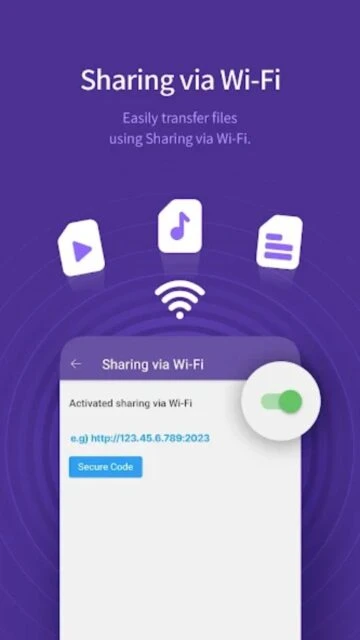
Network playback via FTP, UPNP, SMB, and WebDAV
Precise playback speed control from 0.25x to 4x
Subtitle setting customization for color, size, and position
Premium Features in the Paid Plan
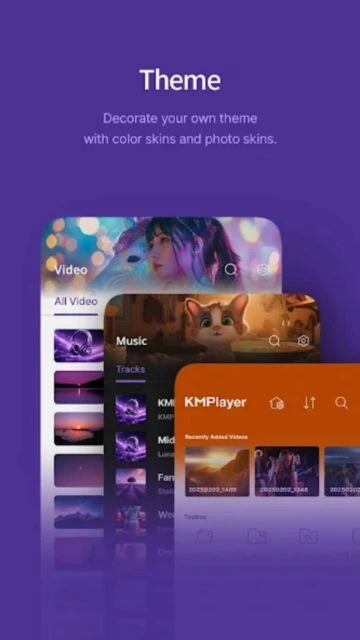
VIP Themes for a fully personalized app interface
High-quality MP3 converter to extract audio from video
GIF Maker to create animated loops from favorite scenes
Torrent Client for real-time playback while downloading
Video and Audio cutting tools for precise editing
Ad-free experience for uninterrupted media viewing
Priority customer support for technical assistance
Advanced audio processing for clearer sound quality
Free / VIP Subscription from $3.90/mo
Free vs Premium Comparison
Feature
Free
Premium
Ad-Free Experience
Contains Ads
No Ads
Video Editing
Basic Playback
Cut/Trim Video & Audio
Media Tools
Standard
GIF Maker & MP3 Converter
Torrenting
Not Available
Play while Downloading
Customization
Standard Themes
VIP Premium Themes
Resolution
Up to 4K/8K
Up to 4K/8K
Frequently Asked Questions
Does KMPlayer support 8K video playback?
Yes, KMPlayer supports 8K and 4K UHD playback, provided your device hardware meets the necessary performance specifications for decoding high-resolution files.
How does the KMPlex reward system work?
KMPlex allows you to earn points by watching videos or completing simple missions within the app, which can then be exchanged for supported cryptocurrencies.
Can I stream videos from my PC to my phone?
Yes, through the KMP Connect feature or via FTP/SMB protocols, you can stream media files stored on your computer directly to your mobile device.
Is the MP3 converter free to use?
The MP3 converter is primarily a VIP feature. Free users can access basic playback, but media extraction tools usually require a premium subscription.
Does it support external subtitles?
Absolutely. KMPlayer supports nearly all subtitle formats (SMI, SRT, ASS, etc.) and allows for full customization of their appearance and sync timing.
KMPlayer stands out as a robust multimedia tool that goes beyond simple playback, offering a unique blend of high-fidelity performance and user incentives. With support for virtually every format from 4K to 8K UHD, it transforms your mobile device into a portable cinema. The app’s distinctive KMPlex feature allows users to earn points simply by enjoying their favorite content.
Why Choose KMPlayer?
This player is designed for power users who demand granular control over their media experience without sacrificing speed or quality. It combines professional-grade features like subtitle customization and playback speed control with a user-friendly interface.
KMPlex Rewards: Earn points by watching videos to exchange for real cryptocurrency or other benefits.
Universal Compatibility: Plays all video and subtitle formats including RTS, MPEG, AAC, WMA, OGG, and MP4 without external codecs.
Advanced Control: precise adjustment of playback speed, brightness, volume, and subtitle timing with intuitive gestures.
Top KMPlayer Alternatives on Rumman
Discover reliable media player alternatives on Rumman that provide smooth playback and extensive format support comparable to KMPlayer.
MX Player features advanced hardware acceleration and intuitive gesture controls for an optimized mobile viewing experience.
VLC Media Player is a versatile, open-source player known for its ability to play virtually any audio or video file format.
Plex offers a powerful platform for organizing and streaming your personal media collection across multiple devices.
How It Works
Upon launching, KMPlayer automatically scans your device and external storage to organize all media files into a neat library. You can stream directly via URL, connect to cloud storage like Google Drive, or play local files. The ‘Quick Button’ overlay provides instant access to essential tools like screen capture and rotation.
Who Should Use It?
KMPlayer is ideal for media enthusiasts who consume high-resolution content and appreciate detailed customization. It is also perfect for users interested in ‘Watch-to-Earn’ models who want to get rewarded for their daily viewing habits.
User reviews and ratings for KMPlayer - All Video Player
See what users think about KMPlayer - All Video Player. Read honest reviews and ratings from real users.
4.1
★★★★★
3 reviews
Great player with unique features
by Sarah Jenkins
★★★★★
2025-11-20
The best player for high-res movies. I love that I can actually earn points just by watching my daily shows. The interface is clean and the dark mode is perfect for night viewing.
Solid performance but ads are heavy
by Michael Chen
★★★★★
2025-10-15
Plays every format I throw at it, even old MKV files. The audio quality is superb. However, the ads in the free version can be a bit intrusive on the pause screen.
Best customization options
by Elena Rodriguez
★★★★★
2025-09-28
I switched from VLC because of the subtitle controls here. Being able to resize and recolor subs instantly is a game changer for watching foreign films.
Write a Review
KMPlayer - All Video Player Screenshots & Photos
Browse through screenshots and photos of KMPlayer - All Video Player to see how it looks and works.
KMPlayer - All Video Player Videos
Watch videos to see how this app works and learn about its features.

 100
100