GOM Player is a powerful video player application developed by GOM & Company. It delivers consistent playback of numerous video formats without encoding headaches. The app emphasizes ease-of-use while maintaining professional-grade features for advanced users seeking customizable viewing experiences.
The player supports gesture-based controls, subtitle management, screenshot capture, and integration with popular cloud storage providers. Advanced settings allow fine-tuning of video appearance, playback speed, and audio properties. Sleep timer functionality and section-repeat features provide convenience for various viewing scenarios.
Features Of GOM Player
Play MP4, MKV, AVI and diverse video formats without pre-conversion
Access 360-degree VR videos with immersive viewing experience
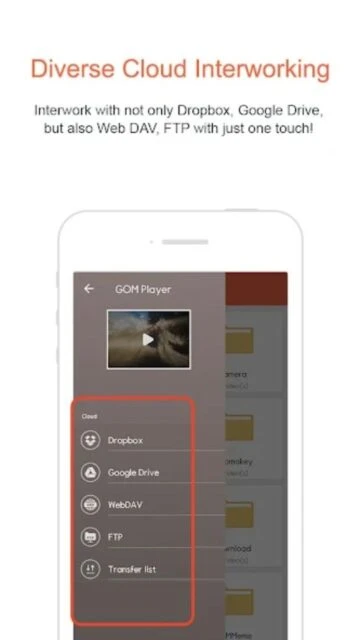
Connect to Dropbox, Google Drive, WebDAV and FTP cloud storage
Control playback speed from 0.1X to 3.0X for flexible viewing
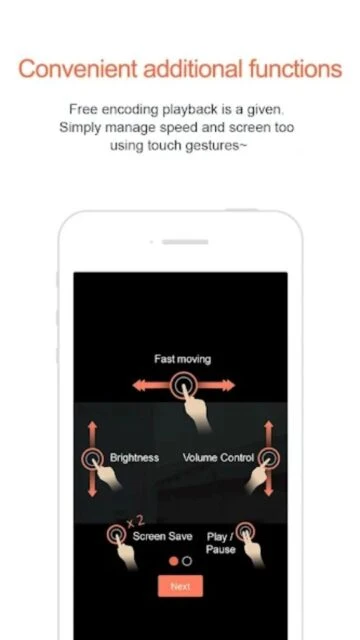
Adjust brightness, volume and aspect ratio with finger gestures
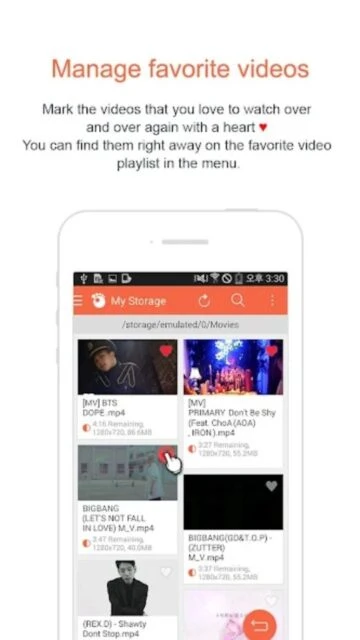
Manage favorite videos list for quick access to frequently watched content
Capture screenshots during playback with transparency adjustment
Set sleep timer to automatically stop playback after specified time
Premium Features in the Paid Plan
Unlock EAC3 and DTS codec support for high-quality audio formats
Access advanced video settings for professional quality control
Remove ads for continuous viewing without interruptions
Priority customer support for technical assistance and troubleshooting
Enable 4K video playback optimization features
Access exclusive interface skins for customized appearance
Unlock extended gesture controls for advanced playback manipulation
Enable batch processing features for multiple video management
Free with in-app purchases for premium codecs
Free vs Premium Comparison
Feature
Free
Premium
Format Support
MP4, MKV, AVI and standard formats
All free formats plus EAC3 and DTS codecs
Cloud Storage
Dropbox, Google Drive, WebDAV access
Enhanced cloud sync with offline caching
Advertisement
Contains ads during playback
Ad-free viewing experience
Speed Control
0.1X to 3.0X playback speeds
Precision speed controls plus presets
VR Support
360-degree VR video playback
Advanced VR with enhanced rendering
Customer Support
Community support via forums
Priority email and chat support
Frequently Asked Questions
Which video formats does GOM Player support?
GOM Player supports MP4, MKV, AVI, MOV, FLV, WMV, and many other formats. The app automatically detects and plays most video files without requiring separate codec installations or format conversion.
Can I stream videos from cloud storage?
Yes, GOM Player integrates with Dropbox, Google Drive, WebDAV, and FTP services. Connect your cloud account within the app and stream videos directly from cloud storage without downloading.
Does GOM Player support 360-degree VR videos?
Yes, GOM Player includes built-in support for 360-degree VR video playback. You can access and play VR content from YouTube and other sources with full immersive controls.
What are premium codecs and why are they paid?
EAC3 and DTS are advanced audio codecs requiring licensing fees. These paid codecs enable playback of specific high-quality audio formats on compatible devices only.
How do I manage advertisements in the app?
The free version includes ads during playback. Users can upgrade to remove advertisements completely or use the free version with occasional ad interruptions between content.
Is my personal data safe with GOM Player?
GOM Player requests photo library and media storage access for playback functionality. However, data transmission is not encrypted. Review the privacy policy at https://www.gomlab.com for detailed information about data handling.
What are the minimum system requirements?
GOM Player requires Android 4.0.3 or later for Android devices, and iOS 11.0 or later for Apple devices. Most smartphones and tablets released in recent years meet these requirements.
GOM Player is the leading mobile video player that brings the reliability and feature-rich experience of the desktop version to your smartphone and tablet. With support for diverse video formats and advanced playback capabilities, GOM Player delivers consistent performance for users worldwide. Experience effortless video playback with intuitive gesture controls and customizable interface options.
Why Choose GOM Player?
GOM Player stands out for its exceptional format compatibility and user-friendly design. The app handles numerous video codecs without requiring separate installations, making it ideal for users working with various media types. Advanced features like 360-degree VR support enable immersive viewing experiences, while cloud storage integration connects you to Dropbox, Google Drive, WebDAV, and FTP servers for convenient file access from anywhere.
Multi-format support: Plays MP4, MKV, AVI and numerous other video formats natively
360 VR capability: Experience immersive virtual reality video content with enhanced viewing
Cloud integration: Direct access to Dropbox, Google Drive, WebDAV and FTP storage solutions
How It Works
Simply open GOM Player and select your video file from device storage or cloud services. The app automatically detects the format and plays it without conversion delays. Adjust playback speed, brightness, and volume using intuitive finger gestures. Use the favorites list to organize frequently watched content, and take screenshots during playback whenever needed.
Who Should Use It?
GOM Player is perfect for casual viewers and media enthusiasts who work with diverse video formats. Users managing cloud-stored media collections benefit from seamless integration. Anyone seeking a no-frills, reliable player for Android or iOS devices will appreciate the straightforward interface and consistent performance across devices.
User reviews and ratings for GOM Player
See what users think about GOM Player. Read honest reviews and ratings from real users.
3.5
★★★★★
3 reviews
Excellent video player with diverse format support
by Marcus Chen
★★★★★
2025-11-28
GOM Player is outstanding for watching videos in any format. The interface is intuitive and responsive. Cloud integration works smoothly with Google Drive and Dropbox. Performance is consistently excellent across different devices.
Great features but ads are intrusive
by Jennifer Lopez
★★★★★
2025-11-15
The app handles most video formats well and playback speed controls are helpful. However, advertisements appear too frequently during playback. Would definitely upgrade if premium version had better pricing options.
Reliable player with good customization options
by David Thompson
★★★★★
2025-10-22
Been using GOM Player for months without issues. The screenshot feature works great and gesture controls are responsive. Love the sleep timer function for bedtime viewing. Definitely my go-to video player.
Write a Review
GOM Player Screenshots & Photos
Browse through screenshots and photos of GOM Player to see how it looks and works.
GOM Player Videos
Watch videos to see how this app works and learn about its features.