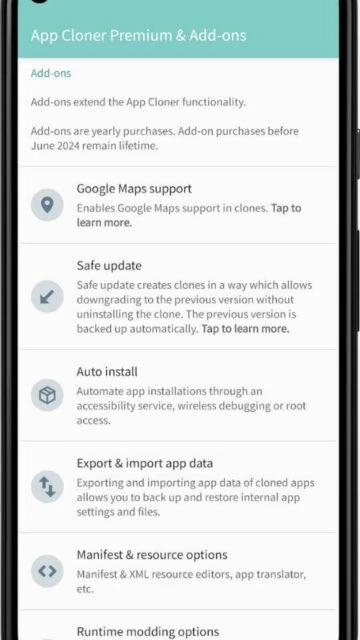
App Cloner Premium represents a sophisticated solution for users demanding granular control over how applications behave on their Android devices. Unlike basic cloning tools that merely duplicate apps, App Cloner Premium allows modification of app permissions, device identifiers, location data, and security properties. This makes it invaluable for privacy-conscious users, developers testing multiple app configurations, and professionals managing separate work and personal accounts with strict isolation requirements.
How to Get Started with App Cloner Premium
The setup process involves downloading the App Cloner main application from the official store, then purchasing premium features through the App Cloner Premium & Add-ons companion app. The subscription model requires understanding the package tier system that determines your clone limit and available options.
- Download App Cloner Free Version – Install the base App Cloner application to access core cloning functionality with default limits of 10 clones and 100 supported apps
- Install Companion App – Get the App Cloner Premium & Add-ons app to manage subscriptions, device registration, and payment processing through the integrated store
- Select App to Clone – Browse your installed applications list and choose which app to duplicate with customization options
- Configure Clone Settings – Adjust clone-specific properties like app name, icon color, permission restrictions, and incognito login before finalizing the clone
Who Should Use App Cloner Premium
App Cloner Premium serves advanced users who require precise control over cloned app behavior and integration with development workflows. Casual users seeking simple dual-account functionality may find the learning curve and pricing structure less suitable than simpler alternatives.
- Mobile App Developers – Test multiple app configurations, API endpoints, and authentication methods simultaneously on one device without reinstalling repeatedly
- Privacy-Focused Users – Spoof location data, hide MAC addresses and Android IDs, create incognito login sessions, and strip unnecessary permissions from sensitive apps
- Multi-Account Professionals – Maintain completely isolated work and personal instances of communication apps with separate notification management and data encryption
- NOT ideal for – Casual social media users who need simple dual WhatsApp; they should consider free alternatives like Parallel Space or Multi App: Dual Space
App Cloner Premium Platform Compatibility
App Cloner Premium operates exclusively on Android devices and supports a wide range of OS versions. The platform-specific limitations relate to restrictions imposed by individual apps and Google Play policies rather than the tool itself.
| Platform |
Min. Version |
Unique Features |
Limitations |
| Android Phone |
Android 5.0+ |
Location spoofing, permission modification, mock locations, Android ID hiding, custom referrer injection |
Some banking and certification apps refuse cloned versions; Google apps often incompatible |
| Android Tablet |
Android 5.0+ |
Same as phone with screen size optimization for larger displays |
Limited by developer app restrictions and DRM enforcement |
| iOS |
Not Available |
App Cloner is Android-exclusive; iOS has system-level restrictions preventing unofficial cloning |
No iOS version exists or will be developed due to technical limitations |
| Desktop/Web |
Not Available |
Web management console available for account and device registration on appcloner.app |
Actual cloning requires Android device; desktop serves only administrative functions |
App Cloner Premium Integrations & Ecosystem
App Cloner Premium integrates with Android system services and third-party applications rather than external platforms. Its value multiplies when combined with specific app categories and workflows. The subscription management integrates with cryptocurrency payment systems for enhanced privacy.
- WhatsApp Business + App Cloner – Run official WhatsApp and WhatsApp Business simultaneously on same device, then add cloned instances for additional business accounts without rooting
- VPN Integration – Premium options allow configurable VPN settings per clone, enabling each instance to route traffic through different VPN profiles for geo-testing
- Game Account Management – Clone gaming apps to maintain multiple game accounts with different progress levels and purchases, particularly useful for games like PUBG Mobile and Clash of Clans
- Development Testing – Export cloned APK files for testing multiple build variants and creating offline backup copies outside of Play Store restrictions
Best Alternatives to App Cloner Premium
Several alternatives exist in the app cloning space, each optimized for different user priorities. These alternatives emphasize simplicity and stability over the advanced customization options App Cloner Premium provides.
- Parallel Space (LBE Tech) – Best for casual users seeking maximum compatibility, offers the widest app support with over 100 million downloads and requires no root access
- Clone App – Parallel Dual Space (SZPY Tech) – Best for privacy-conscious users preferring lightweight solutions, includes vault and app lock features with 4.1-star rating
- Multiple Accounts: Dual Space (MA Team) – Best for professionals managing multiple social accounts, emphasizes data separation and security with independent notification management
- Multi App: Dual Space (waxmoon) – Best for users preferring unlimited free cloning, supports unlimited app instances without subscription fees and includes ad removal with premium
App Cloner Premium vs Top Competitors
The competitive landscape shows distinct trade-offs between customization depth, ease of use, and cost. App Cloner Premium positions as the premium option for power users, while competitors emphasize accessibility and stability for mainstream users.
| Feature |
App Cloner Premium |
Parallel Space |
Multi App: Dual Space |
| Pricing |
Free (10 clones/100 apps) + Premium from $20-$3600 crypto-only for enterprise |
Free + Parallel Space Pro subscription $3.99/month |
Free unlimited + optional premium $2.99/month |
| Key Strength |
Advanced customization with location spoofing, Android ID hiding, permission modification |
Broadest app compatibility and user-friendly interface requiring no technical knowledge |
Unlimited free cloning with simple setup and ad-free premium option |
| Target Users |
Developers, privacy-focused power users, advanced professionals |
Casual users managing dual social accounts or gaming profiles |
Users prioritizing unlimited clones and straightforward functionality without complexity |
| Unique Feature |
Export cloned APK files and 300+ device support with enterprise editions |
Pre-configured app templates for popular apps like WhatsApp and Instagram |
Supports unlimited parallel spaces with instant switching between accounts |
| Offline Mode |
Clones run independently once created; limited online sync for account management |
Full offline operation; all cloned apps function without internet after setup |
Full offline operation with persistent account data storage across sessions |
App Cloner Premium Privacy & Security Overview
App Cloner Premium emphasizes user control over privacy parameters by allowing modification of device identifiers and permission structures. However, security depends heavily on how clones are configured and which apps are being duplicated, as cloned banking or payment apps may trigger security restrictions.
| Security Aspect |
Implementation |
User Control |
| Data Encryption |
Each clone’s data stored in isolated directory; no built-in encryption beyond Android system filesystem encryption |
Users must manually encrypt sensitive data or use encryption-enabled cloned apps |
| Authentication |
Supports incognito login option hiding authentication tokens from original app instance |
Users enable/disable incognito mode per clone; biometric authentication can be disabled for advanced privacy |
| Data Collection |
App Cloner collects device ID and app usage statistics for device synchronization across registered accounts |
Users can disable data collection through privacy settings; cryptographic payment methods minimize personal data tracking |
| Third-Party Sharing |
No direct third-party sharing; however, location spoofing and Android ID modification are transparent to cloned apps |
Users have full control over which device identifiers are hidden or spoofed for each clone |
App Cloner Premium Accessibility Features
App Cloner Premium incorporates standard Android accessibility support, allowing users with visual impairments or motor limitations to configure and manage clones. The interface relies on system-level accessibility services rather than app-specific implementations.
- Screen Reader – Full TalkBack support on Android with proper hierarchy labeling for clone configuration dialogs and settings navigation
- Visual – Supports font scaling from system settings, high-contrast mode activation, and dark theme compatibility for reduced eye strain during extended clone management
- Motor – All drag-and-drop operations have keyboard alternatives; voice control works through Google Assistant for basic app launching functions
- Languages – Interface supports English, Spanish, German, and Chinese; full right-to-left support for Arabic and Hebrew language inputs
Power User Tips for App Cloner Premium
Advanced users can maximize App Cloner Premium by leveraging less obvious features that combine multiple customization options for sophisticated use cases. These techniques enhance both functionality and privacy isolation between cloned instances.
- VPN Per-Clone Routing – Configure each clone with different VPN profiles through premium VPN options, allowing simultaneous location spoofing across different geographic regions for app testing
- APK Export and Backup – Export configured clone APKs using premium backup features to create offline copies of customized app instances for rapid reinstallation or sharing with development teams
- Permission Stripping for Security – Disable camera, microphone, location access, and file permissions on clones of untrusted apps through premium permission modification to isolate potential malware
- Device ID Rotation Strategy – Use the Android ID hiding feature to rotate device identifiers when testing fraud detection systems or creating multiple test accounts on apps tracking device fingerprints
- Mock Location Coordination – Combine mock location and freezing time options when cloning location-based games like Pokémon Go to prevent soft bans triggered by impossible movement speeds
App Cloner Premium Support & Community
Official support channels are maintained directly by AppListo developers, with active community engagement through multiple platforms. User feedback shapes feature development priorities.
- Official Help Center – https://appcloner.app with comprehensive guides covering clone creation, premium features, troubleshooting device limit issues, and package comparison documentation
- Community Forum – Active discussion threads within the app and through support email addressing compatibility issues, feature requests, and user-reported solutions
- Social Media – Support updates and version announcements posted through official channels with response times ranging from 24-48 hours for user inquiries
- Contact Support – Direct support email at [email protected]; developers also maintain Spanish language support through regional channels given company headquarters in Barcelona