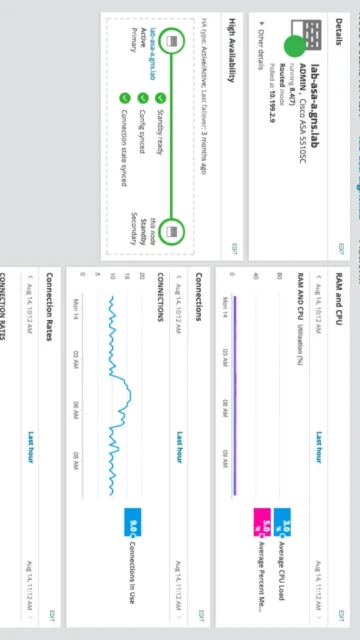
Zabbix 7.0.20 stands as the leading enterprise-grade open source monitoring solution, trusted by Fortune 500 companies and MSPs worldwide. Unlike commercial alternatives, Zabbix offers zero licensing costs regardless of scale, with a robust feature set rivaling paid platforms. This guide covers installation, configuration, integrations, and optimization strategies for deploying Zabbix in production environments. Learn why thousands of enterprises choose Zabbix for unified observability across data centers, cloud, and edge infrastructure.
How to Install Zabbix Server
Installation varies by platform but follows a consistent pattern: adding the official Zabbix repository, installing server and frontend components, configuring a backend database (MySQL/PostgreSQL), and initializing the database schema. The process typically completes in under 15 minutes on modern systems.
- Add Official Repository – Download and install Zabbix release package from https://www.zabbix.com/download to access official repositories with pre-built binaries
- Install Components – Execute package manager commands to install zabbix-server, zabbix-frontend-php, and zabbix-agent packages for your Linux distribution
- Configure Database – Create MySQL/PostgreSQL database, import Zabbix schema, and configure database connection in /etc/zabbix/zabbix_server.conf
- Start Services – Enable and start zabbix-server and zabbix-agent services, then access web frontend at http://server-ip/zabbix with default admin:zabbix credentials
Who Should Use Zabbix Server
Zabbix serves enterprises, managed service providers, and DevOps teams managing 100+ monitored devices. It excels for organizations requiring extensive customization, multi-tenancy, or integration with existing infrastructure monitoring workflows.
- Enterprise IT Operations – Monitor thousands of servers, network devices, and applications with centralized alerting and role-based access control
- Managed Service Providers – Leverage multi-tenant architecture to monitor clients’ infrastructure with isolated dashboards and permissions
- DevOps Engineers – Integrate with CI/CD pipelines, Kubernetes clusters, and cloud platforms for continuous monitoring and incident response
- NOT ideal for – Small teams with only 5-10 devices or those seeking turnkey SaaS solutions may find configuration complexity unnecessary
Zabbix Platform Compatibility
Zabbix components run across diverse operating systems. The server requires Linux for optimal performance, while agents support Windows and Unix-like systems. Web frontend works in modern browsers with responsive design supporting mobile access.
| Platform |
Min. Version |
Unique Features |
Limitations |
| Linux |
RHEL 7+, Ubuntu 18.04+, Debian 9+ |
Native packages, systemd integration, optimal performance |
Requires root for server installation |
| Windows |
Server 2012 R2+, Windows 10 |
Agent for passive/active checks, service installation |
Server component not available for Windows |
| macOS |
10.13+ |
Agent support for monitoring Mac workstations |
No server or frontend support |
| Web Browser |
Firefox 91+, Chrome 92+, Safari 14+ |
Responsive dashboard, mobile optimization |
Minimum 1200px screen width recommended |
Zabbix Integrations & Plugins
Zabbix connects to 30+ monitoring plugins and external services via webhooks, enabling seamless integration with existing DevOps ecosystems. Native support for Prometheus, SNMP, SSH, and HTTP protocols provides flexibility for diverse infrastructure environments.
- Database Monitoring – MySQL, PostgreSQL, Oracle, Redis plugins enable direct database health checks without agent installation
- Container & Orchestration – Docker and Kubernetes integration plugins provide container-native metrics and auto-discovery
- Webhook Integrations – Send alerts to Slack, Discord, Telegram, and custom HTTP endpoints for incident notification workflows
- API Bindings – Official SDKs for Python, PHP, Go, Java, Perl, and Ruby enable custom monitoring solutions and automation
Best Alternatives to Zabbix Server
Consider alternative monitoring platforms based on architecture preferences, budget constraints, or specific use case requirements. Each alternative excels in different scenarios within the observability landscape.
- Prometheus – Best for Kubernetes-native environments, excels with containerized metrics and time-series data, simpler learning curve
- Grafana – Best for visualization dashboards, provides superior graphing capabilities but requires external data sources
- Datadog – Best for cloud-first SaaS monitoring, offers extensive integrations but requires per-host subscription costs
- Splunk – Best for log analysis and compliance, handles unstructured data better than Zabbix but higher licensing costs
Zabbix vs Top Competitors
Zabbix’s open source foundation and absence of licensing fees distinguish it from commercial platforms. While competitors offer superior SaaS experiences or specialized features, Zabbix provides unmatched flexibility and cost efficiency for enterprise deployments.
| Feature |
Zabbix |
Prometheus |
Datadog |
| Pricing |
Free (open source), optional paid support |
Free (open source) |
$15-25 per host/month subscription |
| Key Strength |
Enterprise customization, multi-tenant, 900+ templates |
Container-native metrics, pull-based architecture |
Managed SaaS, extensive integrations, support included |
| Target Users |
Enterprises, MSPs, infrastructure teams |
DevOps, SRE, cloud-native teams |
Enterprise SaaS, startups seeking managed solutions |
| Unique Feature |
Distributed proxy architecture, action automation |
PromQL query language, scrape-based collection |
APM integration, machine learning alerting |
| Learning Curve |
Steep |
Moderate |
Easy |
Zabbix Keyboard Shortcuts
Master navigation and data access using keyboard shortcuts to improve monitoring efficiency. These shortcuts accelerate common workflows for operations teams managing large infrastructures.
| Action |
Windows/Linux |
macOS |
| Go to Dashboard |
G then D |
G then D |
| Search Objects |
G then S |
G then S |
| Next Item in List |
J |
J |
| Previous Item in List |
K |
K |
Zabbix Performance Optimization
Optimize Zabbix deployments by tuning database connections, cache sizes, and processor counts. These strategies prevent bottlenecks when monitoring 1000+ hosts and collecting metrics at 1-second intervals.
- Database Optimization – Run PostgreSQL or MySQL on dedicated hardware, enable TimescaleDB extension for superior time-series performance and compression
- Cache Tuning – Increase HistoryCacheSize, TrendCacheSize, and ValueCacheSize proportional to item count to reduce database load by 40-60%
- Processor Scaling – Increase StartPollers, StartTrappers, and StartDiscoverers parameters based on CPU cores and monitored items
- Proxy Deployment – Deploy distributed proxies at remote sites to handle local data collection and reduce WAN bandwidth by aggregating metrics before sending
- Housekeeping Configuration – Adjust history retention periods and trend aggregation to balance storage costs with historical analysis needs
Zabbix Accessibility Features
Zabbix frontend supports accessibility standards enabling users with disabilities to manage monitoring environments effectively. WCAG compliance and keyboard navigation ensure inclusive operations team access.
- Keyboard Navigation – Full keyboard support with Tab navigation, Enter/Space for actions, and arrow keys for menu selection without mouse dependency
- Visual Accessibility – High contrast mode, adjustable font sizes, and color-blind friendly status indicators meet WCAG AA standards
- Screen Reader Support – Semantic HTML and ARIA labels enable NVDA and JAWS compatibility for status readings and form interactions
- Multilingual Interface – Support for 40+ languages including right-to-left (Arabic, Hebrew) for global operations teams
Zabbix Support & Documentation
Zabbix benefits from extensive official documentation, active community forums, and optional commercial support plans. Resources span installation guides, API references, and advanced configuration examples.
- Official Documentation – Comprehensive guides at https://www.zabbix.com/documentation covering all versions, API, templates, and troubleshooting
- Community Forum – Active discussions at https://support.zabbix.com with solutions from Zabbix engineers and experienced administrators worldwide
- Training & Certification – Zabbix Company offers official training courses and certification programs for administrators and developers
- Commercial Support – Enterprise Support plans provide 24/7 phone/email support, upgrade assistance, and custom development services

 42
42