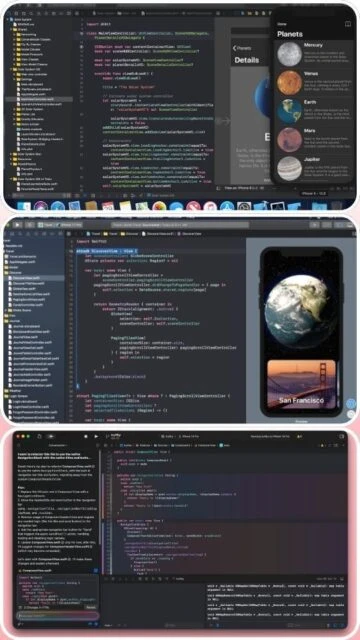
Xcode stands as Apple’s official integrated development environment (IDE), representing the gold standard for developing applications across the entire Apple ecosystem. Available exclusively on macOS, Xcode provides developers with a unified platform combining code editing, interface design, debugging, and deployment tools optimized for iOS, macOS, watchOS, and tvOS development.
The environment features deep integration with Swift programming language, SwiftUI declarative framework, and Apple’s vast collection of proprietary frameworks including Core ML, ARKit, and Metal. Xcode 16 introduces advanced AI coding assistance powered by machine learning models trained specifically for Swift development, alongside improved build performance and enhanced debugging capabilities. This comprehensive guide explores installation procedures, platform compatibility, feature highlights, competitive positioning, optimization strategies, and support resources essential for Apple platform developers.
How to Install Xcode
Installing Xcode primarily occurs through the Mac App Store, offering the most straightforward approach for macOS users. The download size exceeds 11-13 GB requiring stable internet connection and sufficient disk space. Installation completion typically requires 30-60 minutes depending on system specifications. Manual download from Apple Developer portal provides alternative for developers with specific version requirements or slower internet connections.
- Download from Mac App Store – Search Xcode in Mac App Store, click Get or download button, authenticate with Apple ID to begin installation
- Accept License Agreement – Launch Xcode from Applications folder, accept iOS/macOS SDK license agreement, allow installation of additional components
- Configure Command Line Tools – Xcode installs command-line tools automatically; verify via Terminal with xcode-select –install command
- Activate Developer Mode – Enable Developer Mode in System Settings > Privacy & Security for device deployment and advanced debugging capabilities
Who Should Use Xcode
Xcode serves as the exclusive official IDE for Apple platform development, making it essential for iOS and macOS developers seeking native performance and deep ecosystem integration. The comprehensive toolset and seamless Apple hardware integration create unmatched development experience for Apple-focused teams. Developers building exclusively for non-Apple platforms should consider platform-specific alternatives.
- Professional iOS Developers – Native app developers benefit from official support, AppKit/UIKit mastery, and direct access to latest iOS features and APIs
- macOS Application Developers – Desktop application creators leverage AppKit framework, powerful debugging, and native macOS performance optimization
- Apple Ecosystem Specialists – Teams building cross-platform Apple applications (iOS, watchOS, tvOS) utilize unified SwiftUI codebase and single IDE environment
- NOT ideal for – Android-exclusive developers, cross-platform teams, or Windows-based developers require alternative IDEs and frameworks
Xcode Platform Compatibility
Xcode exclusively targets Apple’s macOS platform, supporting both Apple Silicon and Intel-based Macs though with varied performance characteristics. The IDE enables development for iOS, macOS, watchOS, tvOS, and visionOS through unified toolchain. Platform-specific simulators and device deployment capabilities ensure comprehensive testing across Apple’s device ecosystem.
| Platform |
Min. Version |
Unique Features |
Limitations |
| macOS |
macOS 11.3 or later (recommended 12+) |
SwiftUI Live Preview rendering, native Simulator for iOS/watchOS/tvOS, Metal GPU profiling, Xcode Cloud integration |
Requires 50+ GB free space for full installation with simulators |
| Apple Silicon Mac |
M1 or later chips |
Optimized compilation, native Simulator performance, Apple Intelligence support in Xcode 16+ |
None – full compatibility and best performance |
| Intel Mac |
Core i5 2018+ models |
Full feature compatibility, Simulator support, debugging capabilities |
Slower compilation speed, cannot access Apple Intelligence features |
| iOS Simulator |
Xcode 16 supports iOS 15+ |
Hardware-accurate simulation, gesture support, notifications, performance metrics |
No physical hardware testing, some features require physical device |
Xcode Integrations & Plugins
Xcode integrates seamlessly with Apple’s development ecosystem and third-party services through native plugins and extensions. These integrations eliminate context switching between tools and streamline common development workflows. Integration capabilities expand through TestFlight, App Store Connect, and CloudKit services.
- SwiftUI Preview and Canvas – Real-time interactive preview of SwiftUI components during code editing with live refresh and simulation
- Xcode Cloud CI/CD Integration – Automated builds, testing, and deployment directly from Xcode interface with GitHub Actions-style workflows
- App Store Connect Integration – Direct app submission, TestFlight beta distribution, app analytics, and crash report analysis from Xcode
- GitHub and Git Integration – Source control management within Xcode for cloning, branching, committing, and pull request workflows
Best Alternatives to Xcode
While Xcode dominates official iOS development, alternative tools serve specific niches and developer preferences. Cross-platform frameworks enable sharing codebases across iOS and Android. Evaluating alternatives depends on project scope, team expertise, and deployment requirements. Some developers prefer lightweight editors with extended plugin ecosystems.
- AppCode by JetBrains – Best for developers preferring JetBrains interface and advanced refactoring, requiring Xcode installation for compilation
- Flutter SDK with VS Code – Best for cross-platform iOS and Android development with single Dart codebase and rapid iteration
- React Native with VS Code – Best for JavaScript developers building iOS and Android apps with shared codebase and web development familiarity
- .NET MAUI with Visual Studio – Best for C# developers building native iOS and Android applications with .NET ecosystem integration
Xcode vs Top Competitors
Xcode’s exclusive positioning in Apple’s ecosystem makes direct comparison challenging, as no true competitor matches its native iOS capabilities. Cross-platform alternatives sacrifice performance and native features for broader platform support. Comparative analysis reveals Xcode’s strengths in native development offset by limited cross-platform flexibility. Selection depends on project requirements and target platforms.
| Feature |
Xcode |
AppCode |
Flutter/VS Code |
| Pricing |
Free from Mac App Store |
$199/year commercial, free 30-day trial |
Free, open-source (MIT) |
| Key Strength |
Official Apple IDE with exclusive SwiftUI preview, native Simulator integration, deepest ecosystem access |
Advanced code analysis, JetBrains refactoring tools, multi-platform support with caveats |
True cross-platform iOS/Android development, rapid prototyping, JavaScript ecosystem familiarity |
| Target Users |
Professional iOS/macOS developers building native apps |
Developers preferring JetBrains ecosystem, teams with Kotlin experience |
Full-stack developers, startups prioritizing time-to-market, cross-platform teams |
| Unique Feature |
SwiftUI Live Preview, Simulator with hardware simulation, Xcode Cloud native CI/CD |
Deep JetBrains analysis engine, keyboard-centric workflow, plugin extensibility |
Single codebase for iOS and Android, hot reload for rapid iteration, web development overlap |
| Learning Curve |
Moderate – Apple ecosystem concepts essential |
Steep – comprehensive feature set and JetBrains paradigms |
Minimal – familiar JavaScript/Dart syntax for existing developers |
Xcode Keyboard Shortcuts
Mastering Xcode keyboard shortcuts dramatically improves development velocity and reduces repetitive mouse interactions. Swift developers benefit from efficient navigation and code manipulation shortcuts. Consistent practice internalizes shortcuts, enabling focus on creative problem-solving rather than tool navigation.
| Action |
macOS Shortcut |
Alternative |
| Find in Project |
Cmd+Shift+F |
Opens project-wide search with regex support |
| Open Quickly (File Search) |
Cmd+Shift+O |
Filter files by name as you type |
| Build Project |
Cmd+B |
Compiles changes without running app |
| Run Application |
Cmd+R |
Builds and launches app in Simulator |
| Stop Running Application |
Cmd+. |
Terminates active app session |
Xcode Performance Optimization
Optimizing Xcode performance requires strategic configuration adjustments and system resource management. These techniques reduce build times, improve Simulator responsiveness, and prevent IDE sluggishness during complex projects. Implementation yields noticeable productivity improvements.
- Enable Build Cache – Configure DerivedData caching in build settings to avoid rebuilding unchanged components, dramatically reducing incremental build times
- Increase Simulator Resolution – Adjust Simulator scale to balance visual clarity with performance, using lower scales for faster interaction on older systems
- Disable Unused Plugins – Remove or disable unnecessary extensions that consume memory without providing development benefit
- Allocate Sufficient Memory – Configure SwiftUI Preview memory allocation separately from main IDE to prevent preview crashes with complex layouts
- Optimize Index Settings – Configure workspace indexing scope to exclude build artifacts and external packages from indexing overhead
Xcode Accessibility Features
Xcode incorporates comprehensive accessibility features supporting developers with diverse abilities and needs. The IDE provides native macOS accessibility integration through VoiceOver, keyboard navigation, and visual customization options. Ongoing improvements expand accessibility capabilities with each major release.
- Screen Reader – Full VoiceOver support on macOS with keyboard-driven interface, syntax highlighting announcement, and code navigation
- Visual – High contrast themes, customizable font sizes and colors, color blind-friendly syntax highlighting, dyslexia-friendly fonts
- Motor – Complete keyboard-only navigation, customizable shortcuts, voice command integration through macOS Voice Control
- Languages – 30+ UI languages including Chinese, Japanese, Korean, Arabic, and comprehensive RTL language support
Xcode Support & Documentation
Extensive official documentation and Apple Developer resources ensure swift resolution of development challenges. Multiple support channels provide layered assistance from official guides to community forums. Regular updates maintain documentation accuracy with iOS and macOS releases.
- Official Documentation – Apple Developer website provides comprehensive guides covering Xcode setup, SwiftUI fundamentals, debugging, testing, and app distribution
- Community Forum – Apple Developer Forums actively discuss implementation approaches, architectural questions, and feature updates from Apple engineers
- Video Tutorials – WWDC (Worldwide Developers Conference) videos cover Xcode features, new frameworks, and best practices from Apple experts
- Contact Support – Apple Developer Support available for enrolled members via support portal for technical assistance and account issues

 26
26