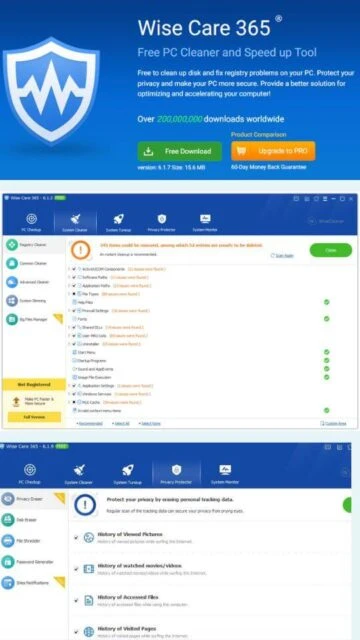
Wise Care 365 stands as one of the most comprehensive PC maintenance and optimization platforms available for Windows systems today. Developed by WiseCleaner.com, this sophisticated utility brings together decades of system optimization expertise in an elegant, user-friendly interface. The software provides professional-grade optimization tools previously available only in expensive enterprise-level solutions, democratizing access to powerful system maintenance capabilities for all Windows users. From casual computer users to advanced system administrators, Wise Care 365 delivers measurable performance improvements through intelligent registry cleaning, disk optimization, and resource management. The platform continuously monitors system health and proactively identifies optimization opportunities, automatically creating system restore points before making changes to ensure system stability and user confidence.
System Requirements
Operating System:Windows XP 32-bit/64-bit through Windows 11 all editions
Processor:1 GHz processor minimum, Dual-core 2.0 GHz or higher recommended
RAM:1 GB minimum, 4 GB recommended
Disk Space:200 MB free disk space minimum, 500 MB recommended
Additional Requirements:Internet connection required for activation and updates, optional for cloud features
Features Of Wise Care 365
PC Checkup: One-click comprehensive system scan with detailed problem analysis and recommendations
Registry Cleaner: Advanced registry scanning with three modes for safe, default, and deep cleaning options
System Cleaner: Multi-level cleaning including common cleaner, advanced cleaner, and system slimming capabilities
Disk Defragmentation: TRIM optimization for SSDs and defragmentation for traditional hard drives
Startup Manager: Control autostart programs and services to reduce boot time and improve startup performance
Privacy Protector: File shredder, disk eraser, and privacy eraser for secure data destruction
System Monitor: Real-time process monitoring with detailed hardware and operating system information
Context Menu Manager: Removes unnecessary applications from Windows right-click context menu
Big Files Manager: Identifies and manages large files exceeding 10MB to free valuable disk space
Wise Protection: Real-time registry protection against unauthorized modifications by malware
Pros & Cons
Pros
Free version includes most essential optimization and cleaning features
Extremely lightweight footprint with minimal system resource requirements
Compatible with all Windows versions from Windows XP through Windows 11
Automatic system restore points created before any registry modifications
Supports 40+ languages for global user accessibility
Portable version available for use without installation requirements
AD-free interface with no intrusive advertising or promotional popups
Comprehensive privacy protection with secure file shredding capabilities
Cons
Some advanced features locked behind Pro edition paywall
Registry cleaning can cause system instability if incorrect entries are deleted
PC Checkup no longer defaults to registry cleaning in latest version
Limited undo functionality for aggressive cleaning operations
Minimal improvements on already optimized modern systems
May conflict with certain antivirus applications during scanning
Requires system restart for registry defragmentation to take effect
Changelog
Version 7.3.1 (September 29, 2025):
- Improved default browser launch functionality
- Enhanced AI functionality with browser explanation for Windows services
- PC Checkup no longer cleans registry by default, user customizable
- Added cleaning support for Biubiu Accelerator, MAXQDA 24 Reader, MEGAsync
- Improved Amazon Music and QQ cache file cleaning rules
- Fixed minor bugs from previous version
Version 7.2.8 (August 13, 2025):
- Expanded application cleaning database with additional software support
- Improved disk cleanup efficiency and scanning speed
- Enhanced privacy protection features
- Refined startup manager performance classification
Version 7.2.6 (June 24, 2025):
- Added support for latest Windows 11 updates and features
- Improved compatibility with modern SSD drive technologies
- Enhanced system stability during aggressive cleaning operations
Frequently Asked Questions
Is the free version of Wise Care 365 limited?
The free version includes most essential features including PC Checkup, System Cleaner, Disk Defrag, and basic Privacy Protector functionality. Pro version unlocks Wise Protection, Big Files Manager, Startup Manager advanced features, and Privacy Eraser premium options.
Does Wise Care 365 remove viruses and malware?
No, Wise Care 365 is not an antivirus solution and does not detect or remove viruses or malware. Use dedicated antivirus software for malware protection. Wise Care 365 focuses on optimization and registry cleaning.
How often should I run Wise Care 365?
For optimal results, run Wise Care 365 once weekly for typical users or monthly for lightly-used systems. Aggressive daily cleaning is unnecessary and can cause system stability issues. Use scheduled tasks for automatic optimization.
Will Wise Care 365 speed up my computer?
Yes, comprehensive cleaning and optimization typically result in improved startup speed, faster application launching, and reduced system lag. Performance improvements vary based on existing system clutter and age of installation.
Is Wise Care 365 safe to use?
Yes, the software is generally safe with automatic system restore point creation before changes. Advanced features like deep registry scanning carry higher risk and should only be used by experienced users comfortable with system modifications.
Can I use Wise Care 365 on Windows XP or Vista?
Yes, Wise Care 365 supports Windows XP and Vista, though only the portable version v7 officially supports Windows XP. Standard installer versions require Windows 7 or later for full compatibility.
What is Wise Care 365?
Wise Care 365 is a comprehensive PC maintenance suite engineered to keep Windows systems operating at peak performance around the clock. This powerful optimization utility combines advanced registry cleaning, disk optimization, privacy protection, and system monitoring into a unified platform. Available in both free and pro editions, Wise Care 365 provides sophisticated system tuning capabilities backed by over fifteen years of development experience from the WiseCleaner development team. The software supports Windows 7 through Windows 11 and includes automatic scheduling for unattended system optimization.
Unmatched Power
Wise Care 365 delivers professional-grade optimization through five integrated modules encompassing PC Checkup for one-click system scanning, System Cleaner for removing junk and optimizing registry, System Tuneup for accelerating startup and shutdown speeds, Privacy Protector with secure file shredding and disk erasure, and System Monitor for real-time performance metrics. Advanced features include disk defragmentation with TRIM optimization for SSDs, startup manager controlling autorun programs, and context menu cleanup. The AI-enhanced interface suggests optimal cleaning actions while respecting system stability. Pro version unlocks additional tools including Wise Protection, Privacy Eraser, and Big Files Manager for maximum maintenance flexibility.
Who Should Use It?
Wise Care 365 serves Windows users of all technical levels seeking comprehensive PC maintenance without complexity. Home users benefit from automated one-click optimization while power users appreciate advanced customization options. Businesses can leverage system tuning features to maintain employee workstations efficiently. Privacy-conscious users appreciate disk erasure and file shredding capabilities for secure data destruction. Individuals with aging computers or those experiencing performance degradation will find Wise Care 365’s comprehensive cleaning and optimization tools invaluable for system restoration.
User reviews and ratings for Wise Care 365
See what users think about Wise Care 365. Read honest reviews and ratings from real users.
4.1
★★★★★
4 reviews
Best PC cleaning software I have used
by Patricia Williams
★★★★★
2025-11-10
Wise Care 365 transformed my aging laptop performance. Startup time reduced dramatically and system runs smoothly again. Free version includes everything I need. Better than expensive alternatives and completely ad-free.
Excellent value and effective optimization
by Robert Jensen
★★★★★
2025-10-05
Switched from IObit bloatware to Wise Care 365 and reclaimed significant RAM. Lightweight, efficient, and the most cost-effective solution available. Highly recommend to anyone seeking serious PC maintenance without premium pricing.
Good tool but requires careful use
by Elena Rossi
★★★★★
2025-09-18
Wise Care 365 provides excellent cleaning capabilities but aggressive deep scanning can cause issues. Always enable automatic restore points and be cautious with registry modifications. Works well when used responsibly.
Fast and effective system cleaning
by Michael Santos
★★★★★
2025-08-25
Lightning-fast performance and very thorough cleaning. I hate system clutter and this software keeps my small laptop running optimally. Adware-free interface is refreshing compared to other cleaners.
Write a Review
Wise Care 365 Screenshots & Photos
Browse through screenshots and photos of Wise Care 365 to see how it looks and works.
Wise Care 365 Videos
Watch videos to see how this software works and learn about its features.