Wireshark stands as the industry standard for network packet analysis, trusted by network professionals, security researchers, and IT troubleshooters worldwide. This comprehensive guide explores how Wireshark enables deep network inspection through real-time packet capture, detailed protocol dissection, and sophisticated filtering capabilities. Readers will discover installation procedures, platform-specific features, integration possibilities, and optimization techniques to maximize network analysis efficiency.
How to Install Wireshark
Wireshark installation varies by platform, with straightforward graphical installers for Windows and macOS, plus package manager support for Linux distributions. The process typically completes within minutes, requiring appropriate driver permissions for packet capture.
- Download Official Installer – Visit wireshark.org/download and select your operating system version (Windows 64-bit, macOS, or Linux). Official packages ensure security and include necessary drivers like Npcap for Windows capture functionality.
- Run Installation Wizard – Execute the downloaded installer, accepting the GNU GPL v2 license agreement and choosing installation directory. Windows users can optionally install Npcap or USBPcap drivers during setup for enhanced capture capabilities.
- Grant System Permissions – On Windows, the installer may require administrator elevation for driver installation. macOS users may need to authorize system extensions, while Linux users might need to add their user to the wireshark group for non-root packet capture privileges.
- Launch and Verify Installation – Open Wireshark from your applications menu or command line. The welcome screen displays available network interfaces; you can verify functionality by clicking on an interface to detect live traffic and confirm proper installation.
Who Should Use Wireshark
Wireshark serves network professionals requiring deep packet-level analysis, from troubleshooting connectivity issues to investigating security incidents. Its comprehensive feature set benefits IT administrators, security analysts, network engineers, and system developers working across various network environments.
- Network Administrators – Troubleshoot connection problems, analyze bandwidth usage patterns, identify network bottlenecks, and verify proper protocol behavior across your infrastructure.
- Security Professionals – Investigate suspicious network activity, perform security audits, analyze intrusion patterns, detect malware communications, and validate firewall rule effectiveness.
- Software Developers – Debug API communications, verify protocol implementations, test network functionality of applications, and validate data transmission between systems.
- NOT ideal for – Users requiring continuous passive monitoring, businesses needing graphical dashboards with alerts, or those unfamiliar with networking concepts seeking point-and-click analysis without protocol knowledge.
Wireshark Platform Compatibility
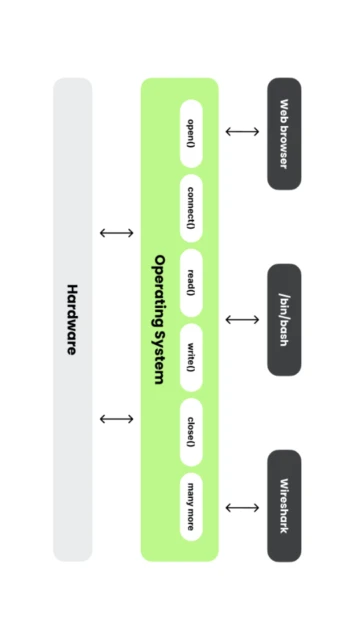
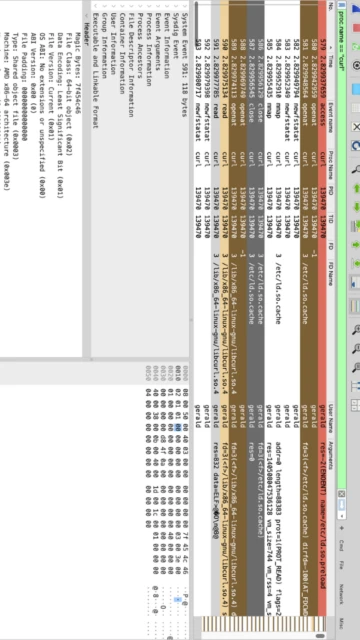
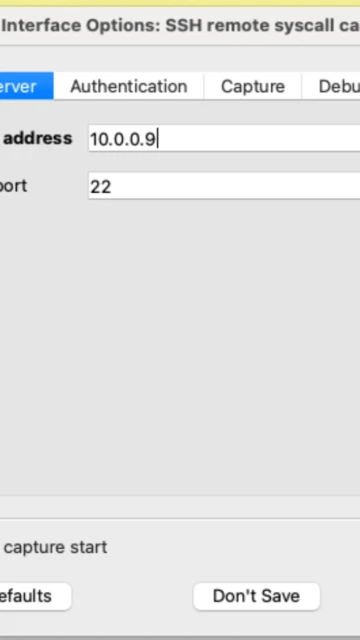
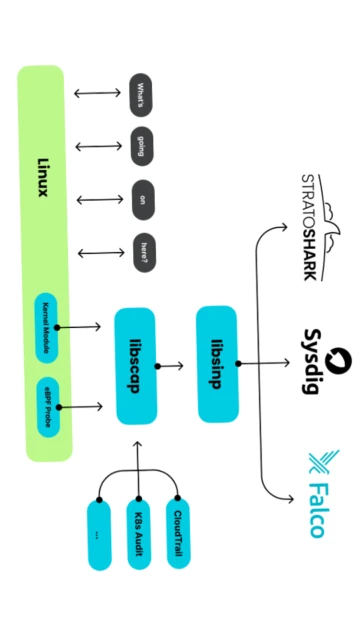
Wireshark maintains robust cross-platform support, delivering identical core functionality across Windows, macOS, and Linux distributions. Platform-specific enhancements include macOS system call tracing, Windows native drivers, and comprehensive Linux distribution compatibility through package managers.
| Platform |
Min. Version |
Unique Features |
Limitations |
| Windows |
Windows 10 64-bit |
Npcap integration for native packet capture, USB packet analysis, extensive driver support for network adapters |
Requires administrator privileges for driver installation; 32-bit support ended with version 3.6 |
| macOS |
macOS 11 (Big Sur) |
tcpdump process information integration, native system extension support, airport wireless diagnostics, Monterey and later process metadata capture |
Lower market share results in less third-party integration; extended support requires newer hardware |
| Linux |
glibc 2.29+ |
Package manager installation via apt, dnf, pacman; comprehensive distribution support; native libpcap library integration; headless server deployment |
Distro-specific package versions may lag official releases; GUI requires X11 or Wayland display server |
| Web |
Not applicable |
CloudShark cloud analysis for browser-based packet inspection and collaborative analysis across teams |
Web browser analysis requires uploading capture files to third-party CloudShark service; no native web version |
Wireshark Integrations & Plugins
Wireshark extends its capabilities through Lua scripting, custom dissectors, and plugin architecture, enabling integration with external tools, log aggregation systems, and automated analysis workflows. Plugins enhance protocol support and enable custom packet processing.
- Lua Scripting Engine – Create custom packet analysis scripts using Lua 5.4 with direct access to Wireshark’s packet processing engine, enabling automated anomaly detection and custom protocol handling without modifying source code.
- Custom Dissectors – Develop proprietary protocol analyzers for specialized network traffic types, allowing organizations to analyze custom application protocols and internal communication standards.
- Export Formats – Output capture data as JSON, CSV, XML, or PDML for integration with SIEM systems, splunk analysis, elasticsearch indexing, or custom data warehouses for historical analysis.
- Command-Line Integration – TShark command-line utility enables scriptable batch processing, automated monitoring via cron jobs, and integration into security orchestration platforms for headless analysis.
Best Alternatives to Wireshark
While Wireshark dominates packet analysis, alternative tools serve specialized use cases. Tcpdump provides lightweight command-line capture, Suricata combines IDS/IPS with packet analysis, Zeek performs advanced threat detection, and CloudShark offers collaborative cloud-based investigation.
- Tcpdump – Best for lightweight CLI-based packet capture on remote servers, minimal resource consumption, and automated monitoring scripts, lacking GUI but perfect for headless environments.
- Suricata – Best for real-time intrusion detection and prevention with active threat response, advanced rule-based signatures, and automated alert generation capabilities.
- Zeek (formerly Bro) – Best for network security monitoring with high-level behavior analysis, generating comprehensive security logs instead of raw packets, and identifying advanced threats.
- CloudShark – Best for team-based investigation with secure cloud storage, granular access controls, built-in collaboration tools, and integrated audit trails for compliance requirements.
Wireshark vs Top Competitors
Wireshark’s open-source nature and comprehensive protocol library establish it as the packet analysis standard, though competitors offer specialized features for IDS, threat detection, and enterprise monitoring. Each tool serves distinct network analysis requirements.
| Feature |
Wireshark |
Suricata |
Zeek |
| Pricing |
Free, open-source GPL v2 |
Free, open-source GPL v2 |
Free, open-source BSD license |
| Key Strength |
3000+ protocol dissection, interactive GUI analysis, real-time packet inspection |
Inline IDS/IPS enforcement, active threat blocking, rule-based detection |
Behavioral analysis, high-level security logging, threat modeling |
| Target Users |
Network troubleshooters, security analysts, protocol developers |
SOC teams, incident response, threat prevention |
Enterprise security analysts, threat hunters, research teams |
| Unique Feature |
GUI-based interactive analysis with point-and-click packet inspection |
Dual-operation: detection and prevention in single platform |
Transaction log generation for SIEM integration and behavioral tracking |
| Learning Curve |
Moderate to Steep – Requires networking protocol knowledge |
Moderate – Rule syntax learning required |
Steep – Zeek scripting language necessary for advanced analysis |
Wireshark Keyboard Shortcuts
Mastering keyboard shortcuts dramatically increases analysis speed, allowing experts to navigate captures, apply filters, and extract data without reaching for the mouse. Essential shortcuts streamline common packet analysis tasks.
| Action |
Windows |
macOS |
| Open Capture File |
Ctrl+O |
Cmd+O |
| Save Capture File |
Ctrl+S |
Cmd+S |
| Find Packet |
Ctrl+F |
Cmd+F |
| Go To Packet |
Ctrl+G |
Cmd+G |
| Follow TCP Stream |
Ctrl+Alt+Shift+T |
Cmd+Option+Shift+T |
| Copy Selected Packet Data |
Ctrl+C |
Cmd+C |
| Mark/Unmark Packet |
Ctrl+M |
Cmd+M |
| Next Marked Packet |
Ctrl+Shift+N |
Cmd+Shift+N |
Wireshark Performance Optimization
Large packet captures demand careful optimization to maintain responsive performance. Implementing capture filters, disabling unnecessary features, and managing memory consumption enables analysis of massive traffic volumes without slowdowns.
- Apply Capture Filters Early – Filter at capture time using BPF syntax (e.g., ‘tcp port 443’) to reduce file size and memory consumption by 50-90%, dramatically improving responsiveness with focused data sets.
- Disable Real-time Dissection – Turn off automatic protocol dissection during large captures, then enable selective dissection afterward, reducing CPU load by 40-60% while maintaining data integrity.
- Increase Memory Buffers – Configure ring buffers to 100-500MB in Capture Options to prevent packet loss during high-traffic periods, improving analysis completeness without consuming excessive disk space.
- Use Display Filters for Analysis – After capture, apply display filters (different from capture filters) to instantly view specific traffic subsets without re-capturing, leveraging indexed parsing for near-instant results.
- Compress Capture Files – Enable gzip or LZ4 compression in File Save options to reduce storage by 85-95%, with LZ4 providing faster random access for non-sequential analysis patterns.
Wireshark Accessibility Features
Wireshark implements accessibility features supporting visual and motor impairments, though comprehensive screen reader support requires third-party assistive technology. The open-source community continues enhancing accessibility options.
- Screen Reader Support – Qt 6.9.3 framework supports JAWS and NVDA screen readers with varying fidelity; complex packet tree structures present challenges, though column-based packet list view offers better compatibility with assistive technology.
- Visual Accessibility – High contrast themes available, font scaling support, color customization for protocol syntax highlighting, and monospace font options for improved readability of packet data displays.
- Motor Accessibility – Full keyboard navigation throughout application with customizable shortcuts, no mouse-required workflows possible, and accessibility options for mouse sensitivity adjustment in system settings.
- Multilingual UI – Supports 20+ interface languages including right-to-left (RTL) script support for Arabic and Hebrew, with translated protocol names and error messages in supported languages.
Wireshark Support & Documentation
Comprehensive official documentation, active community forums, and extensive tutorial library provide multiple support channels. The Wireshark Foundation maintains documentation, community manages user forums, and YouTube hosts hundreds of training videos.
- Official Documentation – Wireshark User Guide covers installation, capture procedures, filtering syntax, and 3000+ protocol references with technical depth; wiki provides supplementary guides and troubleshooting articles updated by community contributors.
- Community Forum – Wireshark-users mailing list and Stack Overflow tag host thousands of Q&A discussions; experienced users provide peer support, and official developers occasionally contribute guidance on complex technical questions.
- Video Tutorials – Official Wireshark YouTube channel (WireSharkFest) provides training from protocol basics to advanced analysis techniques; numerous third-party channels offer beginner-friendly walkthroughs and specialized use-case demonstrations.
- Contact Support – Report bugs via GitHub issue tracker, request features through community proposals, consult commercial support through third-party training companies offering professional Wireshark certification and on-site training.