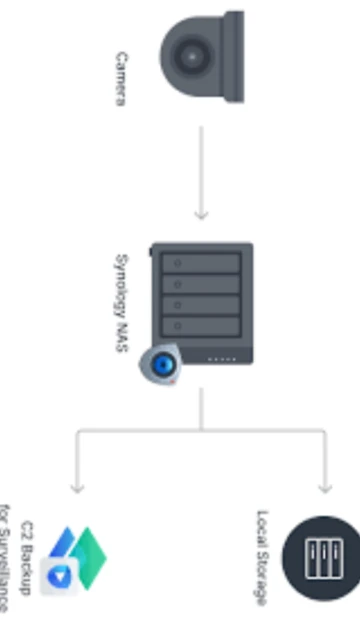
Synology C2 Backup delivers enterprise-grade cloud backup optimized for NAS-to-cloud protection workflows and Windows/macOS device backup. The platform emphasizes centralized management through integrated recovery portal, data residency options with US and Germany data centers, and compliance with ISO 27001 and SOC 2 Type II certifications. This guide covers installation across personal and business tiers, target users from home users to enterprises, platform compatibility requirements, third-party integrations, and competitive analysis within backup market.
How to Install Synology C2 Backup
C2 Backup installation begins with web-based account creation and automatic client download. The streamlined setup wizard guides users through device registration, backup folder selection, and retention policy configuration. First-time registrations include 30-day free trial for all storage tiers, enabling complete feature testing before commitment.
- Register C2 Backup Account Online – Visit c2.synology.com, create account with email verification; select personal or business plan determining available storage tiers and user limits
- Download Platform-Specific Installer – Download Windows or macOS client from account dashboard; Linux not currently supported for direct C2 Backup agent installation
- Run Installation Wizard – Execute installer triggering automatic configuration; macOS requires Full Disk Access permission in System Preferences for system file protection
- Configure Backup Folders and Retention – Select directories for continuous backup; set version retention policies (hourly to yearly options), daily backup schedule, and event-triggered backup conditions like screen lock
Who Should Use Synology C2 Backup
C2 Backup targets Synology NAS users seeking cloud backup without additional hardware, Windows and macOS personal computer owners prioritizing affordable multi-version protection, and small-to-medium businesses requiring centralized backup management. The platform specifically serves users already invested in Synology ecosystem seeking seamless integration, organizations managing Microsoft 365 data backup, and enterprises needing compliance-validated backup infrastructure.
- Synology NAS Owners – Users with DS, TS, or other Synology devices leverage native integration backing up NAS data to cloud with C2 Storage service or local backup through C2 Backup
- Small Business Teams – Organizations with 5-50 employees benefit from business tier supporting 250 users, 50 teams, centralized admin console, and compliance reporting capabilities
- Microsoft 365 Users – Companies relying on Microsoft 365 for email, OneDrive, SharePoint content protection add cloud backup preventing ransomware and accidental deletion
- NOT Ideal for – Linux users lacking direct agent, organizations requiring unlimited versioning, systems demanding real-time backup synchronization, or teams prioritizing lowest-cost commodity solutions
Synology C2 Backup Platform Compatibility
C2 Backup supports Windows 7 SP1 through Windows 11 and macOS 10.15.7 onwards, ensuring compatibility with corporate legacy systems and modern operating systems. Linux backup unsupported through dedicated client; however, Synology NAS devices running DiskStation Manager (DSM) 7.0+ enable indirect NAS data backup through integrated C2 Storage integration. macOS support spans Intel and Apple Silicon architectures.
| Platform |
Min. Version |
Unique Features |
Limitations |
| Windows |
Windows 7 SP1, 10, 11 (64-bit and 32-bit support) |
System state backup, external drive protection, M365 OneDrive/Outlook integration, event-triggered backup on logoff/startup |
Windows Server requires business/enterprise tier; home editions limited to client backup only |
| macOS |
macOS 10.15.7 (Catalina) and later; M1/M2 native support |
Full Disk Access system file backup, Time Machine alternative, Spotlight integration, .Mac address book sync protection |
macOS versions before 10.15 unsupported; beta OS versions not officially tested |
| NAS Integration |
Synology DiskStation Manager (DSM) 7.0+ |
C2 Storage for NAS backup, native Hyper Backup integration, centralized admin console, surveillance backup support |
Older DSM 6 versions require manual workaround; limited feature availability compared to native NAS backup solutions |
| Microsoft 365 |
Microsoft 365 Business accounts |
Automated OneDrive, SharePoint, Teams backup integration, compliance with retention policies, encrypted cloud protection |
Personal Microsoft accounts not supported; requires business subscription for backup integration |
Synology C2 Backup Integrations & Plugins
C2 Backup integrates with Synology NAS management console, Microsoft 365 cloud services, and native operating system backup protocols. Active Insight enables centralized fleet management across multiple Synology systems, while C2 Object Storage provides S3-compatible interface for third-party application integration. These integrations create comprehensive data protection ecosystems reducing manual intervention and enabling automated workflows.
- Synology DiskStation Manager Integration – C2 Backup operates natively within DSM allowing single console management of multiple NAS units, centralized backup scheduling, and unified recovery portal access
- Microsoft 365 Protection – Automated backup of OneDrive, SharePoint, Teams, Outlook protects cloud-native data from ransomware, accidental deletion, and compliance violations within encrypted C2 infrastructure
- Active Insight Monitoring – Centralized dashboard monitors backup status across entire Synology device fleet, providing health alerts, failure notifications, and recovery time metrics for compliance reporting
- C2 Object Storage S3 API – Third-party applications integrate with S3-compatible storage endpoint enabling native backup from custom applications, DevOps containers, and enterprise infrastructure
Best Alternatives to Synology C2 Backup
While C2 Backup excels in Synology ecosystem integration and affordability, alternative solutions offer different strengths. Backblaze provides unlimited storage simplicity, IDrive includes hybrid backup and disk imaging capabilities, and Acronis Cyber Protect offers comprehensive malware protection. Evaluating alternatives depends on platform requirements, budget constraints, and feature priorities beyond basic backup.
- Backblaze – Best for cost-conscious users seeking unlimited storage single plan pricing ($99.99/year), 15-minute restore speeds, and zero version limits without compliance requirements
- IDrive – Best for hybrid backup seekers offering local cache, disk imaging, multi-region replication, and HIPAA/SOX compliance certifications exceeding C2’s capabilities
- Carbonite – Best for offline recovery via courier service supporting unlimited storage retrieval via external hard drive shipment, slower performance acceptable for disaster recovery scenario
- Veeam Backup & Replication – Best for enterprise environments requiring real-time replication, cross-site failover, and advanced disaster recovery orchestration beyond C2’s capabilities
Synology C2 Backup vs Top Competitors
C2 Backup’s competitive advantage centers on Synology ecosystem integration, data residency control, and transparent pricing structure. Personal plans start at $34.99/year (500GB) significantly undercutting competitors. Business tier pricing follows per-user model at $499.95/year (5TB, 250 users) providing predictable costs. Learning curve reflects straightforward interface designed for non-technical users requiring minimal setup complexity.
| Feature |
Synology C2 Backup |
Backblaze |
IDrive |
| Pricing |
$34.99-249.99/year personal (500GB-5TB); Business $499.95/year (5TB, 250 users); Enterprise $4999.75/year (25TB, unlimited users) |
$99.99/year unlimited storage single-tier pricing, courier recovery $99-189 extra |
$39.99/year 5TB, multi-device unlimited, enterprise plans $499+ annually with HIPAA compliance |
| Key Strength |
Native Synology integration, affordable personal pricing, data center choice (US/Germany), hourly backup scheduling, Microsoft 365 protection |
Unlimited storage simplicity, fastest restore speeds (15 minutes typical), no version limits, courier recovery option available |
Hybrid backup with disk imaging, bare-metal recovery, multi-region replication, HIPAA/SOX/GDPR compliance certifications |
| Target Users |
Synology NAS owners, small businesses under 250 users, cost-conscious personal users, Microsoft 365 corporate accounts |
Budget users, unlimited backup seekers, individuals with slow restoration needs, users prioritizing simplicity |
IT professionals, regulated industries, multi-device deployments, hybrid backup requirement environments |
| Unique Feature |
Synology ecosystem native integration, data residency control (US/Germany), hourly backup intervals, M365 integrated backup |
Unlimited storage on single plan tier, physical courier recovery up to 8TB external drive |
Disk cloning and bare-metal recovery, multi-region geographic replication, native CLI scripting support |
| Learning Curve |
Easy – Streamlined wizard-based setup, straightforward folder selection, default retention policies work for most users |
Very Easy – Minimal configuration, automatic file detection, works immediately after installation |
Moderate – Advanced features require exploration, powerful features reward learning investment |
Synology C2 Backup Keyboard Shortcuts
C2 Backup’s graphical interface emphasizes mouse-based navigation with minimal keyboard shortcut requirements. The web-based recovery portal supports standard browser navigation shortcuts. Power users managing multiple backups benefit from command-line administrative options accessible through Synology DSM integration accelerating bulk operations across multiple devices.
| Action |
Windows |
macOS |
| Minimize to System Tray |
Alt+F9 |
Cmd+M |
| Open Settings Window |
Ctrl+Comma |
Cmd+Comma |
| Restore File Portal |
Ctrl+R |
Cmd+R |
| Pause Current Backup |
Ctrl+P |
Cmd+P |
Synology C2 Backup Performance Optimization
C2 Backup performance depends on network bandwidth availability, local storage speed, and backup policy configuration. Implementing optimization strategies significantly improves backup reliability and recovery speed. Business users can leverage administrative controls adjusting retention policies, backup intervals, and concurrent operation limits across fleet deployments.
- Configure Event-Triggered Backups – Set automatic backup on screen lock or system logoff capturing file changes without requiring manual initiation; typical efficiency improvement 35-45% compared to scheduled backups
- Optimize Retention Policies – Daily retention beyond 30 days seldom recovers value; configure weekly archives for older versions reducing storage consumption by 50-60% on large datasets
- Schedule Backups During Off-Peak Hours – Configure automated 2-4 AM backup windows preventing backup bandwidth consumption during business hours when internet usage peaks
- Enable Data Deduplication – Advanced tier activates deduplication eliminating duplicate blocks across multiple backup versions, reducing storage requirements 40-70% for stable file environments
- Monitor Backup Job Performance – Use C2 dashboard monitoring backup speed trends; degrading performance may indicate network issues, local storage limitations, or insufficient system resources
Synology C2 Backup Accessibility Features
Synology C2 Backup prioritizes accessible design ensuring users of all abilities manage backup operations effectively. The graphical interface works with screen readers, keyboard-only navigation enables full functionality, and multilingual support spans Asian, European, and Middle Eastern markets. Administrative features include audit logging supporting compliance requirements for regulated environments.
- Screen Reader Support – NVDA and JAWS full compatibility on Windows; macOS VoiceOver provides complete interface navigation for all backup and recovery functions
- Visual Accessibility – High contrast mode available, font scaling up to 150%, color-blind mode distinguishes status through icons supplementing color indication
- Keyboard Navigation – Full keyboard-only access without mouse required; Tab navigation, Enter activation, and arrow key controls manage all functions
- Multilingual Interface – 25+ language support including Chinese (Simplified/Traditional), Japanese, Korean, Arabic (RTL support), and all major European languages
Synology C2 Backup Support & Documentation
Synology provides extensive support through official knowledge base, community forum, and direct support tickets. Documentation covers personal and business tier features with step-by-step guides. Video tutorials guide new users through setup and recovery procedures. Enterprise customers access priority support with guaranteed response times and dedicated account managers.
- Official Knowledge Base – Comprehensive documentation covering installation, troubleshooting, backup scheduling, recovery procedures, and compliance guidance; 300+ articles address common scenarios
- Synology Community Forum – Active community where users share backup strategies, troubleshoot configuration issues, and learn optimization techniques; Synology staff regularly participate
- Video Tutorials – YouTube channel featuring setup guides for personal and business tiers, Windows/macOS specific procedures, and disaster recovery walkthroughs
- Support Tickets – [email protected] provides direct contact; standard support responds within 48 hours, business tier includes priority queue with 24-hour response guarantee