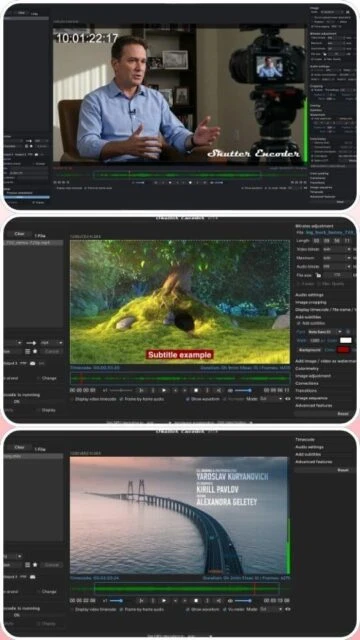
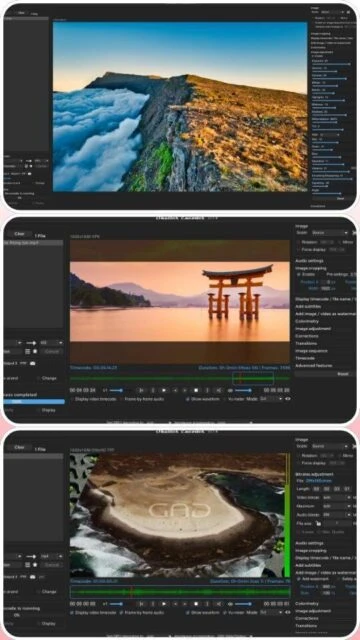
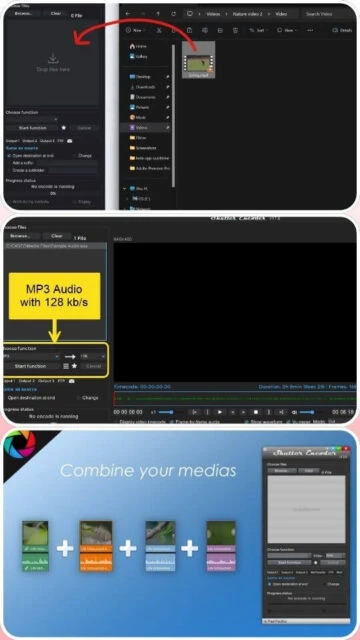
Shutter Encoder is a free, professional-grade video converter and editor designed by industry video editors. It supports virtually all modern video codecs including H.264, H.265, H.266, VP9, and AV1, plus advanced AI features like audio transcription and video translation. The software handles 8K resolution media and provides hardware acceleration on NVIDIA, AMD, and Intel GPUs. With over 2.3 million downloads, it serves professional workflows in editing, broadcasting, and archival applications.
System Requirements
Operating System:Windows 10 64-bit or macOS 10.10 or later or Linux
Processor:Intel or AMD 2 GHz or higher
RAM:4 GB
Disk Space:500 MB
Additional Requirements:NVIDIA GPU driver 347.09+ (optional for CUDA), Java Runtime Environment included
Features Of Shutter Encoder
H.264, H.265, and H.266 encoding with multiple quality presets
AI audio transcription with multilingual support
Video translation and colorization features
Lossless cut editing without re-encoding
Built-in subtitle editor with waveform visualization
Image cropping, rotation, and color correction with LUT support
Batch processing with render queue system
GPU acceleration for NVIDIA, AMD, and Intel graphics
DVD and Blu-ray burning and ripping capabilities
Watermark and logo overlay with position and opacity control
Metadata preservation and editing options
Screen recording and device capture functionality
Pros & Cons
Pros
Completely free with no watermarks or limitations
Professional features comparable to paid software
Active development with frequent updates
Excellent for video professionals and hobbyists alike
Cross-platform support including Linux
Responsive developer support and community
No additional codec installations required
Cons
User interface can appear overwhelming to complete beginners
Complex settings might require learning curve
Portable version has limited file size management
No macOS Apple Silicon native support in current versions
Batch processing sometimes slower on older hardware
Changelog
Version 19.6 (December 11, 2025):
- Added Translate function
- Added XAVC Long GOP function
- Added Custom option for Audio transcription
- Added Prevent sleep mode checkbox to Settings
- Added Timecode section to WAV, AIFF, FLAC functions
Version 19.5 (October 7, 2025):
- Shutter Encoder now signed for Windows & Mac
- Added Audio transcription function
- Added support for .heic format
- Added Rotate, Cropping, Deinterlacing GPU acceleration
- Added Intel Quick Sync for AV1 function
Version 19.4 (August 25, 2025):
- Added Dolby Digital Plus to Custom option
- Added Vulkan Video hardware acceleration for AV1
- Added VP9 GPU decoding
- Added AMD GPU scaling
- Ability to decode Apple ProRes RAW codec
Frequently Asked Questions
Is Shutter Encoder truly free?
Yes, Shutter Encoder is 100% free software with no limitations, watermarks, or trial periods. The developer accepts optional donations to support ongoing development and server costs.
What's the difference between encoding with GPU and CPU?
GPU encoding is significantly faster (3-5x) but may have slightly lower quality. CPU encoding provides superior output quality. The software recommends using CPU for final exports and GPU for previews or time-sensitive conversions.
Can I encode directly from USB without installing?
Yes, Shutter Encoder offers a portable version that requires no installation. Simply extract the files to any USB drive and execute the application directly from the drive.
Which video editing software is compatible?
Shutter Encoder outputs are compatible with Adobe Premiere Pro, Avid Media Composer, DaVinci Resolve, Final Cut Pro, and other professional editing software through standard codec support.
How do I batch process multiple files?
Add multiple files to the queue, configure your output settings once, then use the Render Queue feature to process all files sequentially overnight or in parallel if supported.
Can I use Shutter Encoder commercially?
Yes, Shutter Encoder can be used for commercial projects without restrictions. The freeware license permits both personal and professional use without licensing fees.
Shutter Encoder is a comprehensive video conversion and encoding software designed by video editors for accessibility and efficiency. This guide covers installation, platform availability, integration options, comparative features, keyboard shortcuts, and performance optimization strategies.
Installation & Setup
Download the latest version from the official website for your operating system
Run the installer executable and follow the setup wizard
Launch Shutter Encoder and configure your output preferences
Add media files to the queue via drag-and-drop or file browser
Select your desired function or codec from the extensive list
Click the Start Function button to begin encoding
Platform Availability
Platform
Support
Features
Windows 10/11 64-bit
Full Support
Hardware acceleration, GPU encoding, AI tools
macOS 10.10+
Full Support
Apple Silicon compatible, VideoToolbox acceleration
Linux
Full Support
Open-source codecs, command-line integration
Integration Ecosystem
Adobe Premiere Pro – Seamless codec import/export workflows
Avid Media Composer – Recommended by Avid for ingesting media
DaVinci Resolve – Compatible output formats for color grading
Enable GPU encoding in advanced settings for 3-5x faster processing
Use hardware acceleration with Intel 9th gen or newer processors
Enable multi-threading to utilize all processor cores
Use render queue for batch processing multiple files overnight
Apply GPU decoding alongside encoding for maximum efficiency
Configure output format presets for frequently used settings
User reviews and ratings for Shutter Encoder
See what users think about Shutter Encoder. Read honest reviews and ratings from real users.
4.7
★★★★★
4 reviews
Outstanding free video encoding tool
by gerro_1
★★★★★
2025-11-01
Shutter Encoder delivers professional-grade encoding that rivals paid software. The UI is intuitive for experienced users, and the GPU acceleration makes batch processing incredibly fast. The developer is responsive and releases regular updates.
Excellent functionality with learning curve
by bugcache
★★★★★
2025-04-19
The software is powerful with amazing features, but the interface appears complex initially. However, once you understand the layout, it becomes an invaluable tool for video professionals. Great value for a free application.
Fast and reliable encoder
by Atanas
★★★★★
2024-10-07
This program is incredibly efficient even on older machines. Converted 500MB video files in under one second without quality loss. The interface works smoothly and the software requires minimal system resources despite its powerful capabilities.
Professional features at no cost
by BYTI
★★★★★
2025-05-08
Shutter Encoder puts every commercial program in your pocket. Well-organized interface, efficient performance, and comprehensive codec support. The developer deserves recognition for maintaining this quality freeware.
Write a Review
Shutter Encoder Screenshots & Photos
Browse through screenshots and photos of Shutter Encoder to see how it looks and works.
Shutter Encoder Videos
Watch videos to see how this software works and learn about its features.

 33
33