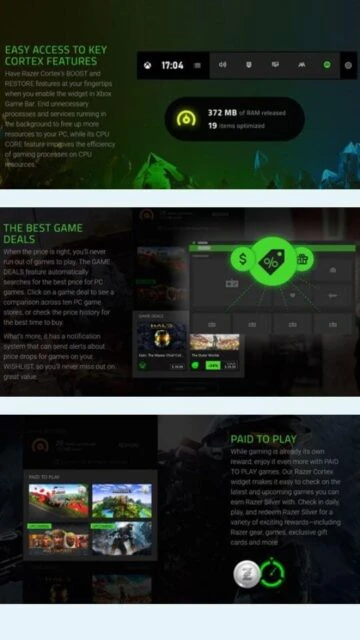
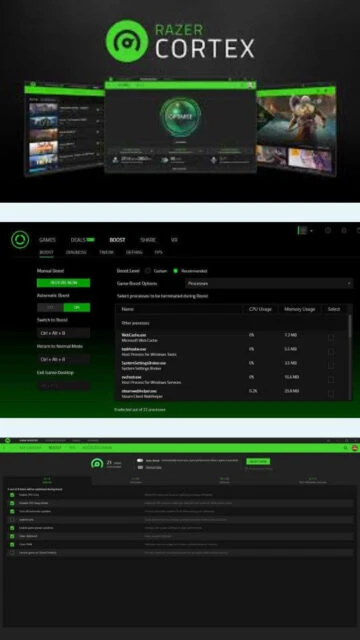
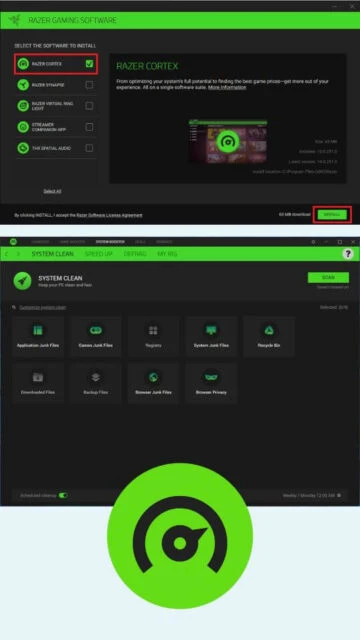
Razer Cortex is a comprehensive gaming optimization platform designed specifically for PC gamers worldwide. Developed by the industry-leading gaming hardware manufacturer Razer, Cortex provides intelligent system optimization that prioritizes gaming performance above all else. The software intelligently manages system resources by suspending unnecessary background processes and allocating freed memory and processing power directly to active games. This results in smoother gameplay, higher frame rates, and faster load times across all gaming titles. Beyond core optimization, Cortex includes an integrated FPS counter for real-time performance monitoring, detailed post-game analytics for performance tracking, a unified game launcher that consolidates games from multiple platforms, and an innovative game deals finder that alerts users to price drops and discounts on their favorite titles.
System Requirements
Operating System:Windows 10 64-bit or Windows 11 64-bit
Processor:Dual-core processor 2.0 GHz or higher
RAM:4 GB
Disk Space:500 MB free disk space
Additional Requirements:Internet connection required for downloading updates and accessing online features, GPU optional for enhanced optimization
Features Of Razer Cortex
Game Booster: Suspends background processes to maximize gaming performance and available system resources
Booster Prime: AI-powered game settings optimization customized to your specific hardware configuration
System Booster: Removes junk files and optimizes system settings for improved daily performance
FPS Counter: In-game metrics display showing real-time frames per second and performance data
Game Launcher: Unified launcher integrating games from Steam, Epic, Ubisoft, and other platforms
Game Deals: Built-in price comparison tool for finding best gaming deals and price drop alerts
Performance Analytics: Post-game detailed analysis of optimization results and performance improvements
Startup Manager: Manages application startup items to reduce system boot time
Disk Optimization: Defragmentation support for HDD and TRIM optimization for SSD drives
Pros & Cons
Pros
Significantly improves FPS on mid-range and lower-end gaming PCs
Intuitive one-click optimization with minimal user configuration required
AI-powered intelligent settings optimization tailored to your specific hardware
Built-in game launcher eliminates need for multiple platform clients
Integrated game deals finder saves money on gaming purchases
Lightweight installation with minimal system resource overhead
Compatible with Windows 10 and 11 64-bit systems
Cons
Minimal performance gains on high-end systems with 6+ cores and 16GB+ RAM
Some users report occasional system freezes when Auto-Boost is enabled
Increased battery drain on gaming laptops during active optimization
Automatic process suspension can cause conflicts with certain game anti-cheat systems
Limited customization options for advanced users
Requires internet connection for full feature functionality
Changelog
Version 11.1.5 (May 25, 2025):
- Improved game detection algorithm for newly released titles
- Enhanced compatibility with latest Windows 11 updates and patches
- Optimized background process management for better system stability
- Fixed issue with FPS counter display on ultrawide monitors
- Updated game deals database with latest promotional content
Version 11.0.0 (April 10, 2025):
- Introduced AI-powered Booster Prime technology
- Added comprehensive game launcher platform integration
- Enhanced system booster with advanced junk file detection
- Redesigned user interface with improved navigation
- Improved performance analytics and post-game reporting
Frequently Asked Questions
Does Razer Cortex actually improve FPS?
Yes, Cortex can improve FPS by 5-10% on mid-range systems by freeing RAM and optimizing CPU allocation. High-end systems with ample resources typically see minimal gains. Performance improvements vary depending on your hardware specifications and installed games.
Is Razer Cortex safe to use?
Yes, Cortex is generally safe but some users report occasional system freezes when Auto-Boost is enabled. Monitor your system performance initially and disable Auto-Boost if you experience instability or compatibility issues with specific applications.
Will Razer Cortex cause game bans?
Cortex itself does not cause game bans as it is not cheating software. However, avoid using macro features or automation scripts which violate most game terms of service and could result in account bans.
Can Razer Cortex improve battery life on laptops?
Unfortunately, Cortex optimization typically increases power consumption rather than improving battery life due to background optimization tasks. Consider disabling Cortex when gaming on battery power to maximize battery duration.
How does Razer Cortex compare to Windows Game Mode?
Cortex provides more advanced optimization features including AI-powered settings tuning and game launcher integration compared to Windows Game Mode. However, Game Mode is built-in and may be sufficient for basic gaming optimization without third-party software.
Does Razer Cortex support Mac or Linux?
No, Razer Cortex is exclusive to Windows 10 and Windows 11 64-bit systems. The software does not support macOS, Linux, or 32-bit Windows installations.
What is Razer Cortex?
Razer Cortex is a specialized game optimization utility engineered for serious gamers seeking peak PC performance. This intelligent gaming platform analyzes system resources and dynamically allocates them toward games, suspending unnecessary background processes to maximize available RAM and CPU power. Built by gaming experts at Razer, Cortex intelligently optimizes frame rates, reduces lag, and accelerates game load times while maintaining system stability and reliability.
Unmatched Power
Cortex delivers professional-grade gaming optimization through its AI-powered system analysis and real-time performance enhancement capabilities. The Game Booster module automatically detects installed games and applies optimized settings tailored to your hardware configuration. Features include built-in FPS counter for in-game metrics, comprehensive performance analytics, unified game launcher integrating multiple platforms, and intelligent deal finder showcasing the best gaming discounts. System Booster cleans junk files while Booster Prime uses advanced algorithms to balance visual quality with gaming performance.
Who Should Use It?
Razer Cortex targets competitive gamers, esports players, and PC users running demanding multiplayer titles or graphically intensive games. Mid-range and lower-end gaming systems benefit most from Cortex’s resource optimization capabilities, while high-end rigs with 6+ cores and 16GB+ RAM experience minimal performance gains. Casual gamers, content creators, and system administrators seeking baseline PC optimization will find Cortex’s streamlined interface and automated features incredibly valuable for daily use.
User reviews and ratings for Razer Cortex
See what users think about Razer Cortex. Read honest reviews and ratings from real users.
4.2
★★★★★
4 reviews
Fantastic FPS improvements on my gaming rig
by Marcus Chen
★★★★★
2025-11-28
Razer Cortex transformed my gaming experience. Valorant FPS increased from 130 to 180 fps. The optimization is seamless and doesn't interfere with gameplay. Highly recommended for serious competitive gamers.
Great utility with helpful features
by Jennifer Rodriguez
★★★★★
2025-10-15
Good gaming optimization tool with user-friendly interface. Game launcher integration is convenient. Some occasional freezes when enabling Auto-Boost but overall solid performance improvement on my mid-range system.
Minimal improvement on high-end system
by David Thompson
★★★★★
2025-09-22
Expected more from Cortex on my high-end gaming PC. Noticed minimal FPS difference and slight battery drain on my laptop. Game deals finder is nice but core optimization underwhelming for premium hardware.
Essential tool for competitive gaming
by Alexandra Kim
★★★★★
2025-08-30
As an esports player, Cortex gives me consistent FPS improvements needed for competitive advantage. The AI optimization works perfectly with my hardware. Worth every byte of storage space.
Write a Review
Razer Cortex Screenshots & Photos
Browse through screenshots and photos of Razer Cortex to see how it looks and works.
Razer Cortex Videos
Watch videos to see how this software works and learn about its features.