PPSSPP represents the definitive PSP emulation solution, delivering comprehensive compatibility with the PlayStation Portable game library through sophisticated CPU emulation and advanced graphics rendering. Released under GPL v2+ licensing and continuously developed by Henrik Rydgård and community contributors, PPSSPP enables players to experience 3,000+ PSP titles on Windows, macOS, Linux, and Android devices with visual quality exceeding original hardware capabilities. This comprehensive guide covers PPSSPP installation across platforms, controller configuration, graphics optimization, and advanced features including cross-platform multiplayer, save state management, and community-created texture replacement packs that elevate classic PSP experiences to modern gaming standards.
How to Install PPSSPP Emulator
Installing PPSSPP is straightforward across all platforms, with standalone installers available for Windows and macOS alongside portable ZIP distributions. Linux users access packages through standard repository systems or compile from source code. Mobile installation via app stores provides one-tap setup. Initial configuration requires establishing game library paths and basic controller mapping.
- Download Latest Version – Visit ppsspp.org and select v1.19.3 (July 2025) installer for your platform; Windows users can choose between installer and portable ZIP options
- Execute Installation – Run the downloaded executable on Windows; macOS users drag DMG to Applications; Linux users install via package managers or compile build dependencies
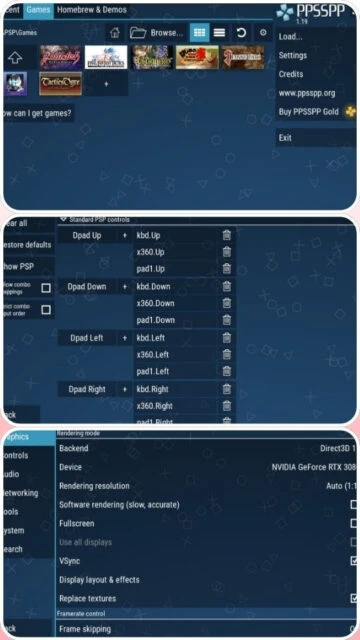
- Configure Game Library Path – Launch PPSSPP, navigate to Settings > System, and specify folder containing PSP ISO/CSO game files; emulator auto-scans and displays all compatible games with cover art
- Set Up Controller and Graphics – Connect gamepad in Settings > Controls and select graphics backend (Vulkan recommended); configure resolution preference matching your display capabilities
Who Should Use PPSSPP Emulator
PPSSPP appeals to diverse player demographics seeking PlayStation Portable library access with enhanced visuals. Nostalgia-driven gamers appreciate authentic PSP gameplay with modern graphical improvements, handheld gaming enthusiasts leverage cross-platform portability, and competitive players utilize save states and performance optimization for speedrunning challenges. Content creators benefit from high-resolution recording capabilities and advanced shader effects.
- PSP Library Collectors – Access to 3,000+ PlayStation Portable titles with visual enhancements exceeding original portable hardware specifications
- Handheld Gaming Enthusiasts – Cross-platform play on smartphones, tablets, PCs, and handhelds maintains gaming continuity across devices with cloud save backup
- Speedrunning Communities – Save state functionality, frame advance controls, and consistent frame-rate delivery enable tool-assisted speedruns and competitive racing
- NOT ideal for – Users seeking GameCube/Wii gaming should use Dolphin emulator; those requiring Nintendo 3DS game support should use Lime3DS or Citra
PPSSPP Platform Compatibility
PPSSPP maintains exceptional cross-platform compatibility spanning desktop operating systems, mobile devices, and even specialized gaming hardware. Each platform implementation optimizes for local hardware while maintaining core feature parity. Mobile versions prioritize touch screen control integration while desktop builds leverage advanced graphics features unavailable on mobile devices.
| Platform |
Min. Version |
Unique Features |
Limitations |
| Windows |
Windows 7 SP1+ |
Vulkan/DirectX 11 graphics backends, Windows ARM64 support, WASAPI audio optimization, file association for ISO/CSO files, controller mapping for arcade sticks |
Older DirectX 9 support deprecated; D3D9 last supported in v1.19 |
| macOS |
macOS 10.7+ |
Universal binary for Apple Silicon and Intel processors, Metal graphics backend option, GameController framework integration |
Lower performance than Windows equivalents; limited audio driver optimization compared to Windows |
| Linux |
Any modern distro |
Vulkan and OpenGL graphics rendering, ALSA/PulseAudio audio support, command-line interface options, source code compilation for custom optimization |
Graphics driver compatibility varies; requires manual driver updates on Nvidia systems |
| Android |
Android 5.0 Lollipop+ |
Touch screen analog stick simulation, gyro aiming support, game controller auto-mapping, cloud save synchronization, immersive fullscreen mode |
Performance limited by device processor; ARM64 architecture required for latest versions |
PPSSPP Integrations & Plugins
PPSSPP includes comprehensive integration support extending gameplay customization and platform expansion. Texture replacement systems enable artists to create professional-quality graphics packs, cheat code databases provide in-game modifications, and cross-platform multiplayer enables network gaming between different device types. Plugin architecture supports specialized modules for enhanced compatibility.
- Texture Replacement System – Community artists create HD texture packs dramatically improving visual fidelity; texture zip archives load directly without repacking requirements
- Cheat Code Support – Built-in cheat database enables in-game modifications including infinite health, money multipliers, and gameplay alterations through action replay format
- Cross-Platform Multiplayer – Network connectivity enables simultaneous play between Android phones, Windows PCs, and other PPSSPP instances with automatic port mapping
- Custom Controller Mapping – Analog stick sensitivity adjustment, trigger calibration, and rapid-fire functionality support diverse input preferences and accessibility needs
Best Alternatives to PPSSPP Emulator
While PPSSPP dominates PSP emulation, alternative platforms serve specific gaming niches. Specialized emulators focus on different console generations, while unified multi-system platforms provide broader library access at potential performance trade-offs. Alternative implementations may provide superior compatibility for niche titles or unique feature implementations.
- RetroArch – Best for multi-system emulation with PPSSPP cores included; unified interface but slightly lower performance than standalone PPSSPP
- Lime3DS/Citra – Best for Nintendo 3DS games with texture upscaling and modernized UI; incompatible with PlayStation Portable titles
- Dolphin – Best for GameCube and Wii games with superior Bluetooth controller support; separate ecosystem for different console generation
- Vita3K – Best for PlayStation Vita games with emerging compatibility; alternative PSP-era gaming platform with fewer titles supported
PPSSPP vs Top Competitors
PPSSPP’s competitive advantages include unmatched PSP library compatibility, superior cross-platform support, and active community development. Performance parity with specialized emulators combined with broader platform support establishes PPSSPP as the definitive PSP emulation solution. Market position reflects minimal competition in PSP emulation category.
| Feature |
PPSSPP |
Dolphin |
RetroArch |
| Pricing |
Freeware (GPL v2+) |
Freeware (GPL v2+) |
Freeware (GPL v3) |
| Key Strength |
PSP exclusive library with 3,000+ games and superior cross-platform mobile support |
GameCube/Wii dominance with Vulkan optimization and original controller support |
Multi-system access with unified interface and shader library |
| Target Users |
PSP game enthusiasts and mobile gaming focus with cloud save synchronization |
GameCube/Wii exclusive players seeking maximum visual enhancement |
Retro collecting communities wanting single-app multi-platform access |
| Unique Feature |
Cross-device cloud save backup and touch screen control optimization for mobile platforms |
Bluetooth Passthrough for original Wii Remotes and motion controller precision |
Unified shader library with community-curated effects across all systems |
| Learning Curve |
Easy |
Moderate |
Easy |
PPSSPP Keyboard Shortcuts
Keyboard shortcut mastery accelerates menu navigation and gameplay management, enabling power users to execute save state operations, toggle graphics modes, and adjust performance settings without mouse interaction. Custom hotkey configuration allows personalization for speedrunning workflows and competitive gameplay scenarios.
| Action |
Windows |
macOS |
| Open/Load Game |
Ctrl+O |
Cmd+O |
| Toggle Fullscreen |
Alt+Enter or F11 |
Cmd+Option+F |
| Pause/Resume Emulation |
F8 |
F8 |
| Save State |
Ctrl+S |
Cmd+S |
| Load State |
Ctrl+L |
Cmd+L |
| Toggle Speed Limit |
Tab |
Tab |
| Fast Forward |
Shift+Tab |
Shift+Tab |
| Screenshot Capture |
F12 |
F12 |
PPSSPP Performance Optimization
Optimizing PPSSPP performance requires systematic configuration of CPU clock frequency, graphics resolution settings, and audio processing modes. Advanced users leverage hardware transform acceleration, disable problematic post-processing effects in specific titles, and implement texture caching strategies. Frame-skip functionality provides significant performance gains for lower-end devices.
- Enable Hardware Transform – Activate Hardware Transform checkbox in graphics settings for massive speed boost; LLE vertex cache further accelerates polygon rendering on most games
- Configure Frameskipping – Set frameskip to Auto or manual values (odd numbers 1, 3, 5 preferred); prevents flickering more effectively than even values; auto-adjust balances visual smoothness with performance
- Adjust CPU Clock Frequency – Reduce emulated CPU clock in System Settings (default -222MHz) to lower values like 111MHz on weak devices; maintain gameplay smoothness while extending battery life on mobile
- Optimize Graphics Resolution – Select 1x PSP native resolution for weak devices; increase to 4x or higher on powerful hardware for modern display scaling without performance penalty
- Disable Post-Processing Effects – Turn off post-processing shaders in specific games exhibiting stuttering; retain effect for visual titles where performance permits
PPSSPP Accessibility Features
PPSSPP incorporates accessibility considerations through customizable control mapping, text scaling options, and language localization. Touch screen controls enable single-handed gameplay on mobile devices. While lacking dedicated screen reader support, comprehensive keyboard navigation and controller flexibility support diverse accessibility needs.
- Screen Reader – Limited native screen reader integration; keyboard-only menu navigation compatible with standard OS accessibility features enabling NVDA/JAWS access
- Visual – Customizable UI font scaling supports high-DPI displays and vision impairment accommodation; adjustable color schemes and customizable button overlay sizes for visual comfort
- Motor – Extensive button remapping supports one-handed gameplay and adaptive controller configuration; analog stick sensitivity customization accommodates varying motor control abilities
- Languages – Supports 30+ languages including RTL Arabic and Hebrew; per-game language override independent of system settings
PPSSPP Support & Documentation
PPSSPP benefits from comprehensive documentation, active GitHub wiki, and responsive developer community. Official FAQ addresses common technical questions, while community forums provide peer-to-peer troubleshooting assistance. Video tutorial ecosystem spans YouTube with hundreds of guides covering installation, optimization, and gameplay.
- Official Documentation – Comprehensive FAQ at ppsspp.org covering hardware requirements, game compatibility, graphics options, and configuration; GitHub wiki provides technical specifications
- Community Forum – Active forums at forums.ppsspp.org with thousands of registered users discussing compatibility, sharing texture packs, and troubleshooting issues
- Video Tutorials – YouTube community maintains installation guides, optimization tutorials, and gameplay recordings; official channel provides quarterly progress reports and feature demonstrations
- Contact Support – GitHub issue tracker enables direct developer communication; Discord server provides real-time technical assistance from core development team