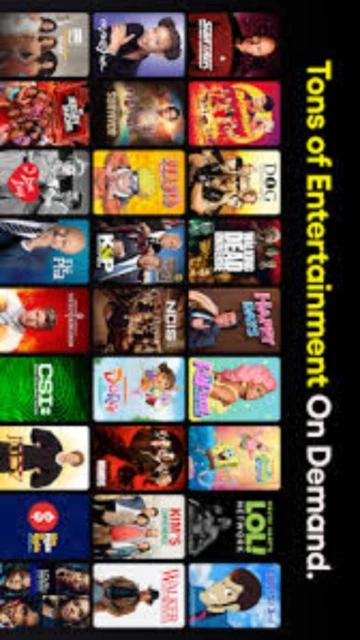
Pluto TV combines linear channels and on-demand catalogs into a familiar guide-driven streaming experience. Instead of asking viewers to build watchlists or manage subscriptions, it recreates channel surfing with themed streams, studio-branded feeds and curated marathons, all funded entirely through advertising rather than paid memberships.
The service runs on a wide range of smart TVs, streaming dongles, game consoles, mobile operating systems and web browsers, so it can easily become the always-on background TV option in a home. Channel offerings evolve frequently, with new pop-up events, seasonal collections and partnerships refreshing the lineup without users needing to update apps or reconfigure devices.
System Requirements
Operating System:Android 5.0 or later (Android TV)
Processor:Not specified by developer; modern Android TV hardware recommended
RAM:Not specified by developer
Disk Space:Not specified; ensure sufficient space for app and cached streams
Additional Requirements:Broadband internet connection, compatible Android TV or smart TV device, regional availability for channels and content
Features Of Pluto TV
Live channel guide: Cable-style grid with over 250 always-on streaming channels across news, sports, movies and entertainment
On-demand library: Thousands of free films, episodes and clips available to start at any time
Curated genres: Themed channels covering crime, reality, classic TV, anime, kids, documentaries and more
Studio-branded channels: Dedicated feeds from major networks and studios, including branded series marathons
Favorites list: Quickly bookmark and access preferred channels from a personalized section
Kids mode: Profile option that limits browsing and playback to family-friendly programming
Cross-device apps: Native applications for many smart TVs, consoles, streaming sticks, mobiles and web
Regular content updates: Constantly refreshed movie rotations, seasonal events and new channel additions
Profile-based recommendations: Basic personalization through recently watched content and channel preferences
Pros & Cons
Pros
Completely free to watch with no subscription fees
No mandatory account registration for basic viewing
Wide mix of live channels and on-demand content
Available on most popular smart TV and streaming platforms
Simple, familiar grid interface that is easy to browse
Family options such as kids-focused channels and modes
Frequent additions of new channels, films and specials
Lightweight Android TV app with straightforward setup
Cons
High volume of advertising compared to paid streaming services
Channel and title availability can vary significantly by region
No offline download support for watching without internet
Limited control over video quality and data usage settings
Fewer recent blockbuster releases than premium paid platforms
Search and discovery tools are simpler than some competitors
Changelog
Version 5.61.0 (2025-10-24):
- Improved launch performance and general responsiveness on Android TV devices
- Extended live guide window and minor guide usability refinements
Version 5.60.0 (2025-09-21):
- Stability fixes for playback interruptions on certain TV models
- Optimizations to background data usage and channel switching
Version 5.59.0 (2025-09-09):
- Minor bug fixes related to favorites and recently watched lists
- Small UI adjustments to channel rows and details overlays
Version 5.58.0 (2025-07-18):
- Enhancements to guide navigation with smoother scrolling
- Internal improvements preparing the app for future feature updates
Frequently Asked Questions
Is Pluto TV really free to use?
Yes. Pluto TV is an ad-supported streaming service, so you do not pay subscription fees or rental charges. Revenue comes from commercial breaks shown before and during programming, allowing viewers to access movies, shows and channels without entering payment details.
Do I need to create an account to watch?
Watching Pluto TV generally does not require signing up. Some platforms may offer optional profiles or personalization, but core live channels and much of the on-demand catalog can be streamed immediately after installing the app or visiting the website.
On which devices can Pluto TV run?
Pluto TV is available for many smart TVs, Android TV and Google TV devices, streaming dongles, game consoles, mobile phones, tablets and desktop web browsers. Exact availability depends on your regionu2019s app stores and device support from manufacturers.
Can Pluto TV replace traditional cable?
For some households, Pluto TV can complement or partially replace cable by providing always-on channels, news and entertainment without a bill. However, local channels, premium networks and specific sports rights might still require traditional providers or additional paid streaming services.
Does Pluto TV support parental controls?
Pluto TV offers kid-focused channels and a Kids Mode profile option on supported platforms to restrict browsing to family content. Parents should still configure device-level parental controls and supervise viewing, because channel availability and age ratings vary by region and platform.
Why are some titles or channels missing for me?
Content licensing agreements differ between countries, so certain channels or movies may be visible in marketing but unavailable in your location. Apps also roll out features gradually, meaning newly announced channels might take time to appear on every device or region.
Can I control video quality to save data?
Quality controls are limited on many Pluto TV platforms, and adaptive streaming usually selects a bitrate automatically. To manage data, connect over Wiu2011Fi when possible, consider device-level bandwidth limits and avoid long viewing sessions on mobile hotspots or metered connections.
Pluto TV is a free, ad-supported streaming service that delivers live television channels and on-demand movies over the internet. Owned by Paramount, it aggregates curated channels, themed collections and partner networks into a cable-like experience available on smart TVs, streaming devices, mobile platforms and web browsers.
Unmatched Power
Pluto TV stands out by offering an always-on grid of more than 250 live channels plus thousands of films and series at no cost to viewers. Curated genre hubs, 24/7 marathons and branded channels from major studios make it easy to drop in and find something instantly. Cross-platform apps remember favorites, support kids-mode profiles and sync viewing so users can move seamlessly between living room, mobile and browser screens.
Who Should Use It?
Pluto TV is ideal for cord-cutters, casual viewers and households wanting free background entertainment without managing subscriptions. It suits users who enjoy browsing themed channels, live news, classic shows or niche genres, and anyone equipping guest rooms, dorms or waiting areas with always-available, no-login streaming content.
User reviews and ratings for Pluto TV
See what users think about Pluto TV. Read honest reviews and ratings from real users.
3.7
★★★★★
4 reviews
Great free option for casual viewing
by Jamie L.
★★★★★
2025-11-26
Pluto TV has become the default background TV at home. The live guide is familiar, selection is varied and setup was effortless on our Android TV. Ads are frequent but acceptable considering there is no subscription cost at all.
Strong channel mix but too many ads
by Ravi Patel
★★★★★
2025-10-14
Content variety is impressive, especially classic shows and themed movie channels. However, commercial breaks can feel repetitive and sometimes interrupt scenes awkwardly. Still worth keeping installed because it fills gaps that paid streaming services in our household do not cover.
Good on TV, weaker on mobile
by Alex Nguyen
★★★★★
2025-09-03
Runs smoothly on our living room TV, but the mobile app occasionally stutters on cellular data and navigation feels cramped. Works best on big screens as a lean-back experience rather than as a primary streaming app on phones.
Decent free service with quirks
by Sofia Martinez
★★★★★
2025-07-22
The price is right and there is always something playing, yet the guide can be sluggish and search is limited. Region locks mean some channels friends mention never appear here, which is frustrating when trying to watch specific series.
Write a Review
Pluto TV Screenshots & Photos
Browse through screenshots and photos of Pluto TV to see how it looks and works.
Pluto TV Videos
Watch videos to see how this software works and learn about its features.