OpenShot – Professional Free Open Source Video Editor

Award-winning free, open-source video editor with ripple editing, effects, transitions, and 3D animation support for cross-platform editing.

About OpenShot Video Editor

OpenShot Video Editor stands as a powerful, award-winning solution for video creation across operating systems. Released in 2011 and continuously refined, OpenShot combines robust editing functionality with accessibility. The software leverages FFmpeg for comprehensive format support and includes Blender integration for advanced 3D animation work. Version 3.3.0, released December 2024, introduces the sleek Cosmic Dusk theme and refined ripple editing for smoother workflows.

The editor excels at supporting creators ranging from social media producers to professional videographers. Its cross-platform compatibility ensures projects transfer seamlessly between Windows, macOS, and Linux systems. The architecture supports unlimited video and audio tracks with precise frame-level accuracy. OpenShot's commitment to open-source development means continuous community contributions and transparent feature development without vendor lock-in concerns.

System Requirements

  • Operating System: Windows 10 64-bit, macOS 10.15 or later, 64-bit Linux
  • Processor: Intel or AMD x86_64 processor, minimum 2 cores at 2.7 GHz, 6+ cores recommended
  • RAM: 4 GB (16 GB recommended)
  • Disk Space: 1 GB for installation, 50+ GB recommended for media storage
  • Additional Requirements: Optional: GPU acceleration, external SSD for caching, FFmpeg libraries

Features Of OpenShot Video Editor

  • Ripple Editing: Advanced ripple delete, slice, and selection with playhead alignment
  • Unlimited Tracks and Layers: Compose complex projects with unlimited video and audio tracks
  • 3D Animated Titles: Integration with Blender for professional animated title sequences
  • Keyframe Animation: Frame-by-frame control over properties for custom effects
  • Transition Library: Automatic transitions on clip overlap with extensive options
  • Audio Editing: Built-in audio mixer with effects, normalization, and precise level control
  • Color Correction: Color grading and correction tools for professional image adjustment
  • Export Profiles: 400+ predefined export profiles for various formats and platforms
  • Recovery Menu: Automatic project versioning with timestamp-based restoration
  • Wayland Support: Linux Wayland compatibility for modern desktop environments

Pros & Cons

Pros

  • Completely free and open-source with no subscription fees
  • Cross-platform support ensures project mobility across Windows, macOS, and Linux
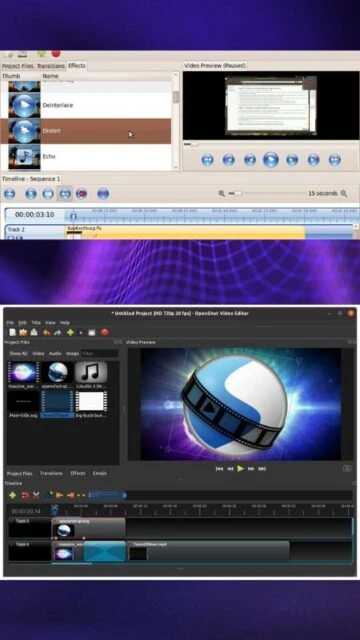
  • Clean, intuitive interface minimizes learning curve for beginners
  • Frame-accurate editing enables precise timing and synchronization
  • Blender integration provides access to professional 3D animation tools
  • Automatic ripple editing prevents timeline gaps and maintains sync
  • Extensive format support through FFmpeg backbone
  • Active development with regular updates and community contributions

Cons

  • Rendering speed slower compared to premium commercial alternatives on standard hardware
  • Plugin ecosystem smaller than industry-standard software like Adobe Premiere
  • Resource-intensive for 4K and high frame rate projects requiring powerful hardware
  • MacOS builds occasionally require extra configuration for full compatibility
  • Limited built-in motion graphics templates compared to professional software
  • Steeper learning curve for advanced compositing and effects work
  • GPU acceleration support varies significantly across different graphics cards

Changelog

v3.3.0 (December 2024):
- Cosmic Dusk default theme for modern interface styling
- Comprehensive ripple editing improvements with multi-layer support
- Recovery menu for previous project version restoration with timestamps
- Wayland-compatible color picker for modern Linux systems
- Enhanced zoom precision and frame boundary detection
- Smarter copy/paste for effects and timeline elements
- Customizable audio buffer size for hardware optimization

v3.2.1 (July 2024):
- Enhanced stability and Windows launch performance improvements
- Theme manager refactor for better thread safety
- Multiple Sentry.io bug fixes for stability

v3.2.0 (June 2024):
- Retro and Cosmic Dusk theme additions
- Improved timeline snapping behaviors
- Remove Gap feature for unwanted silence elimination
- Blender 4.1 support with improved animations

Frequently Asked Questions

Can I use OpenShot professionally?

Yes, OpenShot is production-ready with frame-accurate editing, professional effects, and extensive format support. Many independent creators and small production companies use it successfully for commercial projects, YouTube content, and broadcast work.

Does OpenShot support 4K video editing?

Yes, OpenShot supports 4K editing but requires substantial system resources. A minimum 16GB RAM and 6+ core processor is recommended, along with SSD storage for optimal performance when working with high-resolution footage.

Can I export my projects to different formats?

Absolutely. OpenShot includes 400+ export profiles for various formats including MP4, WebM, ProRes, DNxHD, and platform-specific presets for YouTube, Vimeo, and other social media services.

Is there technical support available?

OpenShot maintains documentation, tutorials, and community forums. While professional support isn't available, the active community and comprehensive user guides provide extensive help resources.

Can I collaborate on projects with other editors?

OpenShot projects are platform-independent and can be shared across Windows, macOS, and Linux systems. Multiple people can edit the same project sequentially, though simultaneous real-time collaboration isn't supported.

Does OpenShot include plugins and extensions?

Yes, OpenShot supports custom effects through the effects library and integrates with Blender for advanced 3D animations. Additional community-created effects can be added to expand functionality.