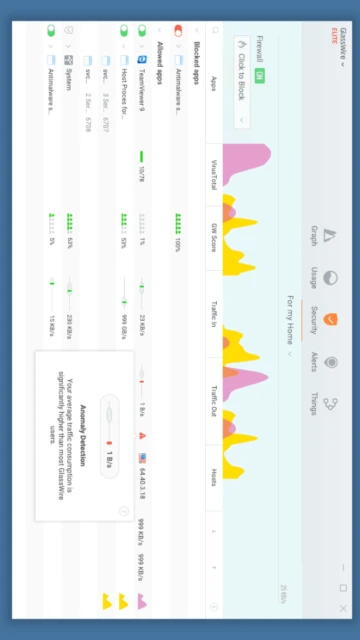
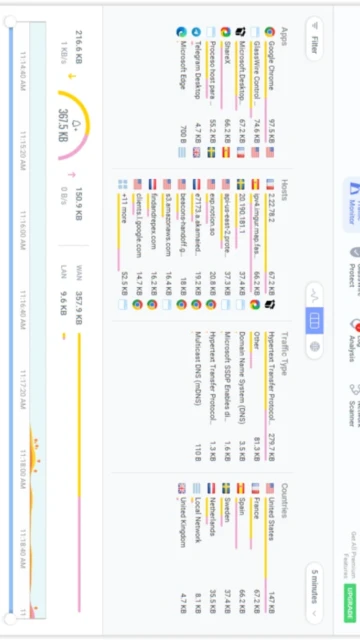
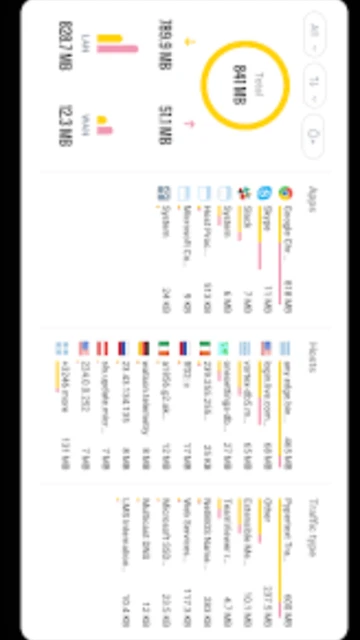
GlassWire 3.7.880 delivers personal network security through real-time traffic visualization and intelligent application firewall control. Unlike technical network analyzers requiring deep protocol knowledge, GlassWire’s graphical interface reveals what every application does on your network. The platform combines passive monitoring, active filtering, and anomaly detection into a unified security tool. This guide explains installation, premium features, integrations, and optimization strategies for maximum network visibility and protection on Windows systems.
How to Install GlassWire
GlassWire installation is straightforward: download the 82.6MB installer from the official website, run the executable, complete the setup wizard, and reboot your system. The process integrates seamlessly with Windows Firewall and launches automatically on startup for continuous monitoring.
- Download Installer – Visit https://www.glasswire.com and click download to get the 82.6MB GlassWire-Setup.exe for Windows 8, 10, or 11 (32/64-bit)
- Run Setup Wizard – Execute the installer and accept the license agreement, then choose installation location and GlassWire components to install
- Configure Windows Integration – GlassWire prompts to integrate with Windows Firewall; accept to enable firewall blocking and ask-to-connect notifications
- Initial Launch and First Run – Reboot system, launch GlassWire, and complete the first-run setup to scan network devices and build traffic baseline for anomaly detection
Who Should Use GlassWire
GlassWire protects individual Windows users and home networks from malware and unauthorized network activity. Power users and IT professionals use it for application monitoring and network troubleshooting. Not suitable for enterprise network management requiring centralized control.
- Home Users – Monitor internet usage, block malware, detect suspicious outbound connections to prevent data theft
- Remote Workers – Verify VPN connections, detect Wi-Fi security threats, and monitor bandwidth on shared home networks
- Cybersecurity Enthusiasts – Analyze application network behavior, test firewall rules, and understand network protocols visually
- NOT ideal for – Enterprise IT departments requiring centralized monitoring across 100+ devices should use Zabbix or enterprise-grade solutions
GlassWire Platform Compatibility
GlassWire exclusively supports Windows operating systems. The platform integrates directly with Windows Firewall kernel-mode driver for blocking capabilities. No native support exists for macOS, Linux, or non-Windows mobile platforms.
| Platform |
Min. Version |
Unique Features |
Limitations |
| Windows Desktop |
Windows 8, 10, 11 (x86/x64) |
Full firewall integration, native kernel driver, system tray monitoring |
No 32-bit support on newer Windows versions |
| Windows Server |
Not supported |
N/A |
Designed for personal use, not enterprise server environments |
| macOS |
Not supported |
N/A |
No plans announced for Mac OS version |
| Linux |
Not supported |
N/A |
Alternative: use Wireshark for Linux network monitoring |
GlassWire Integrations & Plugins
GlassWire connects with Windows security ecosystem and external threat intelligence services. Integration focuses on practical network security rather than third-party plugins or APIs for custom development.
- Windows Firewall Integration – Creates native Windows Firewall rules for applications, provides unified interface for Windows Defender and third-party antivirus
- VirusTotal Integration – Submits suspicious executables to VirusTotal for multi-engine malware analysis before blocking
- GeoIP Filtering – Country-based filtering blocks connections from high-risk nations, useful for compliance and threat prevention
- CSV Export – Export network traffic logs and scanner results to CSV format for archiving, compliance audits, and external analysis
Best Alternatives to GlassWire
Alternative personal firewalls and network monitoring tools offer different strengths. Choice depends on technical skill level, desired features, and integration preferences with existing security software.
- Wireshark – Best for packet-level analysis, provides deeper protocol inspection but steeper learning curve for non-technical users
- ZoneAlarm – Best for antivirus integration, combines firewall with antivirus engine, includes identity theft protection features
- Comodo Firewall – Best for advanced users, offers HIPS (Host Intrusion Prevention) and sandboxing capabilities exceeding GlassWire
- Windows Defender Firewall – Best for minimalists, included with Windows but lacks visual analytics and anomaly detection
GlassWire vs Top Competitors
GlassWire differentiates through visual network analytics and simplicity compared to technical competitors. Premium pricing provides advanced threat detection and unlimited app blocking compared to free alternatives.
| Feature |
GlassWire |
ZoneAlarm |
Comodo Firewall |
| Pricing |
Free + Premium $35.88/year |
Free version available, Premium $39.99/year |
Free with limited features |
| Key Strength |
Visual network analytics, anomaly detection |
Antivirus + firewall combo, identity protection |
HIPS, sandboxing, advanced threat prevention |
| Target Users |
Home users, visual learners, casual monitoring |
Users wanting antivirus bundle, identity theft protection |
Advanced users, security researchers, power users |
| Unique Feature |
Real-time traffic visualization, live connections map |
Identity theft protection, credit monitoring |
Sandbox environment, HIPS intrusion detection |
| Learning Curve |
Easy |
Moderate |
Steep |
GlassWire Keyboard Shortcuts
GlassWire emphasizes visual interaction through its graphical interface. Standard Windows keyboard shortcuts apply for navigation. These common shortcuts accelerate network monitoring workflows.
| Action |
Windows |
Alternative |
| Open Traffic Monitor |
Left panel navigation |
Click Traffic Monitor tab |
| Search Applications |
Ctrl+F in traffic view |
Type application name in search box |
| Block Application |
Right-click + Block |
Select app, Block button |
| Toggle Mini Viewer |
Click Mini Graph icon |
Window minimize/restore |
GlassWire Performance Optimization
Optimize GlassWire to reduce system resource consumption and improve responsiveness. These strategies prevent monitoring slowdowns on older Windows systems with limited CPU or RAM.
- Kernel Driver Optimization – Update Windows with latest driver packages and disable unused network protocols to reduce kernel-mode overhead
- History Pruning – Premium users should configure history retention limits to prevent excessive database growth degrading interface responsiveness
- Notification Tuning – Disable alerts for trusted applications in settings to reduce popup frequency and CPU usage monitoring notifications
- Mini Viewer Resources – Use lightweight mini graph viewer instead of full application window for continuous monitoring, consuming less system memory
- Automatic Update Configuration – Disable automatic updates during business hours; configure updates for off-peak times to minimize system impact
GlassWire Accessibility Features
GlassWire’s visual-first design prioritizes accessibility through clear graphical representations. The interface accommodates users with color blindness through customizable color schemes and status clarity.
- Color Blind Modes – High contrast and alternate color schemes help users with red-green color blindness distinguish network activity types
- Visual Clarity – Large application icons, clear status indicators, and adjustable font sizes improve usability for vision-impaired users
- Keyboard Navigation – Tab-based navigation through interface elements enables operation without mouse for users with motor disabilities
- System Accessibility – Compatible with Windows accessibility features including Narrator screen reader and magnification tools
GlassWire Support & Documentation
GlassWire provides user documentation, video tutorials, and community forums for troubleshooting. Support resources focus on common issues and feature explanations for non-technical users.
- Official Knowledge Base – Comprehensive FAQ and setup guides available at https://www.glasswire.com covering features, troubleshooting, and premium tier differences
- Community Forum – Active user community discusses tips, security concerns, and workarounds at https://www.reddit.com/r/glasswire and official forums
- Video Tutorials – YouTube channel features setup guides, feature explanations, and best practice videos from GlassWire team and community members
- Email Support – Contact [email protected] for technical issues, licensing questions, and account management needs with response within 24 hours

 59
59