Ashampoo WinOptimizer 27 – Comprehensive Windows System Optimization
Professional Windows optimization with intelligent automation and privacy protection
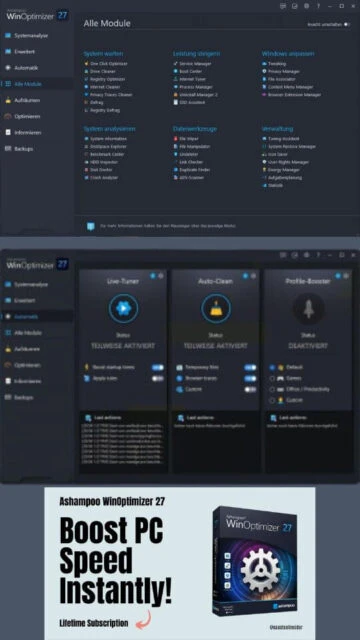
Ashampoo WinOptimizer 27 accelerates Windows performance through intelligent cleaning, privacy protection, and system tuning with over thirty advanced modules.
Ashampoo WinOptimizer 27 represents the evolution of Windows optimization software with over twenty-five years of Ashampoo development experience. The software balances automation with user control, offering both one-click optimization and granular configuration options. With intelligent modules covering system cleaning, privacy protection, performance tuning, and crash analysis, it provides comprehensive Windows maintenance. The company serves over twenty-two million users worldwide across more than one hundred sixty countries, demonstrating sustained trust and reliability.
System Requirements
Operating System:Windows 7, Windows 10, Windows 11 (x64 recommended)
Processor:2 GHz Intel or AMD processor
RAM:2 GB
Disk Space:500 MB free space
Additional Requirements:Internet connection required for activation and updates. Screen resolution minimum 1024x768
Features Of Ashampoo WinOptimizer 27
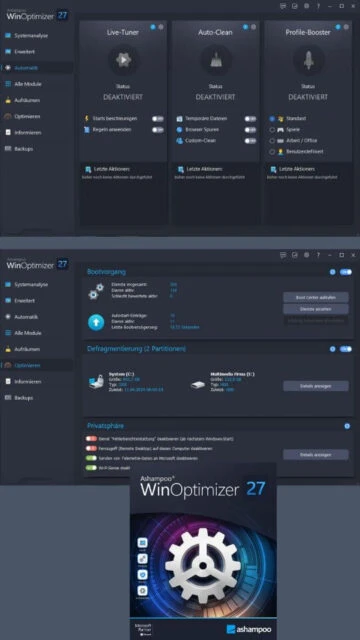
Live Tuner for real-time system performance optimization
Profile Booster with customizable performance profiles for work and gaming
Advanced Crash Analyzer examining Windows error reports
Privacy Manager controlling seventy-three critical system settings
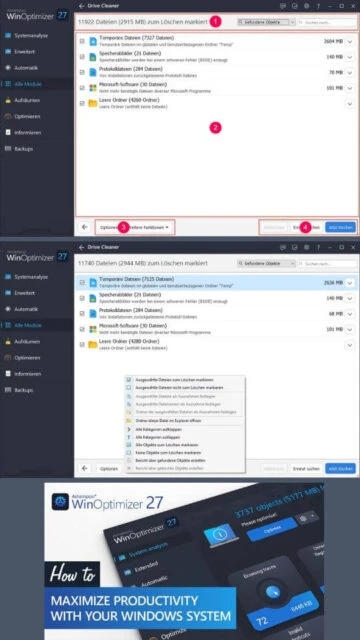
Comprehensive disk cleaning and temporary file removal
Registry optimization and error detection
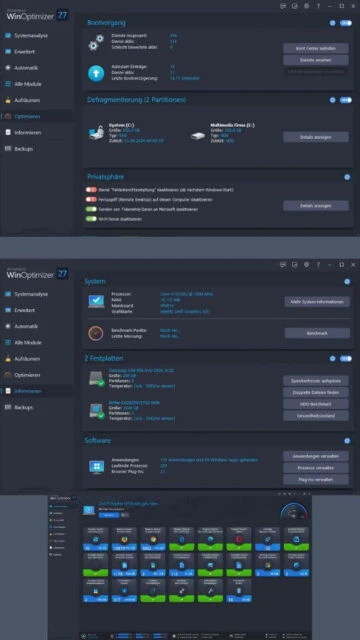
Startup program manager accelerating boot times
Disk defragmentation with SSD optimization
Duplicate file finder and removal
Uninstall manager with residual file cleanup
Process optimization reducing resource consumption
Network and bandwidth monitoring tools
System information and benchmarking utilities
Context menu manager with filter support
Modern dashboard-style statistics display
Pros & Cons
Pros
Extensive module collection covering all optimization aspects
Intelligent automation adapts to usage patterns
User-friendly interface with intuitive navigation
Comprehensive privacy management features
Real-time performance monitoring and optimization
Effective temporary file and junk removal
Uninstall tool surpasses Windows default capabilities
Modern dashboard statistics and reporting
Cons
Subscription model required for continued access
Steeper learning curve for advanced features
Some redundant functions duplicate Windows capabilities
Internet connectivity required for license verification
Potential conflicts with third-party security software
Changelog
Version 27.00.05 (November 13, 2024):
- Enhanced Live Tuner with improved processor efficiency
- Expanded Auto-Clean with additional file type detection
- New Profile Booster replacing Game Booster functionality
- Advanced Crash Analyzer module introduction
- Improved memory management and optimization
- Updated browser and Windows version support
- Enhanced privacy protection mechanisms
- Modern dashboard interface improvements
- Updated cleaner profiles for latest applications
- Performance optimization across modules
Frequently Asked Questions
What is the trial period for WinOptimizer 27?
Ashampoo WinOptimizer 27 includes a thirty-day trial period with full feature access. After trial expiration, paid subscription activation is required for continued use.
Can WinOptimizer damage my system?
WinOptimizer includes safety mechanisms preventing system damage. It creates restore points before major changes, and experienced users can configure conservative settings.
Does WinOptimizer work on Windows 11?
Yes, WinOptimizer 27 fully supports Windows 11 with optimized modules updated for the latest OS features and components.
How often should I run optimization?
Auto-Clean enables continuous optimization. Manual optimization monthly provides adequate maintenance for typical users, or weekly for heavy computer usage.
What is Profile Booster?
Profile Booster provides predefined performance profiles optimizing system resources for specific activities like office work or gaming, replacing traditional game booster functionality.
Is WinOptimizer compatible with antivirus software?
WinOptimizer generally works alongside antivirus solutions, though configuration adjustments may optimize compatibility with specific security software.
What is Ashampoo WinOptimizer 27?
Ashampoo WinOptimizer 27 is a comprehensive system optimization suite designed to improve Windows performance and protect user privacy. With over thirty powerful modules, it combines disk cleaning, registry optimization, startup acceleration, and privacy management into one unified platform. The software includes intelligent automation features that adapt to your specific usage patterns for optimal results.
Unmatched Power
WinOptimizer 27 features live tuning for real-time performance optimization and auto-cleaning that removes unnecessary files as they accumulate. The new Profile Booster replaces traditional game boosting with customizable performance profiles for work and gaming scenarios. Advanced privacy management through the Privacy Manager controls seventy-three critical system settings, blocking telemetry and unwanted tracking. Automated crash analysis examines error reports, while enhanced disk defragmentation and SSD optimization ensure peak storage performance and responsiveness.
Who Should Use It?
WinOptimizer 27 suits casual users seeking automated optimization and power users requiring granular performance control. System administrators managing multiple Windows installations benefit from comprehensive tools. Privacy-conscious users appreciate robust telemetry blocking and data protection features. Gamers utilize profile-based optimization for improved gaming performance and system responsiveness during demanding applications.
User reviews and ratings for Ashampoo WinOptimizer 27
See what users think about Ashampoo WinOptimizer 27. Read honest reviews and ratings from real users.
4.7
★★★★★
4 reviews
Comprehensive toolkit keeps Windows optimal
by Thomas Anderson
★★★★★
2025-11-30
WinOptimizer 27 provides all tools for maintaining Windows in excellent condition. Crash Analyzer and Privacy Tracer cleaner are particularly impressive. This software is definitely a keeper.
Excellent performance improvement results
by Lisa Chen
★★★★★
2025-10-18
Significant boot time reduction and overall system responsiveness improvement. The new Profile Booster feature effectively optimizes for gaming scenarios.
Great tools but subscription model disappointing
by Michael Brown
★★★★★
2025-09-05
Feature-rich optimization suite with impressive capabilities. The shift to subscription licensing is frustrating compared to lifetime licenses, but functionality remains exceptional.
Essential Windows maintenance software
by Jennifer Martinez
★★★★★
2025-07-22
Reliable optimization across many years of use. Responsive support team and regular updates. Occasional performance overhead during deep scans, but results justify it.
Write a Review
Ashampoo WinOptimizer 27 Screenshots & Photos
Browse through screenshots and photos of Ashampoo WinOptimizer 27 to see how it looks and works.
Ashampoo WinOptimizer 27 Videos
Watch videos to see how this software works and learn about its features.

 40
40