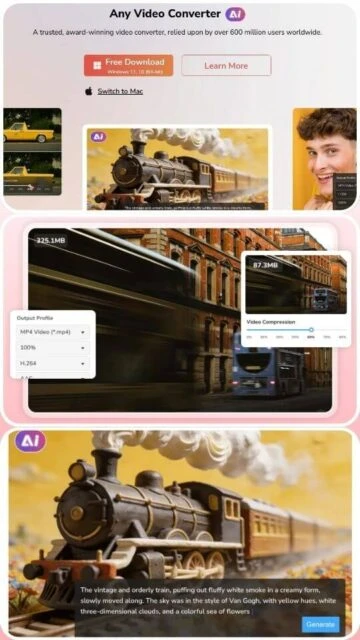
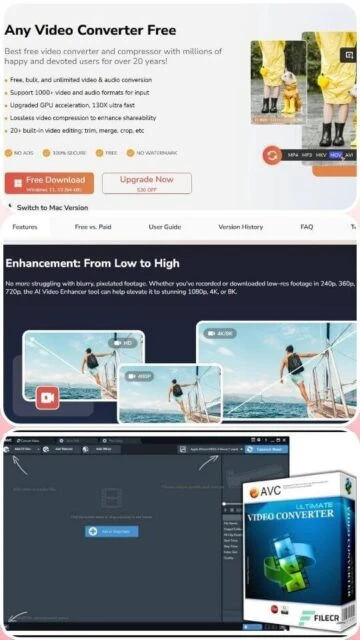
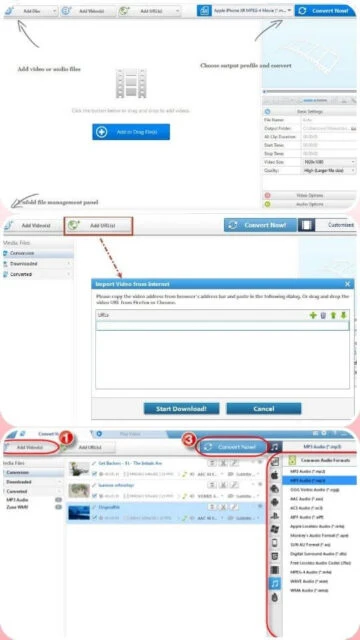
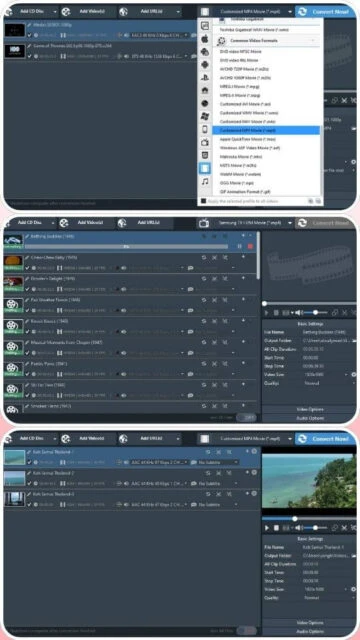
Any Video Converter, developed by AnvSoft Inc., stands as an industry veteran with over 20 years of continuous innovation and user trust from 600+ million customers worldwide. The software supports conversion of 100+ video formats (AVI, FLV, MOV, MP4, MKV, WebM, RMVB, AVCHD, 3GP, DivX) to 160+ output formats optimized for devices ranging from smartphones to gaming consoles. Version 9.1.5 introduces timeline-based editing with precision trimming and merging, enhanced crop tools, and expanded platform download compatibility. The platform includes video downloader for major sites, AI video enhancement with multiple processing models, automatic video blurring with 99% accuracy, photo editing capabilities, and hardware acceleration through NVIDIA NVENC, AMD AMF, and Intel Quick Sync technologies. Professional filmmakers, content creators, and everyday users rely on its consistent performance, rapid file conversion, batch processing, and award-winning customer service.
System Requirements
Operating System:Windows 11/10/8.1/8/7/Vista/XP (64-bit) or macOS 10.15+
Processor:750 MHz Intel/AMD processor or higher
RAM:4 GB (16 GB for AI video enhancer feature)
Disk Space:100 MB free disk space
Additional Requirements:NVIDIA GeForce GTX 1060+, AMD Radeon HD 7000+, or Intel Arc Graphics for hardware acceleration
Features Of Any Video Converter
Video Conversion: Transform 100+ formats to 160+ outputs with customizable codec and bitrate settings
Timeline-Based Editing: Precisely trim, merge, and arrange video clips with frame-accurate controls
Video Downloading: Fetch videos from YouTube, Facebook, Vimeo, and thousands of other platforms
AI Video Enhancement: Upscale and enhance video quality using advanced neural network models
Device-Specific Presets: Ready-made export profiles optimized for iPhone, iPad, Android, PS4, Xbox
DVD Creator: Burn video files to DVDs with menu creation and chapter support features
Photo Editing: Advanced tools for photo enhancement, retouching, and artistic effects application
Auto Video Blurring: Apply AI-powered motion blur to objects with 99% accuracy automation
Subtitle Management: Download, extract, edit, and embed subtitles in video files
Pros & Cons
Pros
Free version offers robust features without watermarks or time restrictions on files
Extremely user-friendly interface requires minimal learning curve for new users
Lifetime license ($49.95) represents excellent value for permanent access
Outstanding customer support team provides same-day responses and problem resolution
20+ years of proven reliability with continuous updates and codec support
Hardware acceleration reduces conversion times significantly across all file types
Comprehensive format support handles virtually all common and legacy video formats
Batch conversion enables processing multiple files overnight or while multitasking
Cons
Free version lacks AI enhancement and some advanced video editing features
Video downloader requires premium version purchase for full functionality
Larger file size (67.7 MB) compared to some lightweight alternatives
Processing speed slower than GPU-optimized converters on CPU-only systems
Limited Linux support restricts usage on non-Windows/Mac platforms
Some users report occasional download failures from certain video platforms
AI features require significant GPU resources for optimal performance
Changelog
Version 9.1.5 (November 19, 2025):
- Introduced timeline-based editing workflow for improved trimming and merging precision
- Refined crop tool interface for smoother user interaction and preview accuracy
- Enhanced playlist download functionality with single file or full list options
- Added MP4 H.264 download support for broader platform compatibility
- Improved overall download tool success rate and reliability
Version 9.1.0 (August 10, 2025):
- Released new AI video enhancement models with improved upscaling quality
- Added support for Apple Silicon M3 chips with optimized CoreML acceleration
- Enhanced subtitle download system for improved accuracy and language support
- Fixed compatibility issues with Windows 11 latest updates
Version 9.0.5 (May 22, 2025):
- Introduced advanced photo editing features with AI enhancement
- Added automatic object motion blur with 99% accuracy detection
- Improved batch processing speed by 25% through optimization
- Enhanced device preset library with latest smartphone models
Frequently Asked Questions
Can I use the free version for commercial purposes?
The free version is suitable for personal use only. Commercial use requires purchasing Pro or Ultimate license version. Check your local laws regarding commercial video conversion and downloading from streaming platforms.
How do I download videos from YouTube with Any Video Converter?
Pro and Ultimate versions include the video downloader. Copy video URL, click Download tab, paste the link, select quality and format, and start download. Free version doesn't include downloading capability.
What is the difference between Pro and Ultimate editions?
Both are $49.95 lifetime but Ultimate includes advanced features like AI video enhancement, automatic object blurring, and photo editing tools. Pro has core conversion and basic downloading. Check official site for current feature comparison.
Does Any Video Converter support batch processing?
Yes, all versions support batch conversion. Add multiple files to queue, configure output settings once, and start conversion. The software processes all files sequentially using your selected profile automatically.
Can I convert videos to device-specific formats automatically?
Yes, Any Video Converter includes presets for iPhone, iPad, Android, PS4, Xbox One, and other popular devices. Select your device, choose video, and the software automatically optimizes format, resolution, and codec settings.
Is GPU acceleration available on Mac computers?
Yes, Mac version supports hardware acceleration through Apple Silicon M1/M2/M3 chips with CoreML optimization. Intel-based Macs use Metal acceleration technology for improved conversion speed.
What happens after I purchase a lifetime license?
After purchase, you receive a license key for immediate activation. The license grants permanent access to the software version purchased with included future updates. No recurring fees or subscription charges apply.
Any Video Converter is a comprehensive multimedia solution trusted by over 600 million users worldwide. This guide provides complete installation instructions, platform support details, integration capabilities, feature comparisons, keyboard shortcuts, and performance optimization strategies.
Installation & Setup
Download the installer from the official Any Video Converter website (9.16 MB file)
Run the executable and accept the language selection for your region
Review and accept the license agreement terms
Select installation location and choose whether to create desktop/menu shortcuts
Complete the installation wizard and restart your computer if prompted
Launch Any Video Converter and configure initial preferences for file handling
Optional: Register premium version to unlock advanced features like AI enhancement tools
Platform Availability
Platform
Support Status
Features Available
Windows 11/10 (64-bit)
Full Support
All features including AI enhancement and hardware acceleration
Windows 8/7 (64-bit)
Supported
Core conversion, downloading, editing tools available
macOS 10.15+
Full Support
Video conversion, downloading, editing; AI enhancement supported
Apple Silicon M1-M3
Optimized
Native acceleration for M-series processors with full feature support
Integration Ecosystem
iTunes – Convert videos directly to formats compatible with iPhone, iPad, and iPod devices
YouTube – Download videos and entire playlists with multiple quality and format options available
Streaming Services – Export videos for playback on Netflix, Hulu, Amazon Prime, and similar platforms
Android Devices – Prepare videos optimized for Samsung, HTC, Google Pixel, and other Android phones
Game Consoles – Convert content for PS4, PS5, Xbox One, Xbox Series X/S playback
Social Media – Pre-configured export profiles for Instagram, TikTok, YouTube, and Facebook sharing
Cloud Storage – Export formats compatible with Google Drive, OneDrive, and Dropbox storage
Ctrl+O – Open or import video and audio files for conversion
Ctrl+Shift+O – Open entire folder for batch conversion processing
Ctrl+S – Save current project configuration and settings
Delete – Remove selected file from conversion queue list
Space – Play/pause preview in video player window
Ctrl+A – Select all files in current conversion list
Ctrl+N – Create new batch conversion project
F5 – Refresh media library and device preset list
Performance Tips
Enable hardware acceleration (NVIDIA/AMD) in settings to reduce CPU usage and speed up conversions
Use preset device profiles instead of manual settings for faster, optimized output configurations
Process multiple files in batch mode to maximize throughput and GPU utilization efficiency
Close other applications consuming bandwidth when downloading videos from streaming platforms
Pre-trim videos before conversion to reduce file size and processing duration significantly
Select lower resolution output when disk space is limited without sacrificing noticeable quality
Update graphics drivers regularly to ensure optimal hardware acceleration compatibility
User reviews and ratings for Any Video Converter
See what users think about Any Video Converter. Read honest reviews and ratings from real users.
4.8
★★★★★
4 reviews
Reliable Converter with Exceptional Support
by John Thompson
★★★★★
2025-11-20
I've used Any Video Converter for over 10 years without issues. When I needed help, support responded same day with solution. The software converts everything I throw at it quickly and reliably. Highly recommend for serious video work.
Perfect Balance of Features and Simplicity
by Lisa Wong
★★★★★
2025-10-18
After trying multiple converters, I chose Any Video Converter for its clean interface and reliability. Batch processing saves hours, device presets work perfectly, and the lifetime license is great value. Customer service team is genuinely helpful.
Excellent Tool with Minor Limitations
by Robert Martinez
★★★★★
2025-09-25
Any Video Converter handles my daily conversion needs excellently. Processing speed is good with GPU enabled. The only downside is some websites block automated downloads. Overall very satisfied with reliability and feature set.
Best Software for Converting Videos and Downloading
by Amanda Foster
★★★★★
2025-08-12
I use this daily as a content creator to download videos, convert formats, and edit clips. The interface is intuitive, conversion quality excellent, and support fantastic. The lifetime purchase was the best software investment I've made.
Write a Review
Any Video Converter Screenshots & Photos
Browse through screenshots and photos of Any Video Converter to see how it looks and works.
Any Video Converter Videos
Watch videos to see how this software works and learn about its features.