Adobe After Effects is the industry-standard software for motion graphics artists, visual effects professionals, and video editors worldwide. Released in 1993 and continuously evolved, After Effects has become synonymous with professional compositing, featuring advanced particle systems, 3D camera tracking, and node-based effects architecture. The 2025 version introduces AI-powered generative fill capabilities, improved HDR color management, and streamlined performance optimizations that make it the preferred choice for film, television, advertising, and digital media production. With Creative Cloud integration, users gain access to thousands of templates, effects, and assets alongside professional-grade compositing tools.
System Requirements
Operating System:Windows 10 64-bit version 22H2 or Windows 11; macOS 11 Big Sur or later
Processor:Intel 6th Gen or AMD Ryzen 1000 Series with AVX2 support
RAM:16 GB
Disk Space:8 GB for installation, 64 GB+ recommended for disk cache
Additional Requirements:GPU with 2 GB VRAM minimum (4 GB recommended), NVIDIA Maxwell or newer, AMD Radeon Pro, or Apple Metal compatible
Features Of Adobe After Effects 2025
Advanced animation with keyframe editor and expression language
3D camera tracking and motion analysis
Particle system with Particular plugin support
AI-powered generative fill and remove tools
HDR color preview and wide gamut support
Puppet pin tool for character animation
Dynamic Link for seamless Adobe integration
Multi-frame rendering for accelerated output
Various blending modes and adjustment layers
Lighting effects and 3D material support
Text animation with individual character control
Mask refinement with automatic edge detection
Pros & Cons
Pros
Industry standard trusted by professionals globally
Seamless integration with entire Adobe Creative Cloud suite
Unmatched motion graphics capabilities and effects variety
Extensive third-party plugin ecosystem for extended functionality
Regular updates with new AI features and performance improvements
Comprehensive online tutorials and community support
Powerful 3D camera tracking and motion analysis tools
Cons
Expensive subscription model at $20.99/month standalone
High system resource requirements limit accessibility
Steep learning curve for beginners unfamiliar with motion graphics
Slow rendering times on lower-end hardware configurations
Limited color grading compared to specialized tools like DaVinci Resolve
Changelog
Version 25.6 (December 2025):
- Fixed stability issues with 4K ProRes file handling
- Improved performance for long-form video projects
- SVG import and shape layer conversion enhancements
- Better keyframe management with offset tools
Version 25.5 (September 2025):
- Layer and keyframe offset functionality
- Text formatting copy/paste without content changes
- Enhanced HDR color metadata support
- Auto-relaunch capability for seamless updates
Frequently Asked Questions
Can I use After Effects without a subscription?
After Effects requires an active Adobe Creative Cloud subscription after the 7-day free trial expires. You can purchase a standalone subscription for $20.99/month or include it in the full Creative Cloud bundle. Educational discounts are available for students and teachers.
What's the difference between After Effects and Premiere Pro?
After Effects specializes in motion graphics, compositing, and visual effects with layer-based timeline. Premiere Pro is designed for video editing with multi-track timeline and color grading. They integrate seamlessly through Dynamic Link for efficient workflows.
How much RAM do I need for 4K video projects?
For 4K video work, Adobe recommends minimum 32GB RAM, with 64GB or higher ideal for complex projects. You can allocate RAM allocation in Edit > Preferences > Memory to optimize performance based on your system.
Are there free alternatives to After Effects?
DaVinci Resolve offers a free version with compositing capabilities, and Blender has a built-in compositor. Both have steeper learning curves but provide powerful alternatives for motion graphics and compositing.
Can I work on the same project across Windows and Mac?
Yes, After Effects projects are compatible across Windows and Mac systems. Simply transfer the project file and ensure all linked media files are included and properly organized in the same folder structure.
What are Dynamic Link sequences and how do I use them?
Dynamic Link creates live connections between After Effects compositions and Premiere Pro timelines. Changes in After Effects automatically update in Premiere Pro without rendering, enabling efficient round-trip editing workflows.
Adobe After Effects 2025 is the industry-standard compositing and motion graphics software trusted by professionals worldwide for creating cinematic visual effects, animated motion graphics, and complex composites. This comprehensive guide covers installation, platform support, integration capabilities, and workflow optimization for both beginners and advanced users.
Installation & Setup
Visit Adobe.com and sign in with your Adobe ID or create a new account
Download the Creative Cloud desktop application for your operating system
Launch the Creative Cloud app and navigate to the Apps section
Search for After Effects and click the Install button
Wait for the installation to complete (typically 10-15 minutes depending on internet speed)
Launch After Effects from the Creative Cloud dashboard or desktop shortcut
Sign in with your Adobe credentials to activate your subscription or trial
Allocate adequate RAM through Edit > Preferences > Memory to allow 16GB minimum for HD work
Use proxy files for 4K and high-resolution footage to improve playback performance
Disable unnecessary effects and plugins to reduce processing load during timeline scrubbing
Organize compositions hierarchically to manage complex projects and improve render times
Use shape layers instead of rasterized graphics for scalable animations and smaller file sizes
Purge memory caches regularly through Edit > Purge > All Memory & Disk Cache
User reviews and ratings for Adobe After Effects 2025
See what users think about Adobe After Effects 2025. Read honest reviews and ratings from real users.
4.7
★★★★★
4 reviews
Industry Standard for Motion Graphics
by Marcus Chen
★★★★★
2025-11-28
After Effects 2025 remains unbeatable for professional motion graphics. The new AI generative tools save hours of work. Dynamic Link integration with Premiere is seamless. Performance improvements make 4K workflows manageable. Essential software for any serious content creator.
Powerful but Resource Intensive
by Elena Rodriguez
★★★★★
2025-11-15
Excellent capabilities for visual effects and compositing, with incredible flexibility. However, system requirements are demanding and the subscription model adds up. Worth the investment for professionals but challenging for hobbyists.
Steep Learning Curve Despite Excellence
by James Patterson
★★★★★
2025-10-22
After Effects is unmatched for motion graphics, but beginners will struggle without tutorials. Once you master the interface and workflow, it's incredibly powerful. The plugin ecosystem is outstanding.
Game Changer for VFX Work
by Sarah Kim
★★★★★
2025-10-05
Updated to 25.6 and the stability improvements are noticeable. Camera tracking is superb, particle effects are flexible, and 3D integration is smooth. Creative Cloud collaboration features enhance team projects.
Write a Review
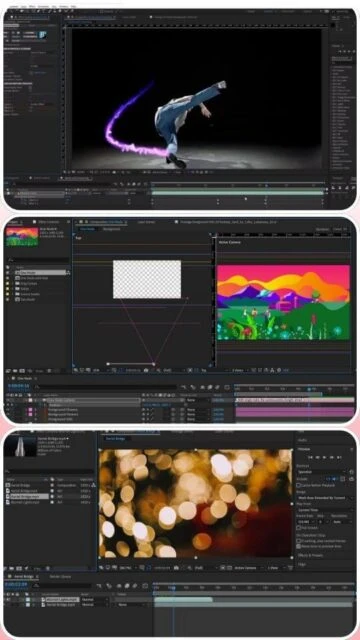
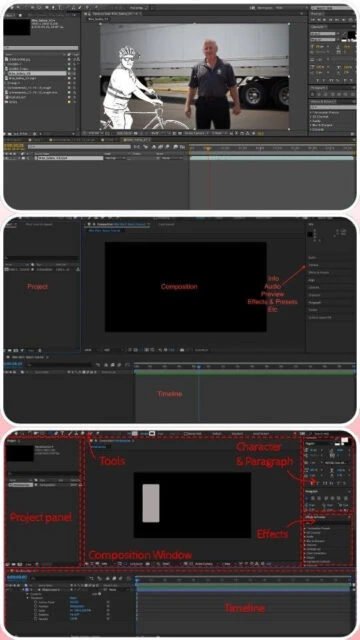
Adobe After Effects 2025 Screenshots & Photos
Browse through screenshots and photos of Adobe After Effects 2025 to see how it looks and works.
Adobe After Effects 2025 Videos
Watch videos to see how this software works and learn about its features.