
 24
24
Ludo King – Digital revival of a classic board game
Ludo King modernizes the classic board game with online play and themes, but heavy ads and swingy dice keep this 7.5/10 experience uneven.
Game Info
Verdict
Ludo King is a wildly popular digital ludo game whose social play shines, but intrusive ads and swingy dice hold it back.
Pros
- Immensely accessible take on a classic board game
- Huge global player base for fast matchmaking
- Cross platform play across mobile and Windows
- Varied visual themes and music keep the board fresh
- Local pass and play is great for families
- Regular events and tournaments add reasons to return
Cons
- Ad frequency between matches can feel excessive
- Perceived dice bias often frustrates competitive players
- Progression mostly tied to cosmetics and coins
- No meaningful single player campaign or challenges
Performance Notes
Ludo King is extremely light and runs at a stable 60 frames per second on most Android and iOS devices, as well as low end Windows laptops when used through Android emulators. Network stability matters more than hardware for smooth online play.
Ludo King takes the centuries-old Pachisi-inspired board game and turns it into one of the most downloaded mobile titles worldwide. Built around simple dice rolls and token movement, it became a social staple during lockdowns and still dominates board game charts. In this review you will see how its online modes, monetization, and live events shape the experience, plus where it stands against rival digital ludo apps.
How to Play Ludo King
Ludo King keeps the rules of classic ludo intact. Up to four players roll a single die, move tokens around the board, and race to get all pieces home. Luck drives the rolls, but smart blocking, safe spots, and timing captures give better players an edge.
- Controls – Simple tap or click to roll the die and select tokens, with an easy tutorial for new players.
- Progression – You earn coins and levels from matches, unlocking themes, dice skins, and limited time event rewards.
- Combat/Mechanics – The core loop is rolling, moving, and occasionally capturing opponents by landing on their tiles.
- Tips – Protect tokens on safe tiles, avoid risky single pieces far ahead, and watch turn order before leaving shelter.
Who Should Play Ludo King
Ludo King suits players who want quick, lightly competitive games they can share with friends or family across phones and PCs.
- Player 1 – Social and family gamers who enjoy simple digital board games they can play together online or on one device.
- Player 2 – Mobile players who like short sessions, leveling up, and collecting cosmetic themes without learning complex systems.
- Player 3 – Fans of traditional ludo or Pachisi who want a faithful digital version with optional online matchmaking.
- Skip if – You dislike randomness heavy games or have low tolerance for frequent ads and in app purchases.
Ludo King Platform Performance
Ludo King runs smoothly on almost any modern phone and modest Windows hardware, since it uses simple 2D visuals and light effects. Frame rates stay stable even on low end devices, and network performance is usually solid except on poor mobile connections.
| Platform | Resolution | FPS | Notes |
|---|---|---|---|
| PC (High) | Up to 4K | 60+ | Runs flawlessly on modest PCs and laptops, even when played through Android emulators. |
| Android | 720p-1440p | 60 | Stable performance on budget phones, with faster loads on newer chipsets. |
| iOS | 750p-1290p | 60 | Smooth on older iPhones and iPads, virtually no frame drops in normal play. |
| Console / Switch | N/A | N/A | No native versions, use mobile or PC instead. |
Ludo King System Requirements
There is no demanding PC requirement because Ludo King is primarily a mobile title. When run through popular Android emulators on Windows, the requirements are still low, and most recent laptops can handle it easily.
| Component | Minimum | Recommended |
|---|---|---|
| OS | Windows 8.1 64 bit | Windows 10 64 bit |
| CPU | Intel Core i3 8300 or equivalent (emulator guideline) | Intel Core i3 9320 or better |
| GPU | NVIDIA GTX 1050 or equivalent | Same or better dedicated GPU |
| RAM | 8 GB | 16 GB |
| Storage | 1 GB available space | SSD Recommended |
Similar Games to Ludo King
If you enjoy Ludo King but want alternatives, several mobile board games offer similar dice driven tension, different monetization, or polish. These are worth testing alongside your current ludo app.
- Ludo Club – Very similar ludo rules with a slightly cleaner interface and faster animations.
- Parchisi Star – Spanish style parchisi variant with more rule tweaks and competitive ranked play.
- Ludo All Star – Adds extra power ups and twists that make games feel slightly less random.
- Carrom Pool – Another classic Indian board game adaptation, more physics based and skill heavy.
Ludo King vs Competitors
Among digital ludo apps, Ludo King trades pure fairness and minimal ads for the largest player base, wide language support, and frequent cosmetic content. Rivals often feel lighter but have less social reach.
| Feature | Ludo King | Ludo Club | Parchisi Star |
|---|---|---|---|
| Price | Free with ads | Free with ads | Free with ads |
| Playtime | Endless online matches | Endless online matches | Endless online matches |
| Multiplayer | Online and local | Online and local | Online only |
| Metacritic | N/A | N/A | N/A |
Ludo King Story and World
Ludo King does not have a traditional story, but it leans on nostalgia and family memories. The board is a digital recreation of the classic cross shaped layout, wrapped in colorful themes like nature, candy, or disco. Each theme brings new textures, dice looks, and music tracks, giving a light sense of place without changing the underlying rules.
Ludo King Graphics and Audio
Visually, Ludo King keeps things simple with flat tokens, bold color schemes, and readable dice. It will not impress next to 3D games, yet clarity helps on small phone screens. The sound design focuses on dice rolls, token hops, and short jingles at key moments. Background music varies by theme, from calm nature sounds to energetic tracks that make long sessions feel less static.
Ludo King Multiplayer and Online
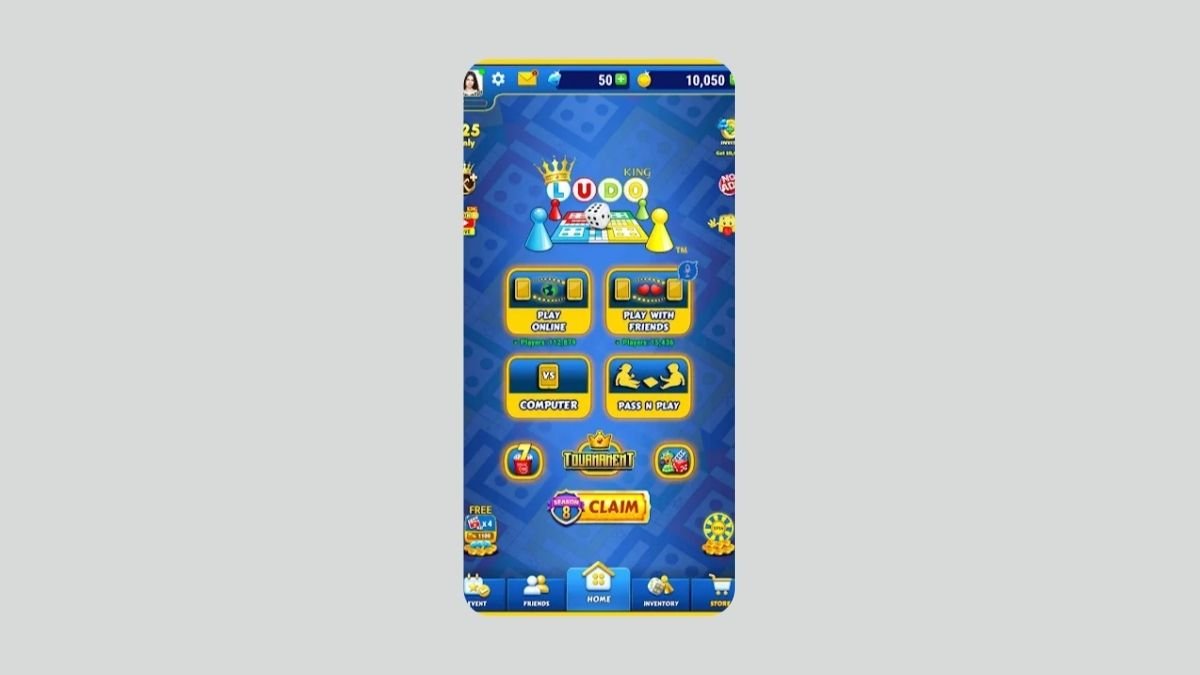
Online play is the heart of Ludo King, letting you match with friends or strangers within seconds. Different modes slightly tweak rules or rewards, but the structure remains easy to understand.
- Classic Online – Two to four players join a lobby, with casual stakes and quick rematches.
- Private Rooms – Invite only lobbies for family or friends, ideal for remote gatherings.
- Tournament Mode – Up to eight players compete in knockout brackets for higher coin prizes.
- Cross Play – Android, iOS, and Windows versions can all connect in shared lobbies.
| Mode | Max Players | Ranked | Main Appeal |
|---|---|---|---|
| Classic Online | 4 | No | Relaxed games with random opponents. |
| Private Room | 4 | No | Play only with people you know. |
| Tournament | 8 | Light ranking | Higher coin rewards and bracket tension. |
| Offline Local | 4 | No | Pass and play on one device. |
Ludo King DLC and Expansions
Instead of big expansions, Ludo King relies on cosmetic themes, limited events, and small rules variants. Spending is completely optional, but the app often reminds you about premium offers between games.
- Premium Themes – Paid boards and dice styles sold individually or in bundles.
- Coin Packs – In app currency for entering higher stake matches or buying cosmetics.
- Season Pass – Periodic passes that bundle exclusive themes, emojis, and boosters.
- Free Updates – New modes, languages, and quality of life tweaks arrive several times a year.
Ludo King Community and Support
Ludo King has a huge global community, especially across India, the Middle East, and Southeast Asia. Players gather on social media and video platforms to share matches, vent about unlucky rolls, and discuss strategies for tournaments.
- Official Forums – Announcements and patch notes usually appear on official social channels and the developer site.
- Reddit/Discord – Unofficial groups organize friendly lobbies and share house rules.
- Mod Support – No mod tools, though some emulators allow basic key remapping on PC.
- Updates – Live service style patches with new themes, bug fixes, and balance tweaks arrive regularly.