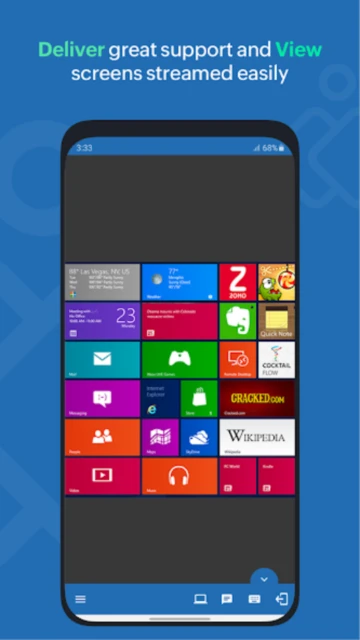
Zoho Assist – Remote Desktop is the technician’s mobile command center, designed not just for viewing screens but for actively resolving IT issues. Unlike passive desktop viewers, this app integrates a suite of diagnostic tools, allowing support agents to manage processes, services, and startup items without ever interfering with the end-user’s visual interface. This guide details how to use its specialized toolset to support clients and manage unattended devices efficiently.
How to Get Started with Zoho Assist
Getting started involves distinguishing between ‘Attended’ support (for clients) and ‘Unattended’ access (for managed devices). The interface separates these workflows clearly.
- Log In as Technician – Sign in with your Zoho account; ensure you have a ‘Technician’ license assigned if part of a team.
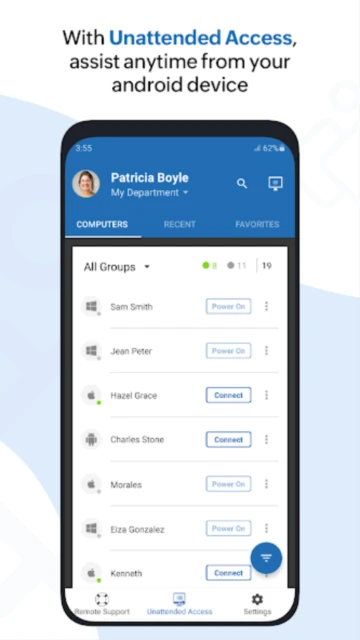
- Configure Unattended Access – Use the ‘Deployment Link’ feature to install the agent on your managed servers or office computers.
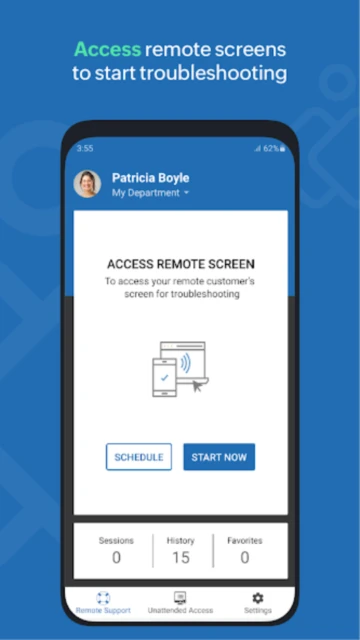
- Start Instant Session – For ad-hoc support, tap ‘Start Session’ and share the generated 9-digit key with your customer.
- Invite via Email/SMS – Send the connection link directly from the app to the customer’s smartphone or email for one-tap joining.
Who Should Use Zoho Assist
This app is strictly tailored for IT support providers and helpdesk teams. It is built to troubleshoot other people’s problems rather than just access personal files.
- MSP Technicians – Managed Service Providers who need to reboot, patch, and manage client servers while away from their desk.
- Internal IT Helpdesk – Corporate IT staff who need to jump on a support call with an employee instantly via their mobile device.
- Independent Consultants – Tech support freelancers who need a professional, secure way to bill and support ad-hoc clients.
- NOT ideal for – Gamers or media consumers (lacks high frame rate optimization).
Zoho Assist Platform Compatibility
Zoho Assist shines with its broad device support, allowing technicians to support almost any device from their Android phone.
| Platform |
Min. Version |
Unique Features |
Limitations |
| Android (Technician) |
7.0+ |
Native diagnostic tools, Voice chat |
Cannot host session from older OS |
| Windows (Customer) |
Win 7+ |
UAC compatibility, Reboot & Reconnect |
Service mode required for admin tasks |
| macOS (Customer) |
10.12+ |
File transfer, Multi-monitor |
Strict privacy perm setup needed |
| iOS (Customer) |
iOS 13+ |
Screen broadcast sharing |
No remote control (View Only) |
Zoho Assist Integrations & Ecosystem
As part of the Zoho suite, Assist integrates natively with helpdesk software, streamlining the ticket-to-solution workflow significantly.
- Zoho Desk – Launch remote sessions directly from within a support ticket, automatically logging session details to the ticket history.
- Spiceworks / Freshdesk – Third-party integrations allow you to sync session data with other popular ticketing systems.
- Google Workspace – Import contacts and email lists to quickly invite users to support sessions.
- Zendesk – A dedicated widget allows support agents to initiate sessions from the Zendesk sidebar.
Best Alternatives to Zoho Assist
While Zoho Assist is a leader in web-based support, other tools may suit different specific workflows or budget structures.
- Splashtop SOS – Best for cost-conscious MSPs, offering a very similar feature set at a competitive price point.
- BeyondTrust – Best for large enterprises requiring deeper security compliance and audit trails than Zoho offers.
- ConnectWise ScreenConnect – Best for speed and reliability in large-scale deployments, though significantly more expensive.
- AnyDesk – Best for speed, offering lower latency which can feel snappier than Zoho’s web-socket based connection.
Zoho Assist vs Top Competitors
Zoho’s main advantage is its “all-in-web” nature and diagnostic tools, which many competitors lack in their mobile apps.
| Feature |
Zoho Assist |
TeamViewer |
AnyDesk |
| Pricing |
Affordable / Free Tier |
High Corporate Pricing |
Mid-range |
| Key Strength |
Deep Helpdesk Integration |
Brand Recognition |
Raw Speed |
| Target Users |
IT Support / Helpdesks |
Enterprise / Personal |
Personal / SMB |
| Unique Feature |
Voice/Video Chat in-app |
AR Support (Pilot) |
Address Book |
| Offline Mode |
No (Cloud dependant) |
LAN Mode Supported |
LAN Mode Supported |
Zoho Assist Privacy & Security Overview
Zoho Corporation is known for its privacy-first approach, avoiding ad-based revenue models even for its free products.
| Security Aspect |
Implementation |
User Control |
| Data Encryption |
AES-256 / SSL |
Standard for all sessions |
| Authentication |
2FA / TOTP |
Enforceable for all technicians |
| Data Collection |
Session Metadata |
Anonymized logs only |
| Third-Party Sharing |
Strict No-Ad Policy |
Data stays within Zoho Ecosystem |
Zoho Assist Accessibility Features
Zoho has improved the technician console to be more accessible, though it is primarily a visual tool.
- Screen Reader – Labeling of buttons and menus has been improved for better TalkBack compatibility.
- Visual – The app supports system-wide Dark Mode, reducing eye strain during late-night support tickets.
- Motor – Large touch targets for major actions like ‘End Session’ or ‘Keyboard’ help prevent accidental disconnects.
- Languages – Supports 15+ languages including right-to-left support for Arabic and Hebrew.
Power User Tips for Zoho Assist
Leverage the hidden depth of the mobile app to resolve issues without ever taking control of the mouse.
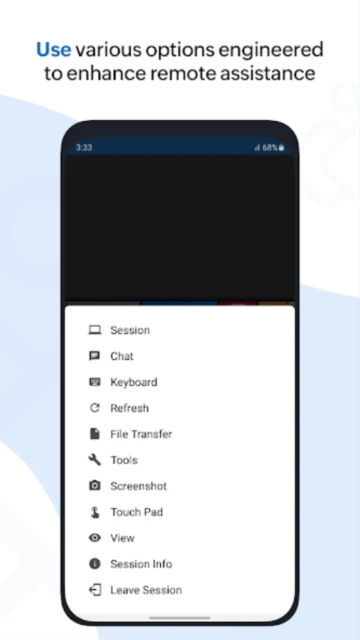
- Use Native Diagnostics – Access Task Manager, Registry Editor, and Command Prompt from the ‘Tools’ menu to fix issues silently.
- Reboot & Reconnect – Use the specialized power menu to reboot a remote machine; the app will auto-reconnect once it’s back online.
- Gesture Navigation – Swipe up with three fingers to toggle the virtual keyboard; pinch to zoom in on high-DPI remote screens.
- Invite External Techs – You can invite a second technician to your active session for collaborative troubleshooting.
- Session Notes – Dictate session notes using your phone’s microphone immediately after closing a session to keep accurate logs.
Zoho Assist Support & Community
Zoho offers a robust knowledge base and community, though phone support is reserved for paying customers.
- Official Help Center – https://www.zoho.com/assist/help/ complete with API documentation.
- Zoho Community Forums – Active discussion boards where product managers frequently reply to feature requests.
- Email Support – fast response times for paid tiers ([email protected]).
- Webinars – Regular training sessions on new features are hosted and archived on their site.

 68
68