X-plore File Manager – Advanced dual-pane file explorer

Powerful dual-pane file manager with cloud storage, FTP/SSH access, encryption vault, and advanced network file sharing capabilities for power users.

About X-plore File Manager

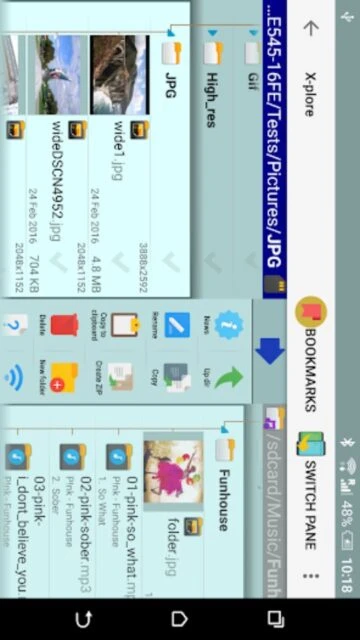
X-plore File Manager is a comprehensive dual-pane file explorer that provides advanced file management capabilities for Android devices. It allows users to navigate two folders simultaneously, making complex file operations intuitive and efficient. The app supports root access on rooted devices, enabling system-level modifications.

X-plore extends functionality through extensive network protocol support including FTP, SFTP, SSH, and SMB, combined with cloud storage integration for Google Drive, OneDrive, Dropbox, and WebDAV. It offers built-in media players, encryption vaults for sensitive files, and a sophisticated app manager for complete device control.

Features Of X-plore File Manager

  • Dual-pane tree view with simultaneous folder navigation and file operations
  • Cloud storage integration for Google Drive, OneDrive, Dropbox, Box, and WebDAV services
  • Full FTP, FTPS, SFTP, and SSH terminal shell support for remote server access
  • Root access capability on rooted devices for system-level file management
  • SSH File Transfer protocol with secure terminal emulation features
  • Built-in music player, video player with subtitles, and image gallery viewer
  • Vault encryption using AES standard with fingerprint protection for sensitive files
  • WiFi file sharing and remote access from PC web browser

Premium Features in the Paid Plan

  • SSH File Transfer and SSH Shell terminal emulator for secure remote connections
  • WiFi file sharing capability allowing device file access over network
  • Access from PC web browser for remote file management
  • Music player with playback from any available storage location
  • Video player with subtitle support and playback controls
  • Vault encryption with AES standard and biometric fingerprint authentication
  • Advanced app manager with backup and uninstall capabilities
  • SQLite database viewer for exploring app data structures

Free with in-app purchases (marked features require donation)

Free vs Premium Comparison

Feature Free Premium
Cloud Storage Support Basic Google Drive, OneDrive access with limitations Full cloud plugin integration with all supported providers
Network Access Read-only FTP and SMB browsing Full SFTP, SSH Shell, and bidirectional file transfer
File Encryption Unavailable in free version AES encryption vault with fingerprint and password protection
Media Playback No playback features Music player, video player with subtitles
WiFi File Sharing Unavailable Share files over WiFi network with PC web browser access
Device Root Access Limited system folder view only Full root explorer with system modifications on rooted devices

Frequently Asked Questions

How do I enable root access in X-plore?

Root access requires your device to be rooted. Once rooted, enable root explorer in X-plore settings. The app will request superuser permissions. Granting these permissions allows system-level file modifications and access to protected directories unavailable to standard apps.

Can I transfer files over WiFi to another device?

Yes, X-plore's WiFi file sharing (premium feature) allows file access from other devices on the same network. Access files through a web browser on any connected device using the IP address and port provided by X-plore.

Which cloud storage providers are supported?

X-plore supports Google Drive, OneDrive, Dropbox, Box, WebDAV, and other cloud providers through optional cloud plugin. Account login required for each service. Files remain on cloud servers; X-plore provides browsing and transfer capabilities only.

What file formats does X-plore support?

X-plore handles standard archives including ZIP, RAR, and 7ZIP. Built-in viewers support images, audio, text files, PDF, and video with subtitles. SQLite database files display as structured tables. Unsupported formats open with system-associated applications if available.

How does encryption vault protect my files?

The Vault feature (premium) encrypts selected files using AES standard encryption. Encrypted files require password or fingerprint authentication to access. This protects sensitive data even if device is compromised or lost, adding a security layer beyond normal file permissions.

Is X-plore free or paid?

X-plore is free to download with core features available at no cost. Advanced features like SSH Shell, WiFi file sharing, and encryption vault require small donations. Basic file management, cloud browsing, and FTP access remain free.