Uptrends – Website monitoring and server status mobile app
Website and server monitoring platform
Uptrends mobile app provides instant website and server status monitoring with push alerts from 233 global checkpoints, enabling teams to quickly detect outages.
Uptrends is the official mobile application for ITRS Uptrends synthetic monitoring platform, providing teams with real-time website uptime and server status monitoring from smartphones and tablets. The app delivers push notifications when monitored websites experience outages or performance issues detected across global monitoring checkpoints.
Monitor website availability, transaction success rates, and API response times with detailed performance metrics viewable directly on your mobile device. Access alert history, customize notification preferences, and manage monitoring settings from anywhere.
Features Of Uptrends
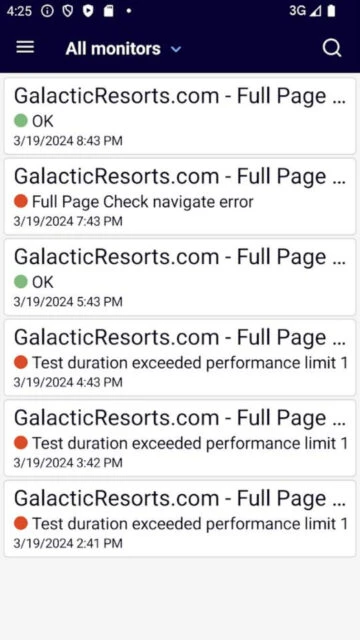
View instant status of websites, servers, and monitored transactions in real-time
Receive push notifications when websites go down or experience performance degradation
Access 24-hour uptime percentage statistics for each monitored endpoint
View comprehensive alert history showing all triggered alerts and resolutions
Toggle monitors on and off directly from mobile app to manage alerting
Monitor complex transactions including checkout flows and user journeys
Track API performance and response accuracy from mobile device
Receive alerts via push notifications through integrated mobile delivery
Access performance data from 233 global monitoring checkpoint locations
Premium Features in the Paid Plan
Advanced multi-location transaction monitoring with detailed step tracking
Customizable alert thresholds and escalation policies from mobile
Performance analytics with graphical trend visualization on mobile
API monitoring with detailed response validation and error tracking
Browser and device-specific performance metrics by user location
Web performance monitoring including Core Web Vitals and W3C metrics
Custom alert routing and integration with Slack, Teams, or PagerDuty
Detailed reporting and historical performance trend analysis
Free
Free vs Premium Comparison
Feature
Free
Premium
Uptime monitoring
Basic status and uptime percentages included
Advanced analytics and historical trending
Global checkpoints
Monitoring from 233 global locations available
Full global coverage with priority support
Alert notifications
Push notifications and email alerts
SMS, phone calls, and third-party integrations
Transaction monitoring
Basic transaction recording available
Advanced multi-step journey tracking
API monitoring
Basic API endpoint checking
Enhanced validation and detailed response analysis
Frequently Asked Questions
Do I need an Uptrends account to use the app?
Yes, you must have an active ITRS Uptrends account to use the mobile app. Create a free account at uptrends.com or log in with existing credentials. The app connects to your monitoring setup through secure authentication.
How often are website checks performed?
Uptrends performs checks up to every minute from 233 global checkpoint locations. Frequency depends on your monitoring configuration and subscription level. More frequent checks provide faster outage detection.
Why doesn't the app show all my monitors on mobile?
Large accounts with many monitors may experience timeout issues loading the complete list. Group monitors by category in your Uptrends web dashboard. Toggle groups on and off in the mobile app to manage load efficiently.
Can I set up alerts from the mobile app?
The mobile app allows toggling existing monitors and alerts on or off. Advanced alert configuration must be done through the Uptrends web dashboard. Alert settings sync to the mobile app automatically.
What is included in the free version?
The free version includes basic website and server monitoring from global checkpoints with push notifications. Uptrends offers a free 30-day trial with all features before requiring subscription.
How do I enable login with QR codes?
From your Uptrends web dashboard, navigate to Apps & Extras menu and generate a QR code. Scan the code with the mobile app for automatic login without entering credentials.
Uptrends is a comprehensive mobile companion for website monitoring and uptime management across distributed global infrastructure. Monitor website availability, server status, and transaction performance from your iOS or Android device with real-time push notifications when issues are detected. Access the ITRS Uptrends monitoring platform on-the-go to manage uptime alerts and review detailed performance metrics across all monitored endpoints.
Why Choose Uptrends?
The Uptrends mobile app extends enterprise-grade synthetic monitoring capabilities to your smartphone, allowing operations teams to receive immediate alerts when websites experience outages or performance degradation. With monitoring from 233 global checkpoint locations, you gain visibility into region-specific issues and can respond immediately to problems affecting users worldwide.
Global uptime monitoring: Monitor website availability and server status from 233 geographic checkpoint locations worldwide to detect localized outages and regional performance problems.
Instant alert notifications: Receive push notifications on your mobile device when websites are down or experience performance issues, enabling rapid incident response.
Multi-location transaction monitoring: Track complex user journeys including shopping carts, logins, and checkouts from multiple global locations simultaneously.
How It Works
Connect your ITRS Uptrends account to the mobile app using secure login credentials or QR code authentication from your web dashboard. View the current status of all monitored websites, servers, and API endpoints. Receive push notifications when alerts are triggered. Access detailed alert history and toggle monitors on or off from the mobile interface to manage false positives or maintenance windows.
Who Should Use It?
Uptrends mobile app is ideal for website operations teams, digital experience managers, e-commerce platform owners, and incident response engineers who need immediate visibility into website uptime and performance. Organizations using synthetic monitoring for availability management and performance optimization benefit from mobile access to real-time monitoring data.
User reviews and ratings for Uptrends
See what users think about Uptrends. Read honest reviews and ratings from real users.
3.2
★★★★★
4 reviews
Great for simple website monitoring
by Emma Thompson
★★★★★
2025-11-12
Perfect solution for monitoring website uptime across global locations. Push notifications are reliable and immediate. Web service is excellent, though the mobile app could use more dashboard customization and filtering options.
Reliable monitoring with UI issues
by Marcus Johnson
★★★★★
2025-10-05
Uptrends provides solid uptime monitoring and the app is generally reliable. Users with many monitors sometimes experience connection errors and need to switch groups to get proper display. Performance could be improved for large monitor lists.
Login issues prevent full use
by Alex Chen
★★★★★
2025-09-18
Cannot get past login screen even with correct credentials. No error messages or feedback about what's wrong. Makes the app unusable for critical monitoring. Web service works fine when accessed from browser.
Powerful monitoring with great support
by Patricia Williams
★★★★★
2025-08-22
Extremely reliable monitoring platform with multiple location support. Customer support is responsive and helpful. The ability to filter by monitor status would enhance the mobile experience significantly.
Write a Review
Uptrends Screenshots & Photos
Browse through screenshots and photos of Uptrends to see how it looks and works.