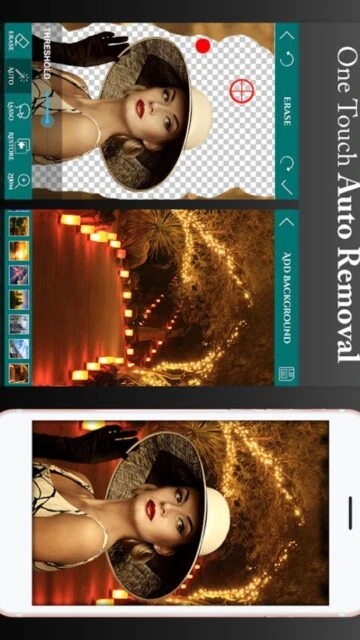
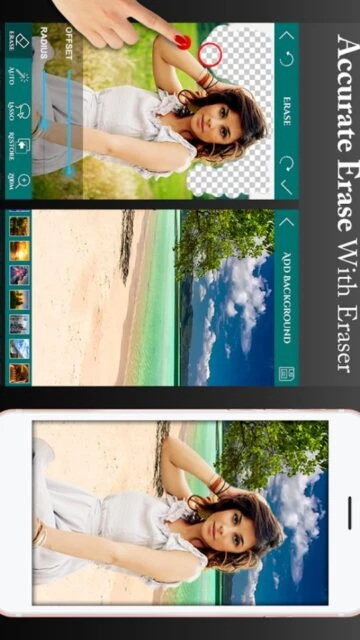
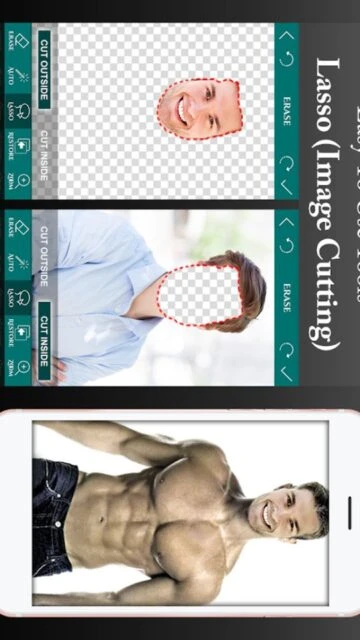
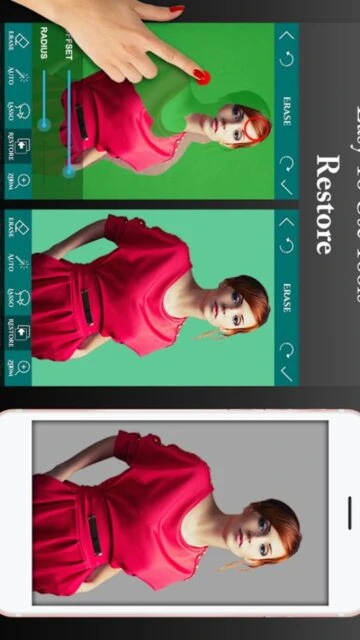
Ultimate Background Eraser is a dedicated utility app focused on one core task: removing image backgrounds with speed and accuracy. It eliminates the need for complex desktop software by bringing professional-grade masking tools to your mobile device.
The app excels at distinguishing between foreground subjects and backgrounds, offering both automated AI-like detection for simple photos and manual brushes for complex textures like hair or fur. It supports saving in PNG format to maintain transparency.
Features Of Ultimate Background Eraser
Auto Erase for one-touch background removal
Manual Erase with adjustable brush size
Lasso Eraser for area selection background removal
Restore tool to retrieve erased parts
Undo, Redo and Zoom for accurate results
Save images in PNG or JPG format
Add new backgrounds from gallery or library
Smooth Edge tool to refine cutouts
Premium Features in the Paid Plan
Ad-free editing experience
High-resolution export options
Unlimited background templates
Priority customer support
Advanced edge smoothing algorithms
Batch processing capabilities
No watermarks on saved images
Exclusive sticker packs
Free / Pro $2.99
Free vs Premium Comparison
Feature
Free
Premium
Ad Experience
Contains Ads
No Ads
Export Quality
Standard Resolution
High Resolution
Watermark
May include watermark
No Watermark
Support
Standard
Priority
Background Library
Limited Selection
Full Access
Undo History
Limited steps
Unlimited steps
Frequently Asked Questions
Can I save images with a transparent background?
Yes, the app allows you to save your edited images as PNG files, which preserve transparency for use as stickers or overlays.
Is this app free to use?
The core features are free to use, but the app includes ads. You can purchase the Pro version to remove ads and unlock high-res exports.
Does it work offline?
Yes, all manual and auto-erase tools work perfectly offline without an internet connection.
Can I change the background after erasing?
Absolutely. You can choose a new background from the app's library or upload your own image to place behind your cutout.
How do I fix a mistake while erasing?
You can use the 'Restore' tool to paint back the original image, or use the Undo button to step back.
Ultimate Background Eraser is a powerful, user-friendly tool designed to make photo cutting and background removal effortless. Whether you are creating stickers for WhatsApp, preparing product photos for e-commerce, or simply making transparent memes, this app delivers professional results in seconds. Its intuitive interface allows even beginners to achieve clean cutouts without complex editing skills.
Why Choose Ultimate Background Eraser?
Unlike generic editors, this app focuses specifically on background removal with specialized tools like the “Lasso” cutter and “Auto” eraser. It saves you time by automating the tedious parts of editing while giving you manual control for fine details. The result is a high-quality transparent image ready for any project.
Auto Erase: One-touch background removal for solid color backgrounds.
Lasso Tool: Select specific areas to cut out with precision.
Zoom & Restore: Zoom in for pixel-perfect editing and restore mistakes easily.
How It Works
Simply load your image from the gallery and choose the “Auto” tool to remove large background areas instantly. For intricate edges, use the “Manual” finger-rub tool or “Lasso” to select the subject. Once finished, smooth the edges with the “Smooth” feature and save as a transparent PNG or add a new background.
Who Should Use It?
Ideal for social media managers, eBay/Amazon sellers needing white backgrounds, and casual users making stickers or collages. It’s perfect for anyone who needs quick, clean cutouts without learning Photoshop.
User reviews and ratings for Ultimate Background Eraser
See what users think about Ultimate Background Eraser. Read honest reviews and ratings from real users.
4.7
★★★★★
3 reviews
Best background remover I've used
by Sarah Jenkins
★★★★★
2025-11-10
I've tried many apps but this one is the most precise. The auto tool works like magic on solid colors, and the zoom helps with tricky edges.
Good but ads are frequent
by Michael Chen
★★★★★
2025-10-22
The tool itself is fantastic and very easy to use. However, the ads can be a bit intrusive in the free version. Worth paying for if you use it daily.
Perfect for my online shop
by Jessica R.
★★★★★
2025-09-15
I use this to clear backgrounds for my Poshmark listings. It makes them look professional and clean. Highly recommended for sellers.
Write a Review
Ultimate Background Eraser Screenshots & Photos
Browse through screenshots and photos of Ultimate Background Eraser to see how it looks and works.
Ultimate Background Eraser Videos
Watch videos to see how this app works and learn about its features.

 47
47