Tasks is a beautifully simple, ad-free to-do list and reminder application designed to organize your busy life effortlessly. Created by Pocket Brilliance Limited, the app prioritizes ease of use and privacy protection, with all user data encrypted both locally and during cloud synchronization.
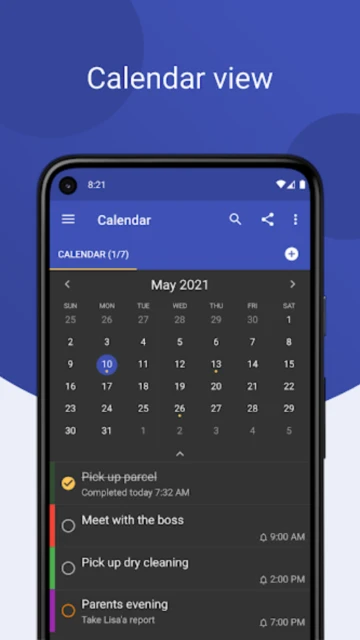
The app features color-coded list management, smart reminder notifications, calendar integration, and widget support for quick home screen access. With 5M+ downloads and a 4.8-star rating, Tasks has become trusted by millions seeking distraction-free task organization without complex project management features.
Features Of Tasks: To Do List & Reminders
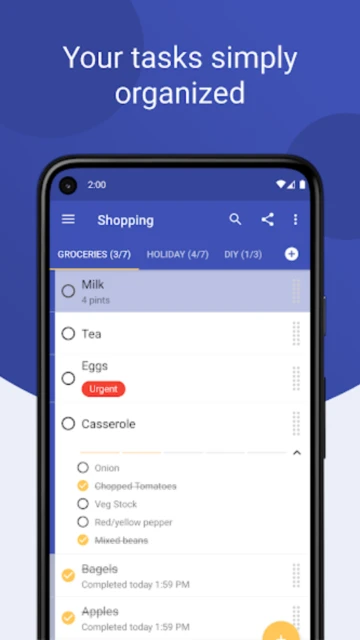
Create and manage multiple color-coded task lists
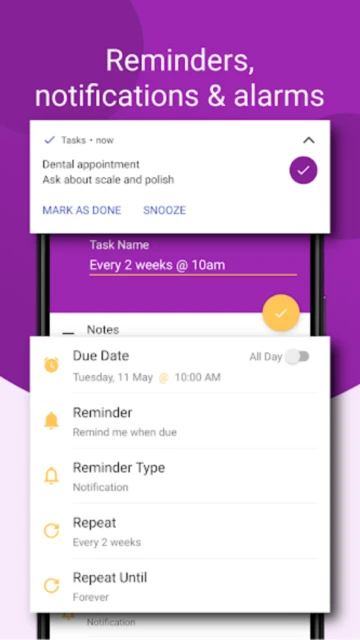
Set due dates and receive smart reminder notifications
Swipe gestures for quick task completion or deletion
Home screen widgets for quick task access
Private local storage with optional encrypted cloud backup
Full device synchronization across phones and tablets
Offline functionality without requiring internet
Dark mode support for comfortable viewing
Cross-platform support on Android and iOS
Premium Features in the Paid Plan
Encrypted cloud backup and device synchronization
Shared lists for collaborative task management
Web access to manage tasks from any device
Unlimited cloud storage for task history
Advanced filtering and search capabilities
Custom task sorting and list reordering
Priority level assignment for tasks
Task categories and tags for advanced organization
Free with optional Premium ($1.99 - $9.99)
Free vs Premium Comparison
Feature
Free
Premium
Price
Completely free
$1.99 - $9.99 lifetime
Cloud Backup
No cloud backup
Encrypted cloud backup included
Shared Lists
Personal lists only
Share lists with others
Reminders
Basic notifications
Advanced smart reminders
Device Sync
Single device only
Sync across devices
Advertisements
No ads ever
No ads ever
Frequently Asked Questions
Is Tasks completely free or are there hidden costs?
Tasks offers a completely free version with all core features including task creation, reminders, and color-coded lists. Premium features like cloud backup and device sync are optional paid upgrades starting at $1.99.
How is my data protected in Tasks?
All task data is encrypted both locally on your device and during cloud transfer if you enable Premium features. Tasks does not track users, display advertisements, or sell data to third parties.
Can I share task lists with other people?
Shared lists are a Premium feature. Once you upgrade, you can share task lists securely with colleagues, family members, or friends for collaborative task management.
Does Tasks work offline?
Yes, Tasks functions completely offline. All task data syncs once internet connectivity returns, and cloud backup requires a Premium subscription for storage in the cloud.
Can I access Tasks on multiple devices?
Free version is single-device only. With Premium, your tasks sync across all your devices including phones, tablets, and web browsers for seamless access anywhere.
Tasks is a meticulously designed productivity application from Pocket Brilliance Limited that brings simplicity and clarity to task management. With its ad-free interface and focus on privacy-first principles, Tasks has earned a trusted reputation among millions of users seeking distraction-free organization without complex features or unnecessary clutter.
Why Choose Tasks?
This application prioritizes ease of use over complicated feature sets, making it ideal for anyone seeking straightforward task organization. The color-coded list system provides visual organization while the persistent notification feature keeps tasks top-of-mind. Users benefit from encrypted local storage, encrypted cloud backup options, and seamless device synchronization without compromising data privacy. The clean Material Design interface eliminates learning curves, allowing immediate productivity from first launch without reading manuals.
Privacy Protected: 100% ad-free with encrypted storage and zero tracker integration
Smart Reminders: Set due dates and receive timely notifications for important tasks
Color Organization: Create and color-code multiple lists for visual task categorization
How It Works
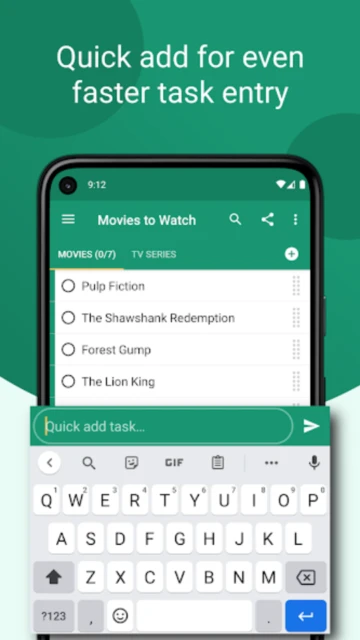
Creating tasks requires just two simple steps: tap the add button and type your task description. Organize tasks across color-coded lists for different projects or life areas. Set due dates and optional reminder notifications for time-sensitive items. The persistent notification keeps tasks visible even when the app is closed. Swipe gestures enable quick task completion or deletion. Premium features unlock cloud synchronization, shared lists for collaboration, and cross-device access through secure encrypted servers.
Who Should Use It?
Tasks serves individuals and small teams prioritizing privacy and simplicity over advanced project management features. Students managing study schedules, professionals tracking personal projects, and productivity enthusiasts appreciate its no-nonsense approach. Users seeking an alternative to feature-heavy apps like Todoist or Asana will find Tasks refreshingly straightforward and privacy-conscious.
User reviews and ratings for Tasks: To Do List & Reminders
See what users think about Tasks: To Do List & Reminders. Read honest reviews and ratings from real users.
4.8
★★★★★
3 reviews
The best to-do app after trying many others
by Emma Martinez
★★★★★
2025-12-07
I've tried probably 15 other task apps and this one is definitely it. The color coding is perfect, it's simple yet customizable, and I loved that customer service responded incredibly fast when I had questions. Buying the lifetime subscription now!
Perfect for productivity and organization
by David Kumar
★★★★★
2025-11-20
Been using Tasks for six months and it's become absolutely essential for managing my daily work and personal tasks. The reminder notifications are reliable and the interface is clean and intuitive. Highly recommended for anyone seeking simplicity.
Great app with one limitation for free users
by Jessica Williams
★★★★★
2025-10-12
Love the app's design and functionality, but the free version doesn't allow transferring tasks between phones. You need to upgrade to Premium for backup and restore features, which is a bit limiting for free users initially.
Write a Review
Tasks: To Do List & Reminders Screenshots & Photos
Browse through screenshots and photos of Tasks: To Do List & Reminders to see how it looks and works.