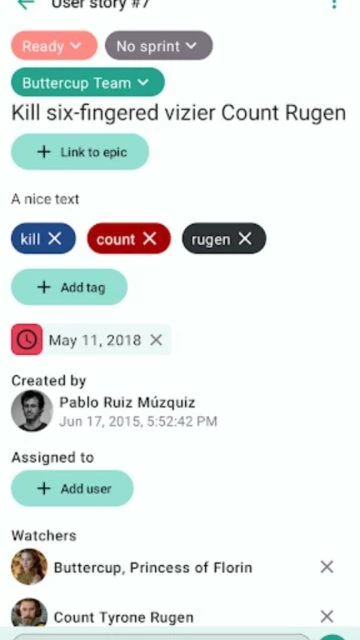
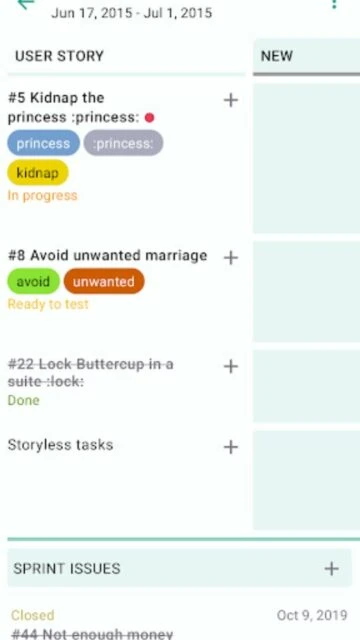
Taiga Mobile was an unofficial open-source Android client developed by Eugene Seager to manage projects on Taiga.io, a powerful agile project management platform. This app brought essential Taiga functionality to smartphones, allowing teams to access sprints, user stories, issues, and tasks on the go. The app was archived in May 2022 and no longer receives updates, making it a legacy solution for users seeking mobile access to Taiga instances. Despite its discontinued status, it remains available on Google Play Store with a 4.9-star rating from 56 reviews and 5,000+ downloads, serving as a reminder of early attempts to mobilize Taiga’s feature-rich interface.
How to Get Started with Taiga Mobile
Setting up Taiga Mobile requires configuring your Taiga server instance or using Taiga.io cloud service. The onboarding process asks for server URL, authentication credentials, and project selection before displaying your project dashboard. First-time users encounter a straightforward login flow that supports both cloud-hosted and self-hosted Taiga instances.
- Configure Server Connection – Enter your Taiga.io cloud URL or self-hosted server address in the app settings to establish connection
- Authenticate with Credentials – Provide your Taiga username and password to log in; supports custom authentication for enterprise servers
- Select Your Project – Browse available projects and select the one you want to manage; appears in your project list on the dashboard
- Navigate to Dashboard – View your “Working On” section to see assigned tasks and sprints; start tracking progress immediately
Who Should Use Taiga Mobile
Taiga Mobile best serves Agile teams already invested in Taiga.io who need mobile access to their existing projects. Remote teams, distributed developers, and project managers benefit from checking sprint progress and updating task status away from desktop. The app’s open-source nature appeals to technically-minded users comfortable with community-maintained software.
- Agile Development Teams – Developers using Taiga.io Scrum methodology can track user stories, update sprint boards, and manage task assignments from their phones
- Project Managers – PMs monitoring multiple projects can view dashboards, track burn-down charts, and access project timelines via mobile while on-site or traveling
- Self-Hosted Users – Teams running private Taiga instances on internal servers gain mobile access without requiring official vendor support
- NOT ideal for – Users requiring continuous support, security updates, and active development should choose actively-maintained alternatives like Jira Mobile or Asana
Taiga Mobile Platform Compatibility
Taiga Mobile exclusively targets Android devices running Android 5.0 (API level 21) or higher. The app does not offer iOS support or web alternatives through Taiga Mobile directly, though users can access Taiga.io via mobile browsers. Desktop web interface remains the primary platform for Taiga project management with the most complete feature set.
| Platform |
Min. Version |
Unique Features |
Limitations |
| Android |
5.0 (API 21) |
Full mobile UI with Kanban view, sprint management, task creation, wiki navigation |
Archived since May 2022; no security or compatibility updates |
| iOS |
Not supported |
No native app available |
Must use mobile browser to access Taiga.io web interface |
| Web |
Modern browsers |
Complete feature set including all Taiga.io functionality |
Not Taiga Mobile; requires web access instead |
| Desktop |
Web browser |
Full Taiga.io web interface with maximum functionality |
Taiga Mobile does not support desktop deployment |
Taiga Mobile Integrations & Ecosystem
Taiga Mobile connects to Taiga.io instances but does not offer direct integrations with external tools like Slack, GitHub, or GitLab. Integration capabilities depend entirely on your Taiga.io server configuration and plugins enabled at the backend. The app serves as a mobile view layer for Taiga’s core ecosystem rather than acting as an integration hub itself.
- Taiga.io Cloud – Direct connection to cloud-hosted Taiga projects with automatic project sync and real-time notifications
- Self-Hosted Taiga Instances – Full compatibility with privately-hosted Taiga servers using custom domain URLs and internal network authentication
- Wiki Pages – View, create, edit, and delete Wiki documentation directly from the app without returning to desktop interface
- Comment System – Leave and delete comments on user stories, tasks, and issues to maintain team discussion threads from mobile
Best Alternatives to Taiga Mobile
Since Taiga Mobile development ended in 2022, actively-maintained alternatives offer more security, features, and ongoing support. Teams dependent on mobile Agile project management should evaluate these competing solutions with current updates and platform support for iOS and Android.
- Jira Mobile – Best for development teams, offers native iOS/Android apps with sprint management, issue tracking, and deep GitHub/Bitbucket integration
- Asana Mobile – Best for cross-functional teams, features timeline views, task dependencies, portfolio dashboards, and seamless mobile-to-web sync
- monday.com Mobile – Best for visual project tracking, includes customizable views, automation access, and team collaboration directly from phone
- Trello Mobile – Best for simple Kanban workflows, lightweight interface with card management, attachments, and real-time team updates
Taiga Mobile vs Top Competitors
Taiga Mobile addresses a specific niche: open-source Agile fans wanting mobile access to Taiga.io projects. However, its archived status and lack of iOS support place it behind actively-maintained competitors offering broader platform support, continuous security patches, and additional features like advanced reporting and AI-powered automation.
| Feature |
Taiga Mobile |
Jira Mobile |
Asana Mobile |
| Pricing |
Free (archived) |
Free tier + paid plans from $7/user/month |
Free tier + premium from $13.49/user/month |
| Key Strength |
Open-source; self-hosted server support |
Deep software development workflows; Atlassian ecosystem integration |
Cross-team flexibility; timeline and dependency management |
| Target Users |
Taiga.io existing users; open-source teams |
Software developers; technical project managers |
Marketing, operations, product teams |
| Unique Feature |
Wiki page management from mobile |
Agile reports and burndown charts on mobile |
Portfolio-level project visibility and roadmaps |
| Offline Mode |
No offline functionality |
Limited offline viewing (Android); limited iOS offline |
No true offline mode; requires internet connection |
Taiga Mobile Privacy & Security Overview
Taiga Mobile transmits login credentials over your Taiga server’s existing security infrastructure. The archived app does not receive security patches, making it unsuitable for handling sensitive enterprise data without risk assessment. All data remains stored on your Taiga server; the app stores minimal local cache for UI performance.
| Security Aspect |
Implementation |
User Control |
| Data Encryption |
Relies on Taiga server’s HTTPS/SSL configuration; no app-level encryption layer |
Server administrator controls encryption settings; no user-level encryption options |
| Authentication |
Username/password authentication; supports custom auth on self-hosted instances |
Users control login credentials; can implement multi-factor auth at server level |
| Data Collection |
App collects only Taiga project data; no analytics or tracking included |
Users choose which projects and servers to connect; full data control via Taiga instance |
| Third-Party Sharing |
No third-party sharing; open-source code available for inspection |
Users control data sharing through Taiga project permissions; no external API access from app |
Taiga Mobile Accessibility Features
Taiga Mobile was built with Jetpack Compose Material Design 3, providing modern Android accessibility support through system-level features. However, as an archived app, it receives no targeted accessibility improvements or testing against latest Android standards. Users should verify their specific accessibility needs against Android accessibility framework compatibility.
- Screen Reader – Built-in TalkBack support through Android accessibility framework; Compose UI components provide content descriptions
- Visual – Material You dynamic theming includes dark mode toggle, adjustable text sizing via system settings, OLED-friendly display modes
- Motor – Full touch navigation with standard Android gesture support; no voice control integration specific to Taiga Mobile
- Languages – Taiga.io backend supports 30+ languages; app language follows system locale settings without independent language selector
Power User Tips for Taiga Mobile
Maximize Taiga Mobile efficiency by leveraging quick-access shortcuts, Kanban filtering, and the estimation game feature for relative task sizing. Sprint selection, task reassignment, and wiki page creation become faster with understanding the app’s gesture controls and dashboard widgets designed for mobile workflows.
- Use Sprint Shortcuts – Add sprint shortcuts directly from sprint view to quickly access frequently-used sprints on your home screen, reducing navigation depth
- Filter User Stories and Issues – Apply status, assignee, and tag filters to reduce on-screen clutter and focus on actionable items assigned to your team
- Leverage Kanban Board Zoom – Tap zoom controls on Kanban boards to alternate between overview and detailed view for effective status tracking
- Apply Estimation Game – Use relative story point estimation during sprint planning sessions to collaboratively size user stories using the built-in comparison game
- Check Dashboard First – Start each session on the “Working On” dashboard to identify blocked tasks or high-priority items needing immediate attention
Taiga Mobile Support & Community
Taiga Mobile support channels operate independently of official Taiga Agile LLC. The developer Eugene Seager maintains a SimpleLogin email alias for contact. Community resources exist through GitHub issues and the broader Taiga community forums, though archived status means slower response times.
- Official Help Center – No dedicated Taiga Mobile documentation; refer to Taiga.io user guide at https://taiga.io/taiga-project/ for core platform information
- Community Forum – Taiga community discusses mobile access at https://community.taiga.io with occasional third-party client discussions
- Social Media – Taiga official Twitter/X @taigaio posts updates about main platform; Taiga Mobile updates from individual developer were last posted in 2022
- Contact Support – Reach Eugene Seager via [email protected] for app-specific issues; expect slower responses due to archived status
Taiga Mobile Latest Updates & Roadmap
Taiga Mobile v1.9 released May 30, 2022, represented the final version with Wiki support additions including page view, create, edit, and delete functionality. The app was subsequently archived with no further development roadmap. Taiga Agile LLC (official platform maintainers) has not announced native mobile app plans as of October 2025, with community requests for official mobile apps remaining open without commitment. Users seeking active mobile Agile solutions should migrate to supported alternatives rather than await Taiga Mobile updates.



![Taiga Mobile [Archived] Screenshot](https://rumman.net/wp-content/uploads/2025/12/Taiga-4-360x640.webp)