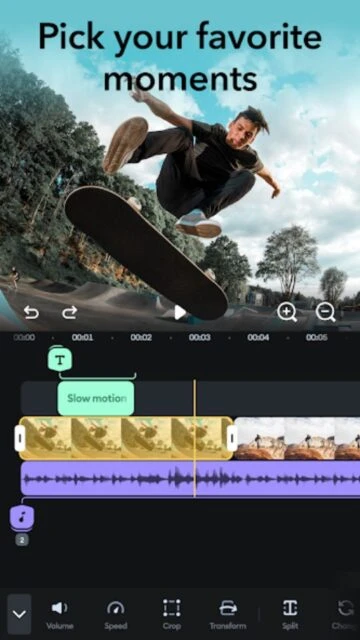
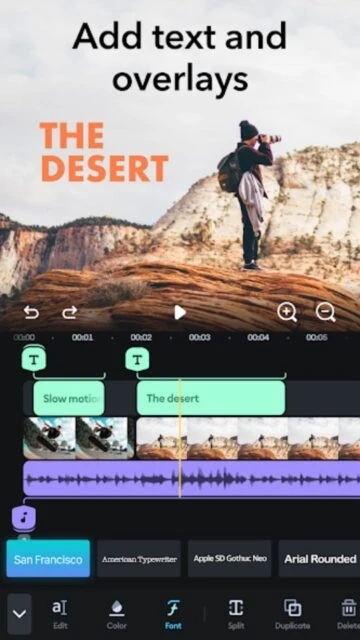
Splice simplifies the editing process without sacrificing quality. It features a timeline that is easy to manipulate with touch, making it simple to trim tight cuts. The app includes high-quality transitions like glitches and fades that add production value instantly.
Its strongest asset is the audio integration. You can mix multiple audio tracks, add voiceovers, and utilize a massive library of sound effects and music, ensuring your video sounds as good as it looks.
Features Of Splice - Video Editor & Maker
Intuitive trimming and cutting tools
Speed control with ramping effects
Royalty-free music and sound effects library
Overlay text and custom title slides
Glitch, vintage, and chroma effects
Transition library (fade, swipe, cross-dissolve)
Voiceover recording feature
Pan and zoom (Ken Burns effect)
Aspect ratio resizing for social media
High-quality export up to 4K
Premium Features in the Paid Plan
Unlimited access to music library
Premium effects and filters pack
AI-powered captions and subtitles
Advanced transition styles
No watermark on exports
Priority customer support
Weekly updates with new assets
4K Ultra HD export enabled
Free Trial / $2.99/week or $69.99/yr
Free vs Premium Comparison
Feature
Free
Premium
Music
Limited selection
Full Royalty-Free Library
Watermark
Yes
None
Effects
Standard filters
Premium & AI Effects
Subtitles
Manual entry
AI Auto-Captions
Export
1080p
4K Ultra HD
Updates
Standard
Weekly Asset Drops
Frequently Asked Questions
Is the music really royalty-free?
Yes, the music in the Splice library is licensed for use on social media platforms like Instagram and YouTube.
How do I cancel the subscription?
You must cancel via your Apple ID or Google Play subscriptions settings, not just by deleting the app.
Can I add voiceovers?
Yes, Splice has a built-in voice recorder that lets you record commentary over your video timeline.
Does it support 4K?
Yes, 4K export is supported, typically for premium subscribers on capable devices.
Can I use it offline?
Yes, most editing features work offline, though downloading new music or effects requires an internet connection.
Splice brings the power of a desktop editor to your mobile device without the clutter. Optimized for speed and simplicity, it allows creators to make stunning videos in minutes, not hours.
Why Choose Splice?
Splice is favored by GoPro users and Instagram creators for its straightforward approach. It excels at syncing video to music, with built-in tools that automatically match cuts to the beat of your soundtrack.
Speed Ramping: easily adjust playback speed for slow-motion or fast-forward effects with a few taps.
Music Library: Extensive library of royalty-free tracks that are safe to use on social media.
Beat Sync: Visual markers help you cut your footage perfectly to the rhythm of the music.
How It Works
Select your clips, choose a soundtrack, and let Splice help you find the rhythm. Tap to trim clips, drag and drop to reorder, and apply transitions. Use the slider to adjust speed, then save directly to your camera roll.
Similar Video Editing Applications
These applications provide comparable video editing capabilities and multi-track timeline support. They offer similar functionalities for high-resolution content creation and professional audio mixing.
CapCut – Comprehensive editor featuring multi-layer tracks, AI effects, and automated audio synchronization tools.
PowerDirector – Advanced editing suite offering chroma key, speed adjustment, and 4K resolution export options.
InShot – Efficient utility for trimming clips, applying filters, and adjusting aspect ratios for various social platforms.
VN Video Editor – Non-linear platform providing standard timeline operations and multi-format media import features.
Alight Motion – Vector-based animation tool with professional compositing features and keyframe editing capabilities.
Who Should Use It?
Ideal for action sports enthusiasts, travel vloggers, and social media managers who need to turn raw footage into an engaging reel quickly and efficiently.
User reviews and ratings for Splice - Video Editor & Maker
See what users think about Splice - Video Editor & Maker. Read honest reviews and ratings from real users.
4.5
★★★★★
3 reviews
Quick and easy for Reels
by Emily R.
★★★★★
2025-11-28
I use this for all my Instagram Reels. It's so much faster than using the built-in IG editor and the music sync is spot on.
Good but expensive
by Tom H.
★★★★★
2025-10-12
The app is great, very stable. But the weekly subscription price is a bit high if you don't use it every day.
Love the transitions
by Lisa M.
★★★★★
2025-09-05
The glitch transitions are super cool. It makes my travel videos look way more professional than they actually are.
Write a Review
Splice - Video Editor & Maker Screenshots & Photos
Browse through screenshots and photos of Splice - Video Editor & Maker to see how it looks and works.
Splice - Video Editor & Maker Videos
Watch videos to see how this app works and learn about its features.

 47
47