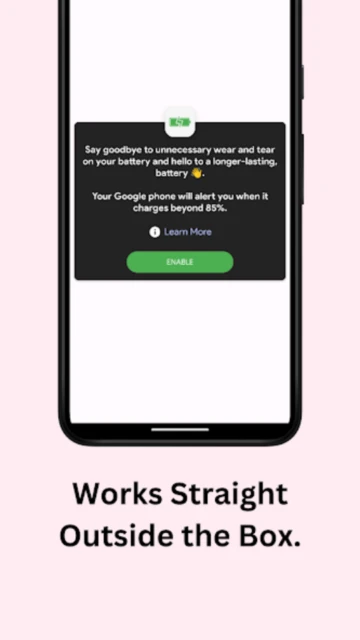
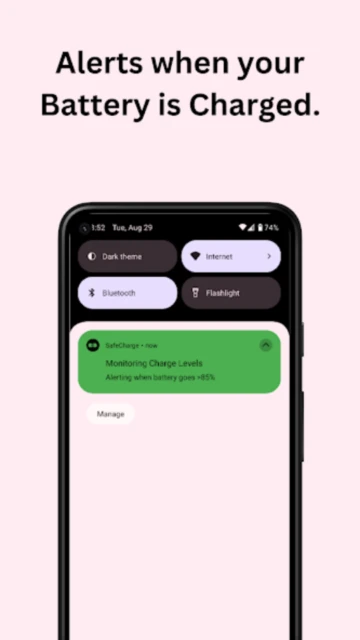
SafeCharge (SafeCharge – BatteryWise) distinguishes itself in the utility sector by combining battery longevity tools with an uncompromising privacy stance. While most apps demand internet access to serve ads, SafeCharge operates entirely offline. It focuses on the “40-80 rule” of lithium-ion chemistry, alerting users to unplug at optimal thresholds to prevent the chemical stress that degrades battery capacity over time.
How to Get Started with SafeCharge
Setup is intentionally minimal, designed to be “set and forget” for immediate battery protection.
- Set Alarm Threshold – Open the app and slide the target charge percentage to 85% (recommended).
- Enable Notifications – Grant permission for the app to send sound alerts even in Do Not Disturb mode.
- Test the Alarm – Plug in your charger and verify the “Charging” status changes in the app.
- Activate DayDream – Optionally enable the screensaver mode to see a desk clock while charging.
Who Should Use SafeCharge
This app is vital for users who keep their phones for 3+ years and want to maximize hardware lifespan.
- Privacy Advocates – Users who refuse to install flashlight or battery apps that request internet access.
- Overnight Chargers – People who fear battery swelling or degradation from leaving phones plugged in 24/7.
- Office Workers – Those who leave phones on wireless pads all day and need reminders to remove them.
- NOT ideal for – Users needing detailed usage graphs or per-app consumption analysis.
SafeCharge Platform Compatibility
Designed as a lightweight Android utility, it supports a wide range of legacy and modern devices.
| Platform |
Min. Version |
Unique Features |
Limitations |
| Android |
Android 6.0+ |
DayDream Clock Mode |
No root features |
| iOS |
N/A |
Not Available |
System handles optimization |
| Web |
N/A |
None |
App only |
| Desktop |
N/A |
None |
Not applicable |
SafeCharge Integrations & Ecosystem
SafeCharge functions as a standalone guardian but integrates with basic system alerts for efficiency.
- System Notification Channel – Uses high-priority alerts to bypass silent modes when critical.
- Android DayDream – Integrates as a native screensaver during charging sessions.
- Always On Display – Minimal resource usage compatible with OLED always-on screens.
- Battery Optimization – Whitelists itself to prevent the OS from killing the alarm process.
Best Alternatives to SafeCharge
For users seeking different approaches to battery preservation, these alternatives offer varying complexity.
- AccuBattery – Best for users who want historical health data alongside charge alarms.
- Battery Charge Limit – Best for rooted users who want the phone to physically stop charging automatically.
- Chargie – Best for users willing to buy a hardware dongle for Bluetooth-controlled cutoff.
- Full Battery & Theft Alarm – Best for users who need anti-theft security alongside battery alerts.
SafeCharge vs Top Competitors
SafeCharge wins on privacy and simplicity, lacking the feature bloat of commercial rivals.
| Feature |
SafeCharge |
AccuBattery |
Battery Charge Limit |
| Pricing |
Free (Donation) |
Freemium |
Free (Root) |
| Key Strength |
No Internet Perm |
Data Logging |
Auto Cut-off |
| Target Users |
Privacy Focused |
Data Geeks |
Root Users |
| Unique Feature |
DayDream Clock |
Health Est |
Kernel Control |
| Offline Mode |
Yes (100%) |
Yes |
Yes |
SafeCharge Privacy & Security Overview
The app’s open-source nature and lack of internet permissions make it the gold standard for utility privacy.
| Security Aspect |
Implementation |
User Control |
| Data Encryption |
N/A (No data sent) |
Full control |
| Authentication |
None |
Anonymous use |
| Data Collection |
Zero (Verified) |
N/A |
| Third-Party Sharing |
Impossible |
No network code |
SafeCharge Accessibility Features
Simple UI design ensures usability for all, though advanced accessibility options are basic.
- Screen Reader – Labeled sliders and buttons for TalkBack users.
- Visual – Clear, large text for charge status and percentage.
- Motor – Simple tap-to-set interface requires no complex gestures.
- Languages – English default, icon-heavy interface is universally understandable.
Power User Tips for SafeCharge
Maximize the utility by combining it with smart habits and system settings.
- The 80% Rule – Set your alarm to 80% instead of 100%; this triples lithium-ion cycle life compared to full charges.
- Heat Management – If the alarm sounds, unplug immediately; heat at high voltage is the #1 battery killer.
- DayDream Setup – Enable the “DayDream” feature in Android settings to turn your phone into a desk clock while charging.
- Notification Tone – Note that the alert tone is hardcoded; keep volume high if charging in another room.
- Background Restrictions – Ensure you exclude SafeCharge from your phone’s “Battery Saver” list so the alarm doesn’t fail.
SafeCharge Support & Community
Support is driven by the open-source community and the developer’s GitHub presence.
- Official Help Center – GitHub repository README file.
- Community Forum – GitHub Issues page for bug reports.
- Social Media – Developer updates on X/Twitter.
- Contact Support – Email support listed on the Play Store.

 57
57