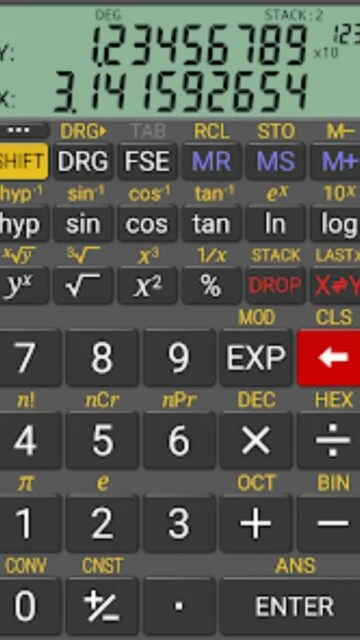
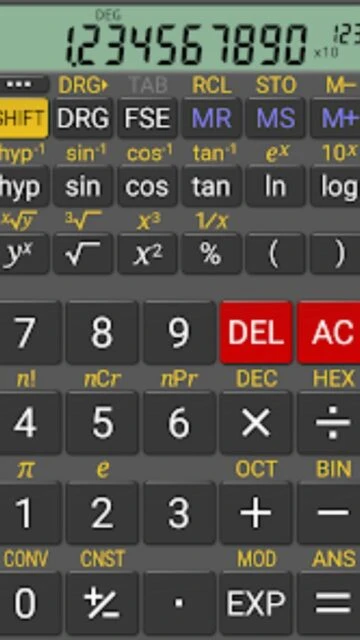
RealCalc Scientific Calculator represents a focused approach to mobile computation, deliberately mimicking traditional hand-held calculator design while incorporating modern scientific features. As one of Android's oldest and most respected scientific calculator applications, it maintains clean simplicity without overwhelming feature complexity. The 20 million download base reflects proven user trust and reliable performance across Android devices.
The application distinguishes itself through authentic calculator interface design, support for both algebraic and RPN operation modes, and practical utility conversions. Users appreciate the straightforward navigation, comprehensive help documentation, and consistent performance reliability. RealCalc Plus premium version extends functionality with fraction calculations, landscape mode, and customizable conversions.
Features Of RealCalc Scientific Calculator
Traditional algebraic or RPN calculation operation modes
Standard scientific functions with trigonometry support
Trig functions in degrees, radians, and gradians measurement
Result history tracking with retained previous calculations
Ten dedicated memory storage slots for values
Binary, octal, and hexadecimal numeral system support
Physical constants table with common scientific values
Unit conversion database covering standard measurements
Premium Features in the Paid Plan
Fraction calculations and decimal conversion support
Degrees, minutes, and seconds calculations and conversions
Landscape orientation for expanded viewing interface
Home-screen widget with RPN operation support
Twelve-digit display capability for larger numbers
Custom unit conversions and physical constants editing
Advanced RPN styles including buffered-entry and rolling stack
Free with premium upgrade RealCalc Plus available
Free vs Premium Comparison
Feature
Free
Premium
Display Precision
Standard display with configurable digit grouping
12-digit display with 32-digit internal precision
Operation Modes
Algebraic and RPN modes with standard RPN stack
Advanced RPN modes: buffered-entry and XYZT rolling stack
Fractions Support
Standard fraction display in results
Full fraction calculations with decimal conversion
Display Styles
7-segment, dot-matrix, and standard font available
All free styles plus landscape orientation support
Customization
Physical constants and unit library included
User-editable constants and custom unit conversions
Frequently Asked Questions
What is RPN mode and why use it?
RPN (Reverse Polish Notation) requires entering operands before operators, reducing parentheses need. Many engineers and scientists prefer RPN for faster, more intuitive complex calculations. RealCalc supports both algebraic and RPN methods.
How does RealCalc Plus differ from free version?
RealCalc Plus adds fraction calculations, landscape mode, homescreen widget, 12-digit display, 32-digit internal precision, and customizable unit conversions. Core scientific functions remain identical between versions.
Can RealCalc perform calculations in different number bases?
Yes, enable binary, octal, and hexadecimal calculations through Settings. Essential feature for programmers and engineers working with different numeral systems and bit manipulations.
Is external keyboard support available?
RealCalc supports external keyboard input for faster calculations. Enter numbers and operators using physical keyboard connected to your device for improved workflow efficiency.
How many unit conversions does RealCalc support?
The app includes extensive unit conversion database covering distance, weight, volume, temperature, energy, and other practical measurements. RealCalc Plus allows creating custom conversions for specialized needs.
Does the app work completely offline?
Yes, RealCalc functions entirely offline without internet connection. All calculations, conversions, and features work seamlessly on your device with no online dependency.
RealCalc Scientific Calculator recreates the authentic experience of physical hand-held calculators while delivering comprehensive scientific computing power. With over 20 million downloads and more than 100,000 five-star reviews, it remains one of Android’s most reliable scientific calculation tools. The app combines familiar tactile operation with advanced mathematical capabilities, making complex calculations intuitive.
Why Choose RealCalc Scientific Calculator?
RealCalc excels in providing an authentic calculator experience with full algebraic and RPN operation modes. The app supports all standard scientific functions, trigonometry in multiple angle formats, and precise calculations with configurable display options. Its extensive unit conversion database and physical constants table cover most practical calculation scenarios. The responsive design works seamlessly across phones and tablets.
Dual Operation Modes: Choose traditional algebraic or Reverse Polish Notation methods, both fully supported
Comprehensive Unit Conversions: Convert between numerous units with physical constants table included
Multiple Display Formats: Select 7-segment, dot-matrix, or standard font with customizable digit grouping
How It Works
Enter calculations using traditional calculator buttons or external keyboard input. Switch between display modes and formats to match your preference. Access calculation history with retained results for quick reference. Store up to 10 values in dedicated memory slots. Enable binary, octal, and hexadecimal calculations in settings for programming and technical work.
Who Should Use It?
RealCalc serves students, engineers, and professionals comfortable with traditional calculator interfaces seeking scientific functionality. Ideal for those preferring RPN calculation method or needing portable scientific calculations with reliable precision. Perfect for homework verification, engineering calculations, and educational purposes across multiple disciplines.
User reviews and ratings for RealCalc Scientific Calculator
See what users think about RealCalc Scientific Calculator. Read honest reviews and ratings from real users.
4.5
★★★★★
3 reviews
Perfect scientific calculator interface
by Professional Engineer
★★★★★
2025-11-18
Best calculator I've used after trying many others. Excellent RPN support and responsive design. Purchased premium version to support continued development. Highly reliable for professional calculations.
Authentic calculator feel with power
by College Student
★★★★★
2025-10-22
Accurately mimics real calculator experience while providing modern scientific features. Clean interface with no unnecessary complexity. Perfect for students and professionals who appreciate traditional design.
Great app but upgrade prompts intrusive
by Daily User
★★★★★
2025-09-14
Feature-rich calculator with excellent functionality and reliable performance. Comprehensive help documentation. Only minor issue: frequent upgrade prompts to premium version. Overall very good choice.