ReadEra is a universal reading application designed to bring all your digital documents into one streamlined interface. It stands out by refusing to force advertisements on users, ensuring a clean and focused reading experience for everyone.
The app handles complex formatting with ease, offering customizable font sizes, day/night modes, and margin adjustments. Whether you are reading a technical PDF manual or a casual EPUB novel, ReadEra adapts the text to suit your visual preferences perfectly.
Features Of ReadEra – book reader pdf epub
Auto-detection of books and documents
Support for PDF, EPUB, DOC, DOCX, RTF
Kindle format support (MOBI, AZW3)
No advertisements in the free version
Offline reading capability without internet
Customizable color modes (Day, Night, Sepia)
Split-screen mode for reading two pages
Vertical and horizontal page scrolling modes
Premium Features in the Paid Plan
Synchronization of reading positions across devices
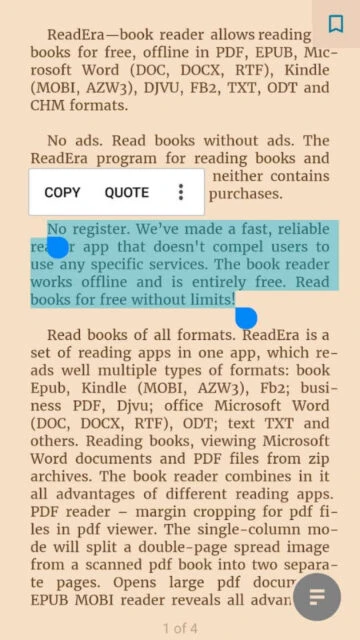
Quote and notes section management
My Fonts feature to upload custom fonts
Thumbnails for all pages in a document
Full color customization for highlights
Expanded library view options
Free (Premium ~$14.99 one-time)
Free vs Premium Comparison
Feature
Free
Premium
Advertisements
None (Ad-free)
None
Sync Across Devices
Not available
Included via Google Drive
Format Support
All formats
All formats
Quote Management
Basic saving
Advanced management
Frequently Asked Questions
Is ReadEra really free?
Yes, the core reading features are completely free and contain absolutely no ads.
Does it support Kindle books?
Yes, it supports standard Kindle formats like MOBI and AZW3, but not DRM-protected files.
Can I sync my progress?
Synchronization is a Premium feature that allows you to sync reading progress via Google Drive.
How do I add books?
The app automatically scans your device storage for compatible files, or you can manually open them.
Does it read text aloud?
Yes, ReadEra supports Text-to-Speech (TTS) using your device's installed voice engine.
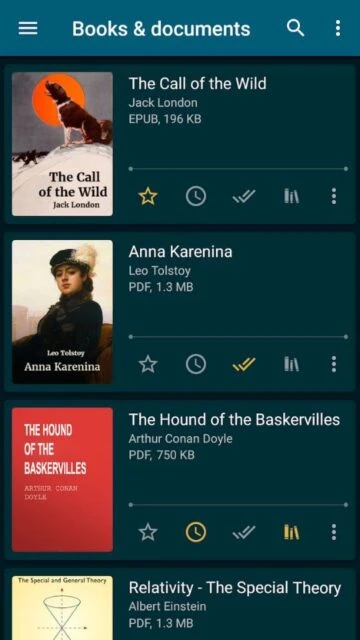
ReadEra is a must-have application for anyone who loves reading on mobile devices, offering a distraction-free environment without any ads or mandatory registration. It automatically detects documents and books on your device, organizing them into a neat, accessible library.
Why Choose ReadEra?
Unlike most competitors, ReadEra is truly free with no ads interrupting your reading flow. It supports all major formats including PDF, EPUB, Microsoft Word, and Kindle, rendering them perfectly on any screen size.
Zero Ads: Enjoy your books without pop-ups or banners.
Multi-Format Support: Reads PDF, EPUB, WORD, MOBI, FB2, and more.
Smart Library: Auto-detects files and saves your reading progress.
How It Works
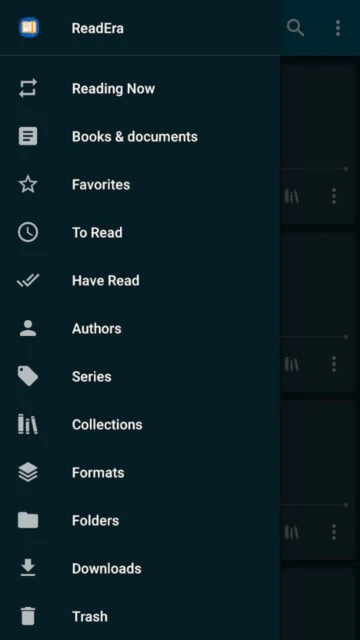
Simply install the app and grant file access. ReadEra scans your device for compatible files and displays them in a list. You can categorize books by author, series, or reading status (Read, To Read, Favorites).
Who Should Use It?
Perfect for students, book lovers, and professionals who need a reliable offline reader for various document formats without the annoyance of advertisements.
User reviews and ratings for ReadEra – book reader pdf epub
See what users think about ReadEra – book reader pdf epub. Read honest reviews and ratings from real users.
4.8
★★★★★
3 reviews
Best reader hands down
by Sarah J.
★★★★★
2025-11-20
I love that there are no ads. It just works perfectly for all my university textbooks and casual reading.
Great but sync costs money
by Mike T.
★★★★★
2025-10-15
The reader is fantastic and smooth. I just wish the sync feature was free, but the one-time purchase is worth it.
Perfect for offline use
by Elena R.
★★★★★
2025-09-28
I use this every day on my commute. It handles large PDF files without lagging, which is rare for mobile apps.
Write a Review
ReadEra – book reader pdf epub Screenshots & Photos
Browse through screenshots and photos of ReadEra – book reader pdf epub to see how it looks and works.
ReadEra – book reader pdf epub Videos
Watch videos to see how this app works and learn about its features.

 40
40