Do I need PRTG Network Monitor installed to use this app?
Yes, the PRTG mobile app requires an active PRTG Network Monitor installation version 14.1 or higher. The app connects to your PRTG server to retrieve and display monitoring data.
 36
36

Monitor networks from anywhere with PRTG mobile app
Mobile network monitoring app providing real-time alerts and device management directly from your smartphone or tablet.
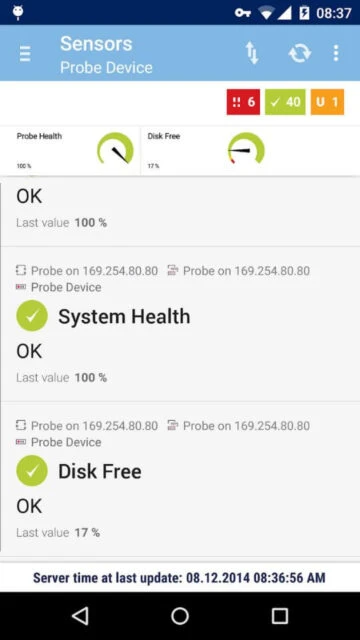
PRTG is a mobile network monitoring client that connects to Paessler's PRTG Network Monitor server. It provides administrators with real-time visibility into network infrastructure including devices, sensors, and channels across multiple PRTG instances.
The app delivers essential network monitoring features through a mobile-optimized interface. Users can acknowledge alarms, pause sensors, trigger scans, run device auto-discovery, and access comprehensive network reports and logs directly from their mobile device.
Free with PRTG installation (license required)
| Feature | Free | Premium |
|---|---|---|
| Device monitoring | Up to 20 devices with PRTG 100 license | Unlimited devices with enterprise PRTG licenses |
| Push notifications | Basic alarm notifications available | Advanced notification customization and scheduling |
| Report access | Standard pre-built reports included | Custom report creation and scheduling features |
| Data retention | 48-hour, 30-day, and annual charts | Extended historical data with custom intervals |
| Support access | Community support forums available | Priority email and phone support included |
| Ticket system | View-only access to existing tickets | Full ticket creation and management capabilities |
Yes, the PRTG mobile app requires an active PRTG Network Monitor installation version 14.1 or higher. The app connects to your PRTG server to retrieve and display monitoring data.
Yes, the PRTG mobile app supports managing and switching between multiple PRTG server instances, allowing administrators with diverse infrastructure to monitor everything from one app.
The app retrieves real-time data from your PRTG server whenever you open it. Push notifications alert you immediately when critical issues occur, keeping you informed instantly.
PRTG supports Android 4.0 and higher. For full functionality including home screen widgets, Android 4.1 or higher is recommended.
No, PRTG uses efficient push notification technology that minimizes battery drain. The app runs minimal background processes, consuming very little power between notifications.
Yes, the PRTG app allows you to pause sensors, acknowledge alarms, trigger manual scans, and run device auto-discoveryu2014all the key management functions available in the web interface.