Podcast Republic – Complete Podcast Manager

Manage over 2 million podcasts, radio streams, and RSS feeds with advanced playback controls and powerful customization options.

About Podcast Republic - Podcast app

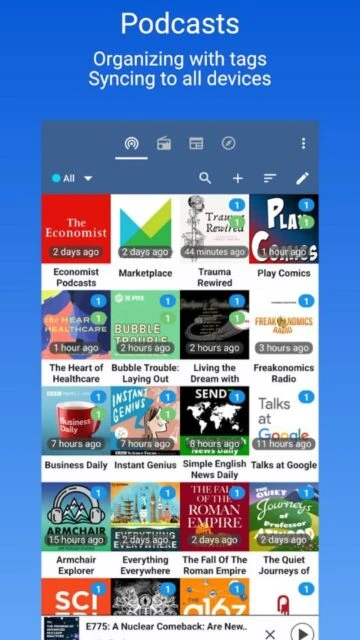
Podcast Republic is a comprehensive podcast management platform serving 2 million+ podcasts and 500 million+ episodes. The Android app boasts 4 million+ downloads with 90,000+ authentic user reviews. It manages podcasts, live radio streaming, audiobooks, and RSS feeds all within a single customizable interface.

The app excels in advanced playback control and automation features. Users enjoy variable playback speeds (0.5x-5x), silence trimming, priority playlists, and intelligent episode filtering. Cloud syncing keeps subscriptions updated across devices automatically, while automation features handle episode downloads and cleanup based on personal preferences.

Features Of Podcast Republic - Podcast app

  • Variable playback speed from 0.5x to 5x for personalized listening pace
  • Automatic silence trimming to save time on long episode listening
  • Volume boost feature to enhance voice clarity in quiet environments
  • Multiple priority playlists with custom organization and sorting
  • Smart play queue designed specifically for podcast listening workflows
  • Schedule podcast or radio playback for specific times each day
  • Sleep timer to automatically stop playback while you rest
  • Chromecast, Wear OS, and Android Auto support for multi-device listening

Premium Features in the Paid Plan

  • Cloud syncing subscriptions and playback progress between multiple devices
  • Automatic backup scheduling to protect your podcast data safely
  • Powerful episode filtering rules based on playback state and publish date
  • Gesture-operated car mode for hands-free playback control
  • Customizable shaking actions to control playback without phone access
  • Advanced chapter navigation with custom skip interval adjustment
  • Bookmark positions inside episodes with personal notes attached
  • Full SD card support for storing downloaded episodes securely

Free with optional $4.99 ad removal

Free vs Premium Comparison

Feature Free Premium
Subscription Required Completely free with all features Optional $4.99 one-time purchase for ad removal
Playback Speed Control 0.5x to 5x variable speed Same as free
Playlist Support Unlimited playlists with priority Same as free
Episode Automation Full automated download and deletion Same as free
Cloud Syncing Real-time sync across devices Same as free
Ad Experience Small ads banner at bottom Completely ad-free interface
Multi-Device Support Chromecast, Wear OS, Android Auto Same as free
Customer Support Community and email support Prioritized support response

Frequently Asked Questions

Does Podcast Republic require a paid subscription?

No, Podcast Republic is completely free with all features included. The only optional purchase is a one-time $4.99 fee to remove the small ad banner at the bottom of the screen. Podcast ads come from publishers and cannot be removed.

Can I sync my subscriptions across multiple devices?

Yes, Podcast Republic offers real-time cloud syncing. Your podcast subscriptions and playback progress automatically synchronize across all connected devices, keeping your listening experience consistent everywhere.

How does silence trimming work?

The silence trimming feature automatically detects and skips quiet moments within episodes, reducing overall listening time without missing important content. This is especially useful for interviews and conversation-based podcasts.

What podcasts are available in Podcast Republic?

With access to 2 million+ podcasts and 500 million+ episodes, Podcast Republic covers major networks like NPR, BBC, CNN, Serial, Joe Rogan Experience, and countless independent creators. Use the discovery feature to find content.

Can I play local media files in the app?

Yes, Podcast Republic supports playing media files stored on your device, including audiobooks, music, and other audio content. This consolidates all audio listening into a single, organized interface.

How do I set up automated episode downloads?

Create rules in the episode filter section specifying which podcasts to download automatically, based on criteria like publication date or priority level. The app automatically deletes downloaded episodes after listening to save storage space.