Pocket Casts – Smart podcast listening companion

Pocket Casts delivers powerful tools to discover, organize, and enjoy podcasts with smart playback controls and cross‑platform syncing.

About Pocket Casts - Podcast App

Pocket Casts is a podcast-focused listening app designed to make subscribing, organizing, and playing episodes effortless. It gathers favorite shows into a single, consistent experience that works across phones and other supported devices, emphasizing clarity and control rather than clutter.

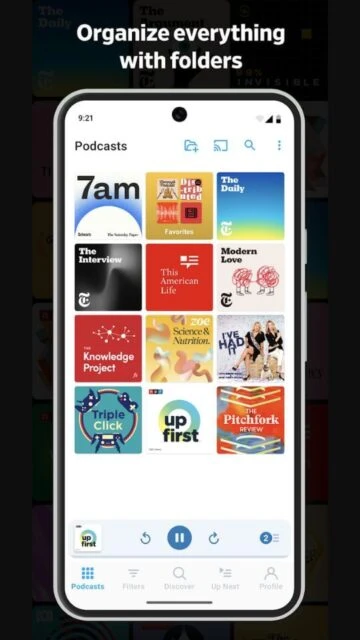
The app offers powerful filters, automatic downloads, and storage tools that help listeners manage even very large podcast libraries. Users can customize playback, build episode queues, and sync progress across platforms, making it especially valuable for heavy podcast listeners who rely on structure and flexibility.

Features Of Pocket Casts - Podcast App

  • Discover tab surfaces trending, featured, and network-curated podcasts for quick exploration and subscription
  • Custom filters let listeners group episodes by status, downloaded state, release date, or priority
  • Automatic downloads fetch new episodes in the background for offline listening based on personal rules
  • Up Next queue helps organize what to hear next, supporting quick reordering and episode management
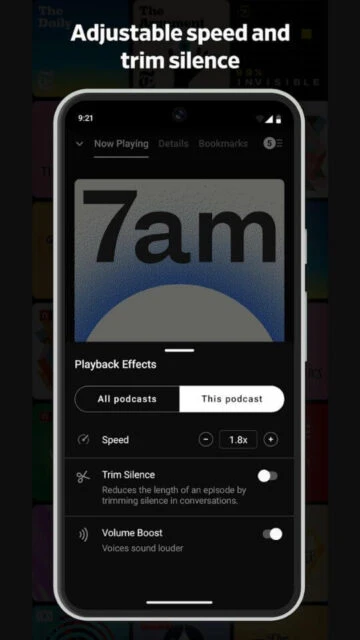
  • Playback controls include variable speed, trim silence, and skip intervals tailored per show
  • Cross-device syncing keeps subscriptions, filters, and listening positions aligned across supported platforms
  • OPML import and export make migration from or to other podcast apps straightforward and reliable
  • Storage management tools monitor space, auto-clean old episodes, and prevent devices from filling unexpectedly

Premium Features in the Paid Plan

  • Cloud storage for personal audio files, enabling playback alongside regular podcast subscriptions
  • Desktop and web player access for listening on computers with the same synced Pocket Casts account
  • Exclusive themes and appearance options for deeper visual customization of the listening interface
  • Additional app icons that let users personalize the Pocket Casts icon on supported platforms
  • Increased cloud sync enhancements supporting larger libraries and more frequent background updates
  • Advanced archival and backup options to preserve subscriptions and filters across device changes
  • Priority feature development support, helping fund continued improvements and platform maintenance
  • Ad-free, supporter-focused experience that removes promotional messages about upgrading within the app

Free with optional Pocket Casts Plus subscription

Free vs Premium Comparison

Feature Free Premium
Automatic downloads Download latest episodes for selected shows with basic controls. Retains expanded history and syncs download preferences across more devices.
Cross-device sync Syncs subscriptions and progress across core mobile devices. Extends sync to desktop and web players with richer metadata support.
Themes and appearance Includes standard light and dark themes only. Unlocks additional themes, accent colors, and extra app icons.
Cloud storage No support for uploading personal audio files. Allows uploading personal audio to listen like regular podcast episodes.
Desktop access Limited to mobile platforms without official desktop apps. Enables full-featured web and desktop listening clients tied to account.
Support and experience Standard functionality with occasional upgrade messaging. Supporter-focused, with fewer upgrade prompts and contribution to ongoing development.

Frequently Asked Questions

Does Pocket Casts work across multiple devices?

Yes. Create or sign into a Pocket Casts account and the app syncs subscriptions, filters, and listening positions between supported devices. This makes switching between phone, tablet, and other platforms seamless, provided each device is signed into the same account.

Can episodes be downloaded for offline listening?

Episodes can be downloaded automatically or manually for offline playback. Users may set per-podcast rules that download new releases as they appear, or selectively download individual episodes before travel. Storage tools help automatically delete older files when no longer needed.

What is included with Pocket Casts Plus?

Pocket Casts Plus adds desktop and web access, extra themes, custom app icons, and cloud storage for personal audio uploads. It is an optional subscription that supports ongoing development while leaving core podcast listening features available to free users.

Is Pocket Casts suitable for new podcast listeners?

New listeners can start easily by using the Discover tab, curated lists, and search to find shows. The interface is approachable, and more advanced tools like filters and custom queues become useful as subscriptions grow. It scales comfortably from a few shows to many.

How does Pocket Casts manage storage space?

The app offers automatic cleanup options to delete played or old episodes, plus clear indicators of how much space downloads are using. Users can adjust per-podcast download and retention rules, ensuring offline listening without allowing audio files to consume excessive device storage.