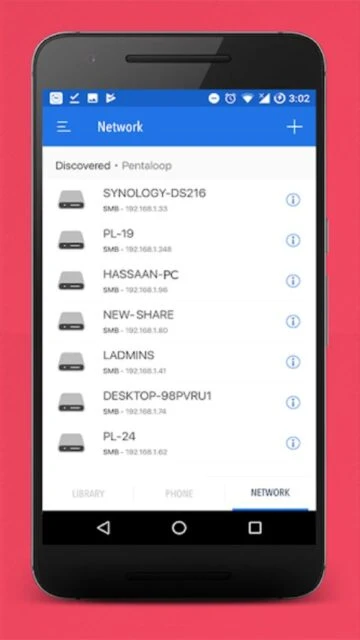
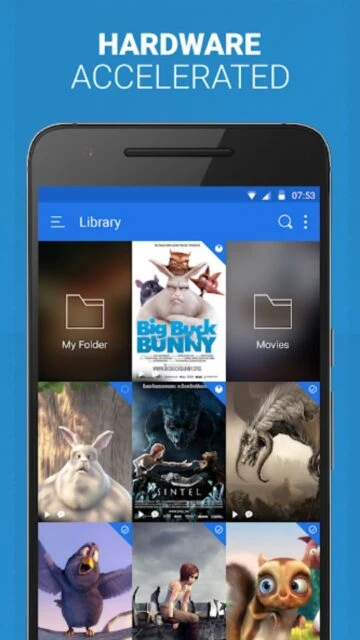
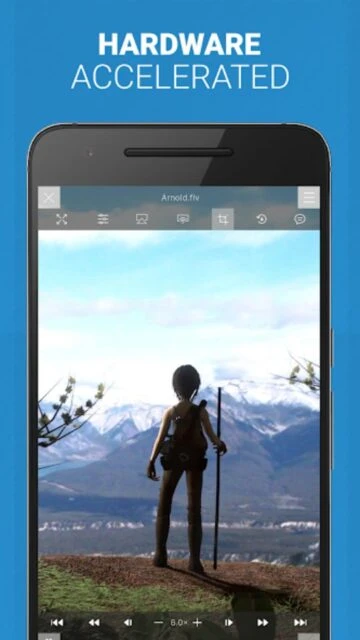
PlayerXtreme Media Player is a universal video and audio player designed for both Android and iOS platforms, supporting playback of 40+ multimedia formats without requiring conversion. The app features sixth-generation hardware-accelerated playback technology, delivering superior audio and video quality on all devices. It enables direct streaming from networked sources including PCs, NAS devices, and DLNA-compatible servers.
The app provides comprehensive subtitle support with real-time downloads, multiple audio track selection, and gesture-based controls. Users can organize their complete media library with poster-view formatting and access content from anywhere on their devices. PlayerXtreme eliminates storage limitations by streaming directly from network sources, providing seamless access to unlimited media without sacrificing quality or performance.
Features Of PlayerXtreme Media Player
Direct playback of 40+ video and audio formats without conversion required
4K Ultra HD and 1080p HD smooth playback with hardware acceleration
Real-time subtitle downloads supporting SRT, SSA/ASS, SMI, and closed captions
Streaming from PC, NAS drives, DLNA servers, and networked storage devices
Intuitive file and folder management with Windows Explorer-like interface
Background playback mode for continued audio during standby
Gesture control system for volume, seeking, and navigation
Multiple audio track support for multilingual content playback
Aspect ratio adjustment and video zoom controls
Library organization with poster-view media display format
Premium Features in the Paid Plan
Password protection and guest access for secure content sharing
Advanced subtitle editor with custom font and timing adjustments
Multi-subtitle display for learning and accessibility purposes
AirPlay and Google Cast support for big-screen streaming
Custom gesture actions for personalized control schemes
Advanced audio synchronization and delay adjustment
Subtitle font size and style customization options
Priority buffering for optimal streaming performance
Exclusive premium features and beta access programs
Cloud-based media library synchronization across devices
Free with in-app purchases; Premium subscription $2.99/month
Free vs Premium Comparison
Feature
Free
Premium
Format Support
40+ formats supported directly
All 40+ formats with enhanced codec support
Subtitle Download
Basic subtitle search
Advanced real-time download with editor
Casting Support
Limited local playback
Full AirPlay and Google Cast support
Guest Access
Not available
Password-protected guest access
Customization
Standard controls
Advanced gesture and control customization
Cloud Sync
Local library only
Cloud synchronization across devices
Frequently Asked Questions
Does PlayerXtreme support streaming from NAS servers?
Yes, PlayerXtreme supports streaming directly from NAS devices, SMB shares, DLNA/UPnP applications like Plex and Kodi, and networked PCs without requiring file conversion or transfer.
How can I download subtitles in real-time?
Enable internet connectivity via Wi-Fi or mobile data. PlayerXtreme automatically detects videos and searches for matching subtitles online, downloading them in your preferred language format.
What's the difference between free and premium versions?
The free version includes all 40+ format support and basic playback. Premium ($2.99/month) adds AirPlay/Google Cast, advanced subtitle editor, guest access, and cloud synchronization features.
Can I play videos while my device is in standby mode?
Yes, PlayerXtreme includes background playback mode allowing audio to continue while your device screen is off, perfect for music and podcast consumption.
Which platforms support PlayerXtreme?
PlayerXtreme is available on both Android (4.4+) and iOS (12.0+) platforms with synchronized premium features across devices.
How do gesture controls work in PlayerXtreme?
Swipe vertically to adjust volume, horizontally to seek forward/backward in video. Customize gesture actions for brightness, speed, and other controls through app settings for personalized experience.
PlayerXtreme Media Player brings comprehensive multimedia capability to Android and iOS devices, delivering universal video format compatibility without conversion requirements. The app combines advanced playback technology with intuitive file management, enabling users to enjoy movies, shows, and music in virtually any format directly from their device or networked sources.
Why Choose PlayerXtreme?
PlayerXtreme stands out with genuine universal format support, eliminating the need for file conversion. Its sixth-generation hardware-accelerated core produces vibrant video and sharper audio quality across all playback scenarios. The app excels at handling diverse streaming sources, network locations, and complex subtitle requirements while maintaining responsive user interface performance.
Universal Format Support: Direct playback of 40+ formats including MKV, MP4, AVI, WMV, MOV without conversion requirements
4K Ultra HD Playback: Smooth 4K and 1080p HD video playback with hardware acceleration for optimal performance
Advanced Subtitle System: Supports SRT, SSA/ASS, SMI, CC formats with real-time downloads and full customization options
Applications Comparable to PlayerXtreme
PlayerXtreme is a multimedia player supporting various formats with advanced playback features. The following applications offer similar functionality and compatibility.
VLC: A versatile open-source media player supporting a wide range of audio and video formats.
MX Player: A feature-rich video player with hardware acceleration and subtitle support.
GOM Player: A multimedia player known for its codec support and user-friendly interface.
KMPlayer: A cross-platform media player with customizable skins and streaming capabilities.
How It Works
Download PlayerXtreme and open your media files directly—no conversion needed. The app automatically detects format and applies optimal hardware acceleration. Browse your device library using intuitive file management that mirrors computer folder navigation. Stream from networked sources like PCs, NAS drives, and DLNA-compatible devices. Customize playback with gesture controls, adjustable aspect ratios, and synchronized subtitle/audio delay settings.
Who Should Use It?
Users with diverse video format libraries benefit tremendously from PlayerXtreme’s universal compatibility. Those managing networked media centers or NAS servers gain seamless streaming capabilities. Anyone seeking superior audio and video quality through hardware acceleration finds significant value. Mobile users wanting comprehensive media playback without conversion will appreciate this all-in-one solution.
User reviews and ratings for PlayerXtreme Media Player
See what users think about PlayerXtreme Media Player. Read honest reviews and ratings from real users.
3.2
★★★★★
3 reviews
Fantastic universal video player with great format support
by David Chen
★★★★★
2025-11-28
PlayerXtreme handles absolutely any video format I throw at it. The streaming from my NAS works perfectly, subtitles download automatically, and the hardware acceleration makes playback smooth even for 4K files.
Good player but navigation needs improvement
by Sophie Laurent
★★★★★
2025-10-20
Format support is excellent and playback quality is impressive. However, the interface could be more intuitive for organizing large libraries. Still, it's the best universal player I've found for Android.
Great features but inconsistent performance sometimes
by Marcus Johnson
★★★★★
2025-09-14
Supports many formats and streaming works well, but occasionally becomes sluggish with large libraries. UI responsiveness could be better. Worth trying but may not work perfectly for everyone.
Write a Review
PlayerXtreme Media Player Screenshots & Photos
Browse through screenshots and photos of PlayerXtreme Media Player to see how it looks and works.
PlayerXtreme Media Player Videos
Watch videos to see how this app works and learn about its features.

 125
125