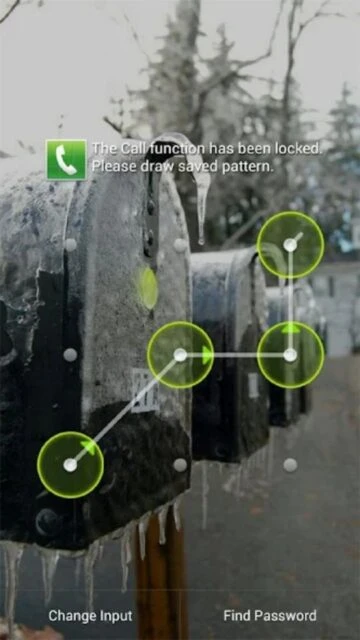
Perfect App Lock Pro is a professional security application that protects individual apps with PIN, pattern, gesture, or text-based passwords. Users can lock messaging apps, social media, banking apps, and any sensitive applications from unauthorized access.
The app offers advanced features including watchdog protection that captures photos of failed unlock attempts, fake popup error messages to deter intruders, and system-wide controls for WiFi, Bluetooth, and data connectivity. It supports time-based and location-based automatic locking policies.
Features Of Perfect App Lock Pro
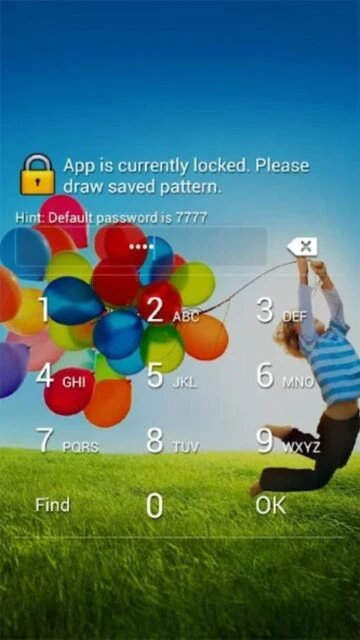
Lock apps using PIN, pattern, gesture, or text passwords
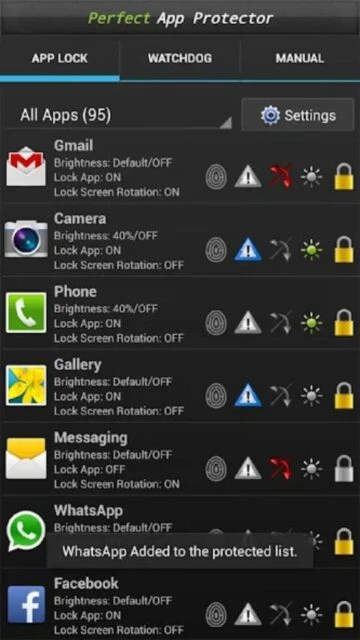
Screen brightness filter management per individual app
Automatic screen rotation prevention for selected apps
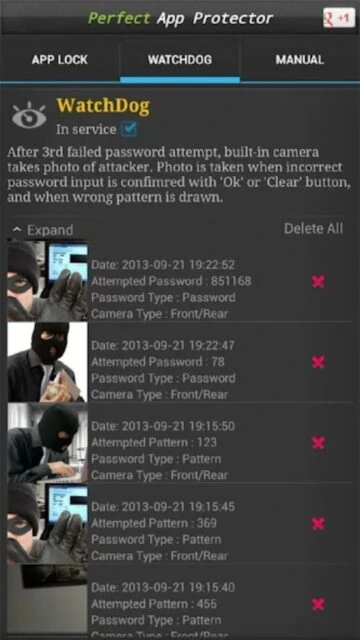
Watchdog captures photos after failed unlock attempts
Lock WiFi, 3G data, Bluetooth, and USB connectivity
Lock home screen, calls, and app installation settings
Time-based and WiFi-based locking policies included
Fake popup error message display for security
Remote SMS command control for service activation
Minimum resource usage with efficient performance
Premium Features in the Paid Plan
Persistent device administrator protection without removal
Unlimited app locking with advanced policy management
Priority technical support from Morrison Software team
Weekly updated security patterns and threat detection
Cloud backup of app lock settings and configurations
Enhanced watchdog with facial recognition capabilities
Scheduled automatic unlock during work hours
Advanced fake popup customization with custom messages
$2.99 one-time purchase
Free vs Premium Comparison
Feature
Free
Premium
Number of Lockable Apps
All apps with basic protection
Unlimited apps with advanced features
Password Types
PIN and pattern only
PIN, pattern, gesture, text, and fingerprint
Watchdog Feature
Photo capture disabled
Full facial recognition with intruder alerts
Automatic Unlock
Manual unlock only
Time and location-based automatic unlock
Remote Control
Local device control
SMS command remote activation
System Lock Control
Limited WiFi control
Complete WiFi, Bluetooth, data, USB control
Frequently Asked Questions
Can I lock all my apps at once?
Perfect App Lock Pro allows you to select any combination of apps to lock. While there's no bulk select all feature, you can lock multiple apps individually through the intuitive interface.
What happens after three failed unlock attempts?
The watchdog feature automatically captures a photo of the person attempting to unlock protected apps. This photo evidence is stored on your device for security verification purposes.
Does Perfect App Lock Pro slow down my phone?
Perfect App Lock Pro is designed for minimum resource usage. The app runs efficiently in the background without significantly impacting device performance or battery life during normal operation.
Can I unlock apps remotely via SMS?
Yes, the premium version supports remote service activation through SMS commands. You can start or stop the AppLock service using text messages to your device for emergency access scenarios.
Is my phone data safe with this app?
Perfect App Lock Pro requires Device Administrator permission for full functionality. Data is processed locally on your device. However, users should download only from official Play Store to ensure security.
Perfect App Lock Pro is a comprehensive security app that lets users protect individual applications with multiple authentication methods including PIN codes, patterns, gestures, and text passwords. This Google Top 20 application offers advanced privacy features like watchdog protection and fake error messages to deter unauthorized access attempts.
Why Choose Perfect App Lock Pro?
Perfect App Lock Pro delivers professional-grade security for sensitive applications. Users benefit from flexible locking options, resource-efficient performance, and remote SMS control capabilities. The app includes advanced features like automatic camera capture of failed unlock attempts and customizable screen brightness management per app.
Multiple Lock Methods: PIN, pattern, gesture, and text password options for versatile security
Watchdog Feature: Automatically photographs intruders after three failed unlock attempts
Advanced Controls: Lock WiFi, Bluetooth, data, and system functions with granular control
How It Works
Installation is straightforward with an intuitive interface. Users select apps to protect, choose their preferred security method, and set locking policies. The app supports time-based and WiFi-based automatic locking, allowing automatic unlock when connected to trusted networks. Device Administrator permission enables deep system protection.
Who Should Use It?
Perfect App Lock Pro suits professionals protecting sensitive work apps, parents securing family devices, and users prioritizing privacy. It’s ideal for anyone wanting granular control over app access without rooting their device or compromising performance.
User reviews and ratings for Perfect App Lock Pro
See what users think about Perfect App Lock Pro. Read honest reviews and ratings from real users.
3.6
★★★★★
3 reviews
Great protection for years
by Sarah Mitchell
★★★★★
2025-11-15
I have used Perfect App Lock Pro for many years without any significant issues. The PIN protection works reliably and the interface is straightforward. Highly effective for securing personal apps.
Some compatibility issues with newer phones
by James Rodriguez
★★★★★
2025-10-22
Works well on most devices but had problems with Samsung Galaxy S24. Many banking apps don't appear in the lock list. Needs better app compatibility detection and a select-all feature.
Good app but needs updates
by Michael Chen
★★★★★
2025-09-18
The security features are solid and watchdog protection is a nice touch. Performance is good with minimal battery drain. Would benefit from modern UI redesign and better Samsung support.
Write a Review
Perfect App Lock Pro Screenshots & Photos
Browse through screenshots and photos of Perfect App Lock Pro to see how it looks and works.
Perfect App Lock Pro Videos
Watch videos to see how this app works and learn about its features.

 40
40