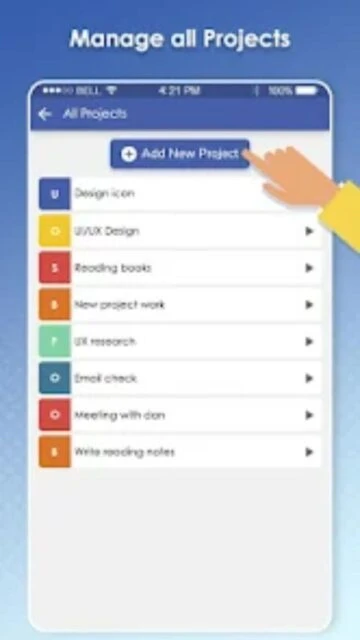
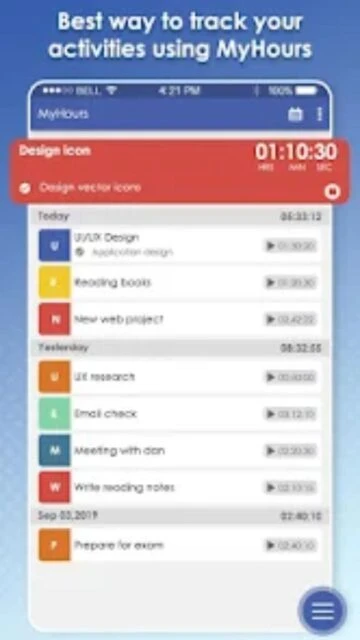
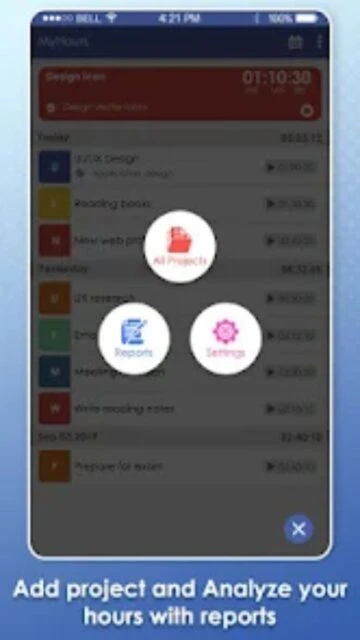
My Hours provides a clutter-free environment for tracking billable work. It solves the problem of lost revenue due to untracked time by offering a frictionless timer that follows you from web to mobile. The app emphasizes flexibility, allowing you to categorize work into clients, projects, and tasks with ease.
Beyond simple tracking, My Hours shines in its administrative capabilities. Managers can oversee team activities in real-time, approve timesheets, and manage billing rates. The platform is designed to be affordable and scalable, ensuring that as your team grows, your overhead for time tracking remains manageable and your data remains accurate.
Features Of Spica My Hours
Real-time stopwatch for accurate task duration tracking
Manual time entry for past or forgotten work logs
Hierarchical structure for Clients, Projects, and Tasks
Personal dashboard with daily and weekly time summaries
Add notes and descriptions to every time log entry
Favorite tasks for quick access to frequent activities
Dark mode support for comfortable night usage
Automatic cloud sync between mobile and web versions
Premium Features in the Paid Plan
Advanced invoicing with customizable company branding
Approval workflow for team timesheets and logs
Budget tracking with email alerts when near limits
Audit logs to track changes to time entries
Priority email and chat support from Spica
Team manager roles and advanced permission settings
Downloadable reports in PDF and Excel formats
Required fields enforcement for data consistency
Free plan; Pro $3/user/month
Free vs Premium Comparison
Feature
Free
Premium
Projects
Unlimited projects
Unlimited projects
Team Members
Unlimited members
Unlimited members
Billing Rates
Standard rates
Date-based rates
Invoicing
Not included
Full Invoicing
Approvals
Self-management
Manager approval
Data History
Recent history
Unlimited history
Frequently Asked Questions
Is My Hours really free for teams?
Yes, the free plan allows for unlimited team members and projects. The Pro plan is only required if you need advanced features like client invoicing, timesheet approvals, or budget alerts.
Can I edit a time log after I stop the timer?
Yes, you can easily edit the start time, end time, duration, or description of any log directly from the mobile app timeline view.
Does it track my location?
No, My Hours is strictly a time tracker and does not use GPS or location tracking services, respecting user privacy and device battery life.
How does the approval workflow work?
In the Pro plan, team members submit their weekly logs. Managers receive a notification to review the entries and can either lock them for billing or reject them for corrections.
Can I set different hourly rates?
Yes, you can set billable rates per project, per task, or per team member, giving you complete flexibility in how you calculate client costs.
My Hours by Spica focuses on doing one thing exceptionally well: tracking work hours on projects and tasks without unnecessary clutter. It offers a clean, intuitive interface that lets you organize your workflow and generate detailed reports in seconds.
Why Choose My Hours?
My Hours is often preferred for its generous free tier and straightforward approach to billing. Unlike complex ERPs, it requires zero training to start using, making it perfect for teams that need to start tracking immediately without a steep learning curve.
Generous Free Plan: robust features for unlimited projects without cost.
Flexible Billing: Set unique billable rates per project, task, or team member.
Detailed Reporting: Generate granular reports to show clients exactly where time went.
How It Works
Create a project, define your tasks, and hit the play button to start tracking. You can also manually enter time logs if you forgot to start the timer. Once tracked, use the dashboard to analyze team performance and export data for client invoicing.
Who Should Use It?
Best suited for freelancers, consultants, and small-to-medium businesses who need a cost-effective way to track billable hours. It is an excellent choice for those who find other enterprise tools too expensive or complicated.
User reviews and ratings for Spica My Hours
See what users think about Spica My Hours. Read honest reviews and ratings from real users.
3.7
★★★★★
3 reviews
Great simple tracker
by David K.
★★★★★
2025-11-01
I love that the free version doesn't limit my projects. It's perfect for my freelance writing business. The interface is clean and doesn't get in the way of my work.
Needs better offline sync
by Jessica M.
★★★★★
2025-10-15
The app is good when it works, but sometimes I have issues syncing data if I've been offline for a while. The web version is flawless, but the mobile app needs an update.
Best value for money
by Tom H.
★★★★★
2025-08-30
Moved here from a more expensive competitor. The Pro plan is only $3 which is a steal. Missing some fancy integrations but covers all the basics perfectly.
Write a Review
Spica My Hours Screenshots & Photos
Browse through screenshots and photos of Spica My Hours to see how it looks and works.
Spica My Hours Videos
Watch videos to see how this app works and learn about its features.

 36
36