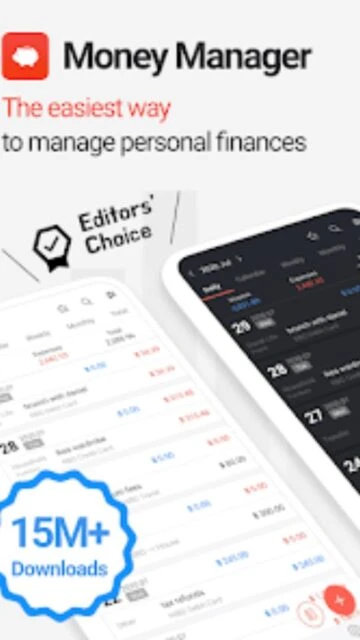
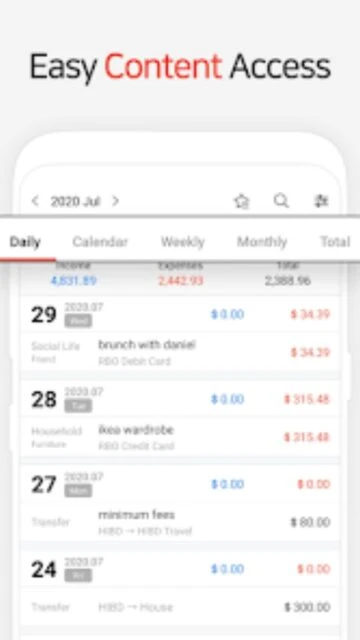
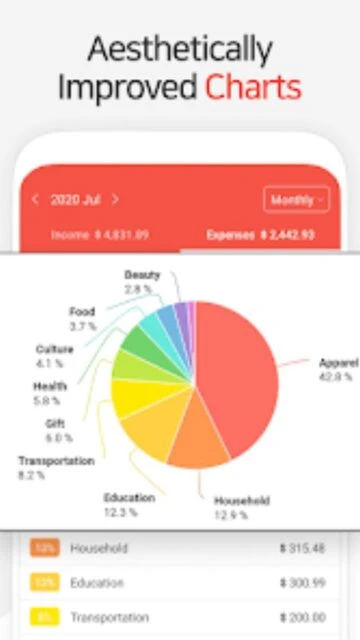
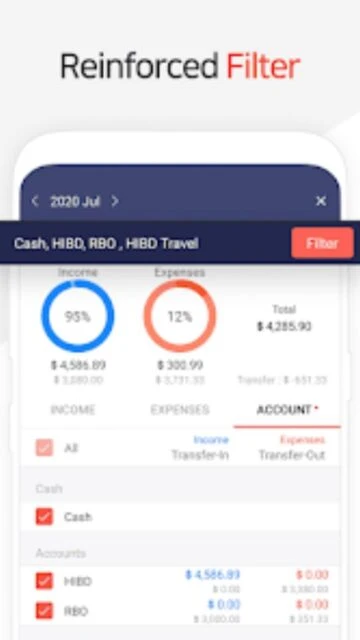
Money Manager Expense & Budget stands as the leading personal finance application for Android and iOS users seeking granular control over their financial accounts. Developed by Realbyte Inc., this dual-platform app employs double-entry bookkeeping—a professional accounting method rarely found in consumer finance apps. The app processes 10 million+ downloads globally and maintains a 4.6-4.8 star rating across both platforms, earning recognition for managing complex household finances without sacrificing simplicity. This guide explores Money Manager’s setup process, platform capabilities, competitive positioning, privacy measures, and advanced features for maximizing your financial management workflow.
How to Get Started with Money Manager
Money Manager’s onboarding establishes your account structure through intuitive configuration steps. The app’s flexible architecture supports unlimited accounts in the paid version, allowing you to organize checking, savings, credit cards, and investment accounts separately.
- Create Account Group – Set up categories like Banking, Credit Cards, Cash, and Investments to organize your accounts logically
- Add Individual Accounts – Link specific accounts (e.g., Chase Checking, AmEx Card) with opening balances to begin tracking
- Configure Budget Categories – Customize expense categories (Groceries, Utilities, Entertainment) and create sub-categories for detailed tracking; adjust the monthly cycle start date from the default calendar date
- Record First Transaction – Enter an expense or income transaction to trigger Money Manager’s double-entry system, which automatically debits/credits your selected account
Who Should Use Money Manager
Money Manager serves multiple user personas with distinct financial management needs. Its professional-grade features appeal to those requiring accounting-level precision, while the customizable interface accommodates casual expense tracking.
- Household Budget Managers – Families tracking joint expenses and individual spending across multiple accounts with real-time budget vs. actual comparisons via pie charts
- Freelancers & Small Business Owners – Independent professionals requiring income/expense separation, tax category tracking, and PC-based data analysis for financial reporting
- International Users & Travelers – Individuals managing accounts in multiple currencies with automatic currency-specific balance calculations and multi-country expense categorization
- NOT Ideal For – Users seeking bank API integration for automated transaction imports; Money Manager requires manual transaction entry rather than connecting directly to financial institutions
Money Manager Platform Compatibility
Money Manager delivers a unified experience across Android, iOS, and desktop platforms with synchronized data. Platform-specific features accommodate different user workflows from smartphones to computers.
| Platform |
Min. Version |
Unique Features |
Limitations |
| Android |
Android 6.0+ (API 23) |
Account Group collapse/expand, transfer swapping, bulk transaction entry, multiple photo attachment in one action |
Limited to 15 accounts in free version; cloud sync requires subscription for data-sync service |
| iOS |
iOS 14.0+ |
iCloud backup/restore via iTunes, VisionOS 1.0+ support for spatial computing, passcode customization with flexible lock intervals |
Requires iOS 14 minimum; iPad/iPod touch versions have identical feature parity to iPhone |
| Web/PC Manager |
Modern browsers with Wi-Fi connectivity |
Bulk editing, sorting by date/category/account group, graphical account fluctuation visualization, bulk CSV import functionality |
PC manager requires local Wi-Fi connection to device; no cloud-based web app available |
| Desktop |
Windows/Mac via PC Manager tool |
Data analysis, report generation, transaction sorting, Excel export, real-time sync with mobile app over Wi-Fi |
Limited to viewing and editing existing transactions; no standalone desktop application available |
Money Manager Integrations & Ecosystem
Money Manager’s integration ecosystem focuses on data portability and external analysis rather than real-time bank connections. Excel export capabilities and multi-device sync enable seamless workflow across different financial tools.
- Excel/CSV Export – Export transaction data in spreadsheet-compatible formats for custom analysis in Microsoft Excel or Google Sheets, enabling pivot tables and custom reporting
- Cloud Data Sync – Premium subscription includes cloud sync service allowing automatic data updates across multiple Android/iOS devices without manual backup procedures
- Email Backup – Send encrypted transaction backups to email address for long-term archival or data recovery without using cloud services; supports importing CSV files previously exported
- Multi-Device Wi-Fi Sync – PC Manager function synchronizes data between mobile app and desktop browser over local Wi-Fi connection for real-time account viewing and bulk editing
Best Alternatives to Money Manager
While Money Manager excels in accounting-grade precision, competing apps offer different strengths. Consider these alternatives based on your specific financial management priorities and preferred interaction methods.
- Spendee – Best for visual expense categorization and shared family budgets; offers stunning UI design with crypto/e-wallet support, web analytics for bulk editing, and international expense tracking with intelligent notifications
- YNAB (You Need A Budget) – Best for proactive envelope budgeting methodology; focuses on goal-oriented financial planning with automated bill payment scheduling and zero-based budgeting philosophy
- PocketGuard – Best for simplified free expense tracking; provides lower-cost premium option ($7.99/month) with income/bill detection and in-your-income-app spending limits without complex account structures
- Quicken Simplifi – Best for comprehensive financial overview; includes automated investment tracking, bank account linking, and detailed net worth calculations ($4/month or $48/year)
Money Manager vs Top Competitors
Money Manager’s double-entry bookkeeping and offline functionality differentiate it from cloud-dependent competitors. This comparison highlights core feature variations across leading personal finance applications.
| Feature |
Money Manager |
Spendee |
YNAB |
| Pricing |
Free with 15 accounts; Premium $2.49/month or $19.99/year for unlimited accounts + cloud sync |
Free with limited features; Premium €3.99/month for full features and syncing |
Paid subscription $14.99/month or $129.99/year; no free tier after 34-day trial |
| Key Strength |
Professional double-entry bookkeeping system with PC management and offline-first approach |
Award-winning visual design with shared family wallet and intelligent spending notifications |
Goal-oriented envelope budgeting with proactive financial prioritization methodology |
| Target Users |
Freelancers, accountants, households requiring accounting-level precision tracking |
Digital nomads, travel-heavy users managing multiple currencies and shared expenses |
Salaried professionals seeking hands-on budget control with debt payoff planning |
| Unique Feature |
Automatic double-entry transactions with recipient sorting and PC-based Wi-Fi editing |
Cryptocurrency wallet integration with hashtag-based expense labeling and location tagging |
Automated YNAB methodology training with behavioral coaching and goal milestone tracking |
| Offline Mode |
Full offline functionality; all data stored locally until manual backup/sync initiated |
Limited offline; cached data only, requires internet for syncing and bank connections |
Requires internet connection for cloud sync; no offline transaction entry capability |
Money Manager Privacy & Security Overview
Money Manager implements encryption and passcode protection for sensitive financial data. The app’s local-first architecture ensures transactions remain on your device until explicitly backed up.
| Security Aspect |
Implementation |
User Control |
| Data Encryption |
Encryption in transit for cloud sync service; local data stored unencrypted on device storage |
Users can disable cloud sync entirely; email/iTunes backups support encrypted archives |
| Authentication |
Passcode protection with configurable lock intervals (immediate, 5 minutes, 1 hour, etc.); fingerprint/Face ID on supported devices |
Optional passcode enforcement; users choose interval between app access and lock activation |
| Data Collection |
Collects usage data and device identifiers per Google Play; does not require location permissions; financial data stored locally by default |
Users can opt-out of cloud sync; diagnostic data collection cannot be disabled through app settings |
| Third-Party Sharing |
Data shared only with cloud sync service (Realbyte Inc.); does not sell financial information to advertisers or data brokers |
Local data never leaves device unless user explicitly enables cloud backup; no third-party analytics integration |
Money Manager Accessibility Features
Money Manager provides foundational accessibility support through platform-level features. The app’s dense financial interface presents challenges for screen reader users despite native VoiceOver/TalkBack integration.
- Screen Reader Support – Native VoiceOver (iOS) and TalkBack (Android) compatibility enables audio descriptions of interface elements; however, complex financial tables and graphical charts may present navigation challenges
- Visual Accommodations – Font scaling via system-level accessibility settings; dark mode support for reduced eye strain during extended financial tracking sessions; high-contrast default interface
- Motor Accessibility – Full gesture-based navigation compatible with iOS and Android assistive touch features; voice control limitations due to absence of dedicated voice command system within the app
- Language Support – 19 languages including English, Spanish, French, German, Chinese (Simplified/Traditional), Japanese, Korean, Russian, Vietnamese, Thai, Turkish, Arabic, and others; right-to-left text rendering for Arabic/Persian users
Power User Tips for Money Manager
Experienced users can optimize Money Manager’s workflow through advanced configuration and strategic use of built-in features. These tactics maximize financial tracking precision and reporting efficiency.
- Automate Recurring Transactions – Set up automatic transfers and recurring expenses (salary deposits, insurance premiums, utility bills) with frequency options (daily, weekly, bi-weekly, monthly) to eliminate manual entry and maintain accurate future balance projections
- Leverage Payment Profiles – Create bookmarks for frequent expenses (coffee runs, gas stations, subscriptions) to enable one-tap entry during checkout, dramatically reducing daily transaction entry time
- Master Sub-Categories – Enable sub-category tracking within parent categories (Dining: Restaurants, Cafes, Delivery) for granular spending analysis; toggle sub-categories on/off to simplify view when needed
- Export for Tax Planning – Quarterly export transaction data to Excel using category filters to identify deductible business expenses, prepare quarterly estimated tax payments, or provide documentation for accountants
- Optimize Multi-Device Workflow – Use PC Manager for weekend financial reviews and bulk transaction edits via larger screen, then sync changes back to mobile app for on-the-go access throughout the week
Money Manager Support & Community
Realbyte Inc. provides multiple support channels for technical assistance and feature questions. Community resources remain limited compared to larger financial platforms, but official support responds to detailed inquiries.
- Official Help Center – Email support at [email protected] with inquiry details; response times typically 24-48 hours for feature explanations and troubleshooting guidance
- Community Forum – Limited official forum; user discussions concentrated on Google Play and App Store review sections where developers respond to specific feature requests
- Social Media – Realbyte Inc. maintains official presence on major platforms for update announcements; real-time support not available through social channels
- In-App Guidance – Built-in tutorial system explains core features during initial setup; contextual help within settings menus for advanced functionality like PC Manager connection
Money Manager Latest Updates & Roadmap
Money Manager released version 4.10.3 on December 4, 2025, introducing enhanced account management and transaction flexibility. Recent updates focus on UI refinement and workflow optimization rather than major feature additions.
December 2025 Update (v4.10.3): Transfer account swapping enables quick reversal of source/destination accounts when recording money movements between accounts. Account Group collapse/expand functionality simplifies navigation for users managing 15+ accounts by hiding inactive account groups. Transaction date flexibility allows users to choose between today’s date or the original recording date when duplicating transactions, useful for recurring expense patterns. Bulk photo attachment capability lets users attach multiple receipts in single upload action rather than sequential uploads.
The development team has indicated ongoing work on frequently requested features including payee field integration, transaction status markers (pending/reconciled/cancelled), and predictive balance calculations for accounts with scheduled future payments. While no official public roadmap exists, community feedback suggests priority on subscription feature parity across iOS and Android by Q2 2026.