MobiSaver: Data&Photo Recovery – Professional Android Recovery
The easiest Android data recovery app
A professional-grade data recovery tool from EaseUS that retrieves deleted SMS, contacts, photos, and videos with high-speed scanning and secure privacy protocols.
MobiSaver is a dedicated data recovery application that focuses on retrieving structured data like contacts and call logs, in addition to standard media files. It addresses the specific need of restoring communication history, which many general file recovery apps neglect. The interface is clean and professional, reflecting its lineage from EaseUS's desktop software suite.
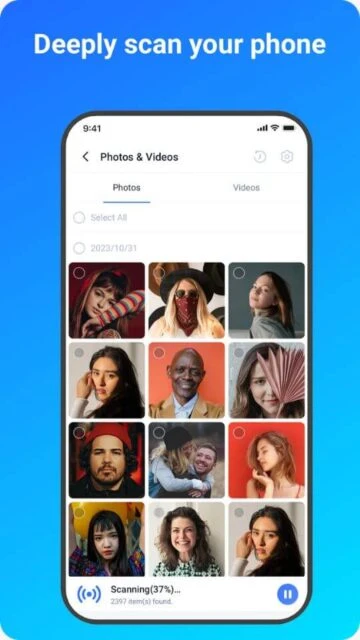
One of its standout capabilities is the granular control it offers during the recovery process. Users can pause scans, filter results in real-time, and preview files with detailed metadata. Whether you are trying to save a single deleted contact or an entire gallery of lost holiday photos, MobiSaver provides the precision tools needed to get the job done securely.
Features Of MobiSaver: Data&Photo Recovery
Recover deleted SMS and call logs
Restore WhatsApp messages and media
Internal and SD card scanning
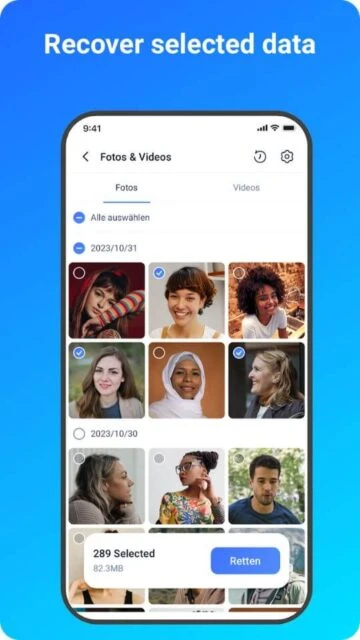
Preview photos with file size info
Real-time scan results display
Filter by date and file type
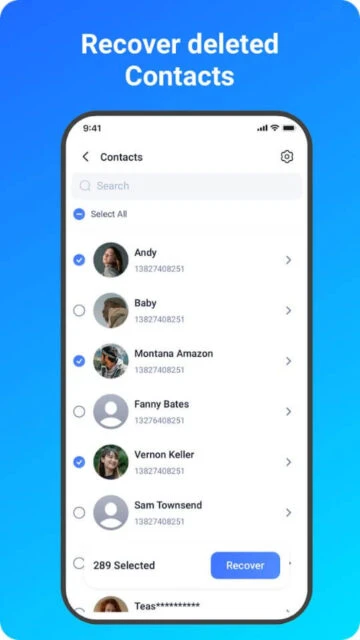
Contact recovery with details
Root and non-root scan modes
Export contacts to CSV/HTML
Secure data encryption
Premium Features in the Paid Plan
Unlimited file recovery
High-quality photo export
Full contact list restoration
Unlimited SMS recovery
Remove in-app advertisements
Lifetime technical support
Deep scan for rooted devices
Priority updates and features
$5.99 - $39.95 per item
Free vs Premium Comparison
Feature
Free
Premium
SMS Recovery
Preview Only
Full Restore
Contacts
Limited Number
Unlimited
Scan Mode
Quick Scan
Deep Scan (Root)
File Formats
JPG/MP4
All Formats
Output Quality
Standard
Original Quality
Updates
Standard
Lifetime Free
Frequently Asked Questions
Why does it show files I didn't delete?
The scan reads all data in the file system. Use the 'Only display deleted items' filter to hide existing files.
Is it safe to use MobiSaver?
Yes, EaseUS is a reputable company. The app uses read-only access to scan your drive and does not upload your data.
Can I recover WhatsApp messages?
Yes, MobiSaver specializes in recovering WhatsApp chats and attachments, but root access may be required for full history.
Why is the rating lower than others?
Recovery is technical; many users rate poorly when hardware limitations prevent recovery, despite the software functioning correctly.
Do I need to pay to scan?
No, scanning and previewing files is completely free. Payment is only required when you want to perform the final recovery.
MobiSaver: Data&Photo Recovery brings professional desktop-grade recovery technology to your Android device. Developed by EaseUS, a leader in data security software, this app is designed to handle critical data loss scenarios such as accidental deletion, virus attacks, and rooting errors. It supports a vast range of file formats and works seamlessly across both internal memory and external SD cards.
Why Choose MobiSaver?
Trust is paramount when dealing with sensitive data, and MobiSaver’s reputation is built on security and reliability. Unlike generic tools, it offers specialized recovery modes for SMS and WhatsApp messages, ensuring that your conversations are restored intact. The app’s ability to distinguish between rooted and non-rooted devices allows it to optimize its scanning method, providing the deepest possible search for your specific hardware configuration.
Message Recovery: Specifically optimized to recover deleted SMS, MMS, and WhatsApp chat histories.
Smart Filtering: Advanced filters allow you to sort recoverable files by size, file type, and date to quickly locate what you need.
Thumbnails Preview: View exact thumbnails of photos and contacts (with names and numbers) before committing to a recovery.
How It Works
MobiSaver automates the complex process of data carving. Upon launching, select a category like ‘Photo & Video’ or ‘SMS’. The app performs a rapid scan for recent files and a background deep scan for older data. Recoverable items are displayed in a list; simply check the boxes for the items you want and tap ‘Recover’ to export them safely.
Who Should Use It?
This app is essential for business professionals and heavy texters who need to recover specific communication logs like contacts and messages. It is also perfect for users who prefer a tool from an established software brand that prioritizes data privacy and offers lifetime technical support options.
User reviews and ratings for MobiSaver: Data&Photo Recovery
See what users think about MobiSaver: Data&Photo Recovery. Read honest reviews and ratings from real users.
2.1
★★★★★
3 reviews
Recovered my contacts!
by David K.
★★★★★
2025-10-30
I wiped my phone by mistake and lost all my business contacts. This app was the only one that found them. Paid for the pro version immediately.
Decent but expensive
by Liam O.
★★★★★
2025-09-15
It found the photos I wanted, but the price to recover them is a bit high compared to desktop software. Good for emergencies though.
Scanned fast
by Priya S.
★★★★★
2025-08-29
The scan was super quick. It didn't find my very old video, but it recovered all the photos I deleted last week.

 40
40