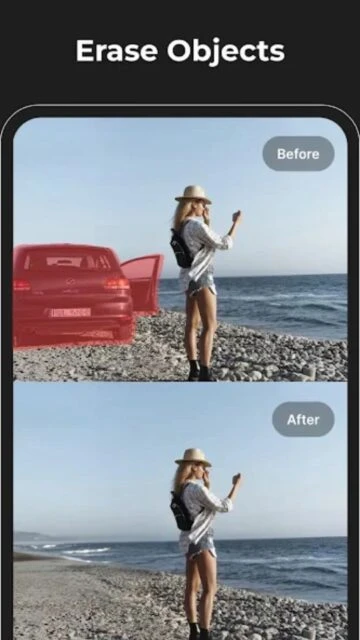
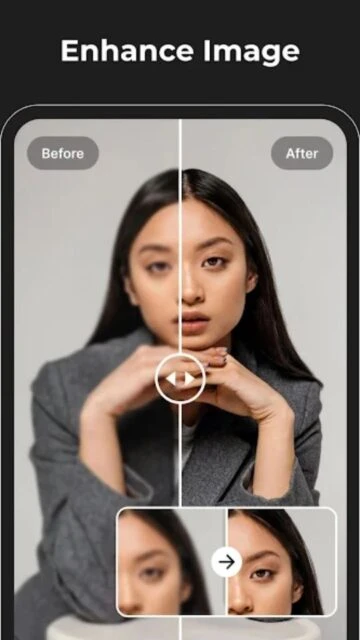
Magic Eraser transforms your photo editing workflow by focusing entirely on removal and restoration. It uses state-of-the-art artificial intelligence to understand the context of your image, allowing it to erase complex objects without leaving obvious blur marks.
Beyond simple erasure, the app doubles as a restoration tool. It can fix old photographs by removing cracks, scratches, and dust spots, breathing new life into your digital memories with just a few taps.
Features Of Magic Eraser - Remove Object
AI-powered object removal tool
Remove people and photobombers
Erase watermarks and text logs
Blemish and pimple remover for portraits
Restore old photos by removing scratches
Simple brush interface for selection
Compare Before and After views
High-quality image export
Premium Features in the Paid Plan
Unlimited daily saves
Processing of high-resolution images
Ad-free editing environment
Advanced AI precision mode
Batch processing for multiple photos
Priority rendering speed
Exclusive filter access
Cloud storage backup
Free / Weekly $4.99
Free vs Premium Comparison
Feature
Free
Premium
Daily Saves
Limited (3/day)
Unlimited
Resolution
Standard HD
Original/4K
AI Accuracy
Standard Model
Advanced Model
Ads
Banner & Interstitial
No Ads
Watermark
App Watermark
None
Support
Email
Priority Chat
Frequently Asked Questions
Does it work on complex backgrounds?
It works best on consistent backgrounds. Complex patterns may require multiple passes or smaller brush strokes for perfect results.
Is the app really free?
You can use the basic features for free with a limit on daily saves. Unlimited access requires a premium subscription.
Can I remove text from images?
Yes, the AI is excellent at removing text overlays, dates, and watermarks from photos.
Does it lower image quality?
The free version may compress large images. The Premium version exports in original quality or 4K.
How do I cancel the subscription?
You can cancel anytime through your Apple ID settings under 'Subscriptions' on your device.
Magic Eraser is your go-to solution for cleaning up perfect shots that were ruined by photobombers or unsightly clutter. Powered by advanced AI, it intelligently fills in the background when you remove an object, making it look like the unwanted element was never there. It’s a must-have for travel photography and social media enthusiasts.
Why Choose Magic Eraser?
This app brings desktop-level “content-aware fill” technology to your smartphone. It doesn’t just smudge the area; it reconstructs the background texture for a seamless edit. Whether it’s a power line, a trash can, or a stranger in your vacation photo, Magic Eraser handles it with surprising accuracy.
AI Object Removal: Smartly erases objects and regenerates the background.
Easy Retouching: Remove blemishes, pimples, and skin imperfections.
Watermark Remover: Clean up images by removing text and logos.
How It Works
Open your photo and select the “Eraser” tool. Brush over the object you want to remove. The AI analyzes the surrounding pixels and instantly fills the selected area with matching texture and color. You can adjust the brush size for precision.
Who Should Use It?
Perfect for Instagram influencers, travelers, and anyone who wants to perfect their photos by removing distractions. It is also great for restoring old photos by removing scratches or stains.
User reviews and ratings for Magic Eraser - Remove Object
See what users think about Magic Eraser - Remove Object. Read honest reviews and ratings from real users.
4.7
★★★★★
3 reviews
Truly magical results!
by David Miller
★★★★★
2025-11-05
I removed a whole group of tourists from my vacation photo and you can't even tell. The AI fill is incredibly smart.
Great for quick touchups
by Emily Zhang
★★★★★
2025-10-18
Super useful for removing small distractions like trash cans or wires. Sometimes struggles with very busy backgrounds but works 90% of the time.
Expensive but worth it
by Chris P.
★★★★★
2025-09-30
The subscription is a bit high, but if you take a lot of photos, the time it saves is worth every penny.
Write a Review
Magic Eraser - Remove Object Screenshots & Photos
Browse through screenshots and photos of Magic Eraser - Remove Object to see how it looks and works.
Magic Eraser - Remove Object Videos
Watch videos to see how this app works and learn about its features.

 41
41