Lockdown is a utility application that enables Android's built-in Lockdown feature across all Android devices running version Nougat or higher. The app instantly locks your device and overrides smart lock and fingerprint settings, requiring password authentication for enhanced security. Perfect for users who need temporary maximum security without navigating system settings.
The app provides convenient access through Quick Settings Tile integration in your notification bar and operates with Device Administrator permissions for reliable functionality. Designed as a focused security tool, it complements traditional security measures by offering rapid lockdown capability when needed.
Features Of Lockdown - Protect Your Device
Activate Lockdown Mode with single tap to disable biometric unlock methods
Access Quick Settings Tile from notification bar for instant device lock
Override smart lock settings to enforce password-only authentication
Compatible with all Android devices running version Nougat or later
Minimal file size of 7.48 MB with lightweight installation footprint
Works seamlessly with Device Administrator permissions framework
Supports quick lock functionality without opening app interface
Minimal resource consumption with low memory usage impact
Premium Features in the Paid Plan
Device Administrator integration for enforcement of lockdown security
Quick Settings Tile placement in notification bar for rapid access
Instant lock capability without navigating system settings menus
Compatibility across Android Nougat through latest Android versions
Simple user interface focused on core security functionality
Reliable performance on majority of Android devices available
Direct lock activation from home screen icon tap
Support for devices with biometric authentication sensors
Free with ads
Free vs Premium Comparison
Feature
Free
Premium
Lock Activation
Single tap lock with Quick Settings Tile
Same functionality, no premium tier available
Biometric Override
Disables fingerprint and smart lock
Same functionality, no premium tier available
Quick Settings Access
Available from notification bar
Same functionality, no premium tier available
Device Compatibility
Android 4.1 and higher versions
Same functionality, no premium tier available
App Size
7.48 MB lightweight installation
Same functionality, no premium tier available
Password Enforcement
Requires password authentication
Same functionality, no premium tier available
Frequently Asked Questions
Does Lockdown work on all Android devices?
Lockdown is compatible with Android 4.1 and later. However, some Redmi devices may experience compatibility issues. The app works best on standard Android devices and Samsung phones with the Lockdown Mode feature available.
Will Lockdown disable my fingerprint permanently?
No. Lockdown temporarily disables biometric authentication when activated, requiring password authentication instead. Once you unlock your device with your password, your fingerprint settings remain unchanged for future use.
How do I uninstall Lockdown?
To uninstall the app, open Settings, navigate to Device Administrators, find Lockdown, and disable it first. Only then can you uninstall the app from your device. Failure to disable it in Device Administrators may prevent successful uninstallation.
Is Lockdown free to use?
Yes, Lockdown is completely free with minimal ads. The app contains only non-intrusive advertisements and offers no premium tier or in-app purchases for additional functionality.
Can I lock my device without opening the Lockdown app?
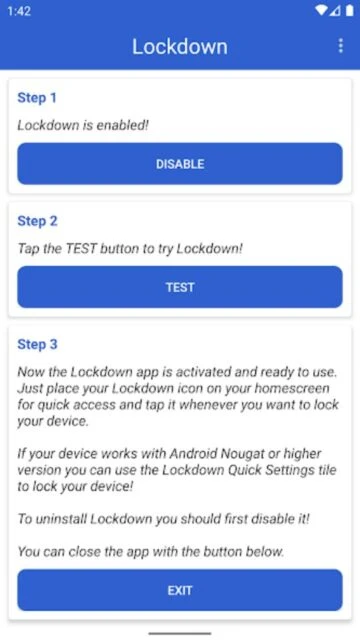
Yes. After enabling the Quick Settings Tile, you can add it to your notification panel. Simply pull down your notification bar and tap the Lockdown tile to instantly lock your device without opening the full app.
Lockdown is a straightforward utility app designed to activate Android’s Lockdown feature, a built-in security mode available on Android Nougat and later devices. This app provides instant device lock functionality with a single tap, forcing your phone to require password authentication and overriding smart lock and fingerprint settings for maximum security.
Why Choose Lockdown?
Lockdown offers essential security features for users who need quick access to their device’s lockdown mode without navigating complex settings menus. The app provides convenient Quick Settings Tile integration, allowing you to lock your device directly from the notification bar. Its minimalist design focuses on core functionality without unnecessary bloat, making it ideal for users prioritizing straightforward device security.
Instant Device Lock: Activate Lockdown Mode with a single tap to disable biometric unlock methods and require password authentication.
Quick Settings Tile: Place a convenient shortcut in your notification bar for immediate access without opening the app.
Lightweight Design: Small file size of just 7.48 MB ensures minimal impact on your device’s storage and performance.
How It Works
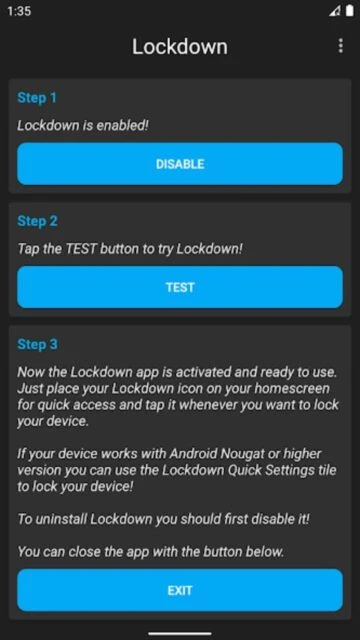
After installation, enable Lockdown in the app’s settings and grant Device Administrator permissions when prompted. Once activated, tapping the Lockdown icon immediately locks your device and disables all biometric unlock methods, requiring you to enter your password or PIN to unlock. The Quick Settings Tile provides rapid access without opening the full app interface.
Who Should Use It?
Lockdown is perfect for users who occasionally need enhanced security, such as travelers concerned about unauthorized access, employees protecting sensitive work data, or anyone temporarily disabling biometric authentication. It’s particularly useful for those already using smart locks or fingerprint security who want a quick way to enforce stricter authentication temporarily.
User reviews and ratings for Lockdown - Protect Your Device
See what users think about Lockdown - Protect Your Device. Read honest reviews and ratings from real users.
3.0
★★★★★
3 reviews
Works perfectly for quick security boost
by Sarah Mitchell
★★★★★
2025-11-15
Great app for when I need extra security quickly. I set it up with the Quick Settings Tile and it's incredibly convenient. Perfect for situations where I need biometric disabled. Minimal ads too, which is appreciated.
Good app but limited compatibility
by James Rodriguez
★★★★★
2025-10-22
The app does exactly what it claims on my phone. However, I read about compatibility issues on some devices. The interface is straightforward and the single-tap lock is very efficient. Would recommend checking device compatibility first.
Simple and effective security tool
by Emily Chen
★★★★★
2025-09-08
Exactly what I needed. No bloat, no unnecessary features. Just quick device lock functionality. The notification tile access makes it incredibly practical. Setup was straightforward with the Device Administrator permission.
Write a Review
Lockdown - Protect Your Device Screenshots & Photos
Browse through screenshots and photos of Lockdown - Protect Your Device to see how it looks and works.
Lockdown - Protect Your Device Videos
Watch videos to see how this app works and learn about its features.