LightX is more than just a photo editor; it is a complete creative studio in your pocket. It simplifies complex editing techniques like curves, levels, and color balance, making them accessible via simple touch controls. The app is frequently updated with the latest AI trends, ensuring users always have access to cutting-edge tools.
Whether you want to create funny caricatures, professional headshots, or artistic surrealism, LightX provides the canvas and the tools. Its non-destructive editing workflow allows you to experiment freely without losing your original image quality.
Features Of LightX Photo Editor & Retouch
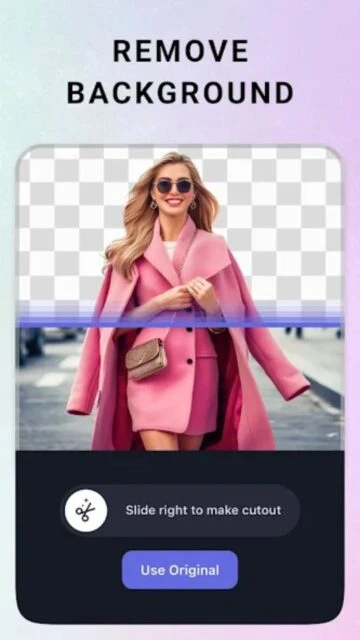
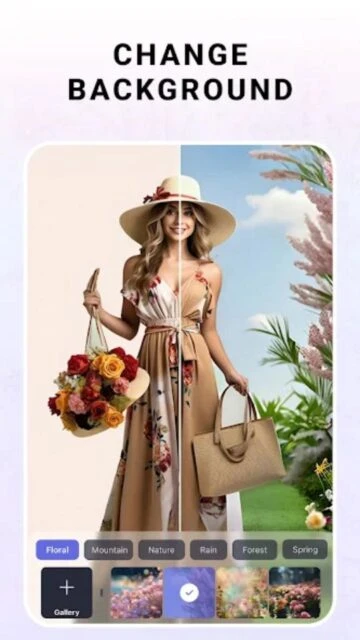
Advanced Photo Cutout and Background Changer
Color Splash effects for selective coloring
Merge photos for Double Exposure effects
Professional Portrait Retouching tools
Blur Photo editor with bokeh effects
Shape manipulation and body reshaping
Text on photo with customizable fonts
Video editing capabilities with trim and merge
Premium Features in the Paid Plan
Access to all premium filters and art effects
High-resolution saving without compression
Unlimited access to stock photos and stickers
Advanced AI generation credits
Ad-free editing experience
Exclusive templates for stories and posts
Priority customer support
Cloud sync across devices
Free / Pro $3.99/mo
Free vs Premium Comparison
Feature
Free
Premium
Filters
Basic Collection
Premium Collection
Save Quality
Compressed
High Definition
AI Credits
Daily Limit
Monthly Allowance
Ads
Yes
No
Templates
Free Selection
All Unlocked
Tools
Basic Editing
Pro Curves/Levels
Frequently Asked Questions
Can I edit videos with LightX?
Yes, LightX includes video editing features like trimming, merging, and adding music, in addition to photo editing.
Is my data safe?
LightX takes privacy seriously and does not sell your photos. Images processed by AI are typically handled securely in the cloud.
How do I use the Color Splash feature?
Select the 'Splash' tool. Your photo turns B&W. Simply brush over the areas you want to reveal the original color.
Is the Pro version a one-time purchase?
LightX offers both subscription models (monthly/yearly) and occasionally a lifetime purchase option depending on the region.
Can I use it on a tablet?
Yes, the interface is optimized for both phones and tablets, offering a great experience on larger screens.
LightX is a versatile photo editing powerhouse that combines the features of multiple apps into one. From advanced background changing and color splash effects to professional portrait retouching and AI avatars, LightX offers everything a creator needs. It bridges the gap between simple filters and professional desktop editing software.
Why Choose LightX Photo Editor?
LightX stands out for its sheer variety of tools. Instead of downloading separate apps for collages, face tuning, and background removal, you get them all here. Its “Color Splash” and “Photo Blender” features are particularly renowned for creating artistic, double-exposure images that stand out on social media feeds.
AI Tools: Generate AI avatars and remove backgrounds instantly.
Color Splash: selectively colorize parts of your photo while keeping the rest black and white.
Photo Blending: Merge photos to create stunning double exposure effects.
How It Works
Select a tool from the bottom menu—such as “Cutout” for backgrounds or “Blend” for mixing images. Use the intuitive sliders to adjust intensity, opacity, and color balance. You can layer effects, add text, and apply stickers before exporting your final masterpiece to social media.
Who Should Use It?
Designed for creative enthusiasts, digital artists, and social media content creators who want to experiment with artistic effects beyond simple filters. It is powerful enough for pros yet accessible for casual users.
User reviews and ratings for LightX Photo Editor & Retouch
See what users think about LightX Photo Editor & Retouch. Read honest reviews and ratings from real users.
4.5
★★★★★
3 reviews
Replaced three other apps
by Mark Thompson
★★★★★
2025-11-20
I used to have separate apps for background removal, collage, and retouching. LightX does it all and does it well.
Solid editor, great AI
by Lisa Wong
★★★★★
2025-10-05
The AI features are impressive, especially the avatar generator. Sometimes the app lags a bit on older phones, but overall very powerful.
My favorite creative tool
by Alex D.
★★★★★
2025-09-28
I love the blending modes! I've made some amazing artistic photos for my portfolio using this app. Highly recommended.

 41
41