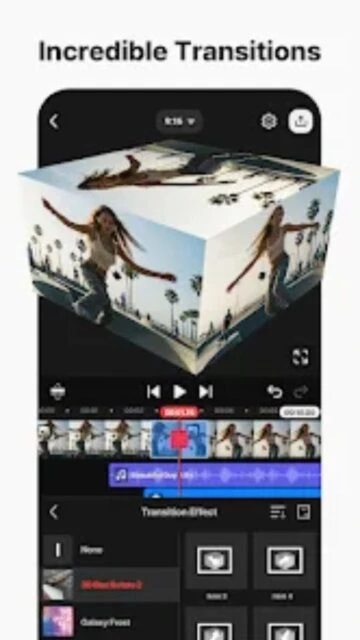
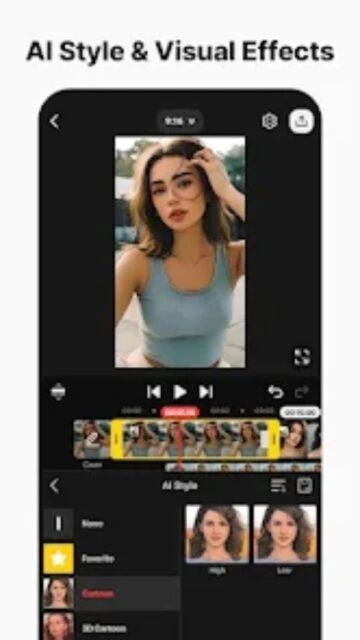
KineMaster is a full-featured video editor for Android and iOS that brings professional editing tools to a mobile interface. It supports multiple video layers, audio filters, and precise cutting tools, making it a favorite among serious mobile creators.
Beyond basic cutting, KineMaster shines with its Asset Store, offering thousands of music tracks, sound effects, and stickers. The app's engine is optimized to handle 4K editing at 60FPS, ensuring your final output looks crisp on any screen.
Features Of KineMaster - Video Editor & Maker
Multi-layer video, images, and text editing
Precise cutting and trimming frame-by-frame
Real-time voice recording and audio mixing
Speed control for time-lapse and slow motion
Keyframe animation tool for adding motion to layers
Chroma key (Green Screen) for advanced compositing
AI Style transfer filters for artistic looks
EQ presets and volume envelope tools for audio
Asset Store with music, fonts, and graphics
Export in 4K 2160p at 30FPS
Premium Features in the Paid Plan
Removal of KineMaster watermark on exports
Unlimited access to Premium Asset Store items
No advertisements in the editing interface
Advanced color grading and filter presets
Transparent background export for easy overlays
Premium music and sound effects library
High-resolution GIF export capabilities
Priority customer support for technical issues
Free / $8.99/mo or $44.99/yr
Free vs Premium Comparison
Feature
Free
Premium
Watermark
Visible on all exports
Completely removed
Asset Store
Basic assets only
Unlimited premium assets
Ads
Banner and popup ads
Ad-free experience
Export Quality
Up to 4K
Up to 4K with higher bitrates
Background Removal
Standard Chroma Key
AI Magic Remover included
Transparent Background
Not available
Supported for overlays
Frequently Asked Questions
Does KineMaster have a watermark?
Yes, the free version places a watermark on exported videos. The Premium subscription removes it completely.
Can I edit 4K videos?
Yes, KineMaster supports editing and exporting 4K video, provided your device's hardware supports it.
Is the subscription cross-platform?
KineMaster Premium is linked to your Google Play or Apple ID, so it generally applies to devices on the same platform account.
How does the Magic Remover work?
It uses AI to detect the subject and remove the background without needing a green screen, available in Premium.
Can I add my own music?
Yes, you can import audio files from your device storage to use as background music or sound effects.
KineMaster redefines what’s possible on a mobile device, bridging the gap between casual editing and professional production. With its intuitive timeline interface and robust feature set, it empowers creators to produce broadcast-quality content directly from their smartphones or tablets.
Why Choose KineMaster?
Whether you are a YouTube creator, a social media influencer, or a journalist on the go, KineMaster offers unparalleled flexibility. Its multi-layer support allows for complex composites, while the Asset Store provides thousands of trendy transitions and effects.
Multi-Layer Editing: Stack unlimited text, image, and handwriting layers for complex visual storytelling.
Chroma Key Engine: Professional green screen removal with precise alpha mask adjustments.
Magic Remover: AI-powered background removal that works instantly without a green screen.
How It Works
Import your media into the magnetic timeline and use precision trimming tools to arrange your story. distinct layers allow you to add effects, overlays, and handwriting independently. Adjust audio with the envelope tool for perfect mixing, then export in up to 4K 60FPS.
Who Should Use It?
Ideal for vloggers, educators, and mobile journalists who need desktop-class features without the desktop. It is perfect for creators who need to edit high-quality video content while traveling or away from a studio.
User reviews and ratings for KineMaster - Video Editor & Maker
See what users think about KineMaster - Video Editor & Maker. Read honest reviews and ratings from real users.
4.4
★★★★★
3 reviews
Best mobile editor hands down
by Sarah Jenkins
★★★★★
2025-11-10
I've been using this for my YouTube channel for three years. The keyframe animation is better than some desktop apps I've tried. Totally worth the subscription.
Great features but pricey
by Mike Ross
★★★★★
2025-10-05
The features are incredible for a phone app, especially the chroma key. However, the annual price keeps going up which makes it hard for casual users.
Solid performance on S24
by David Chen
★★★★★
2025-09-22
Runs perfectly smooth on my Galaxy S24. Rendering 4K videos is super fast and the asset store has everything I need for my reels.
Write a Review
KineMaster - Video Editor & Maker Screenshots & Photos
Browse through screenshots and photos of KineMaster - Video Editor & Maker to see how it looks and works.

 60
60