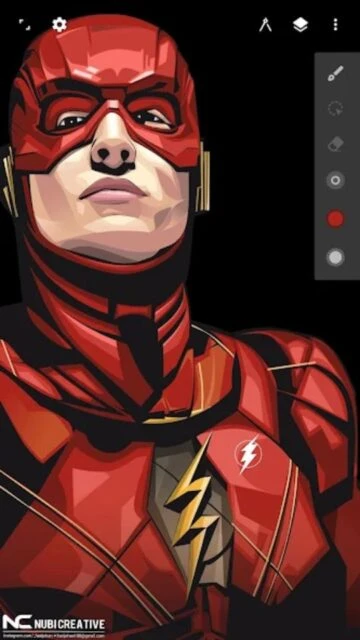
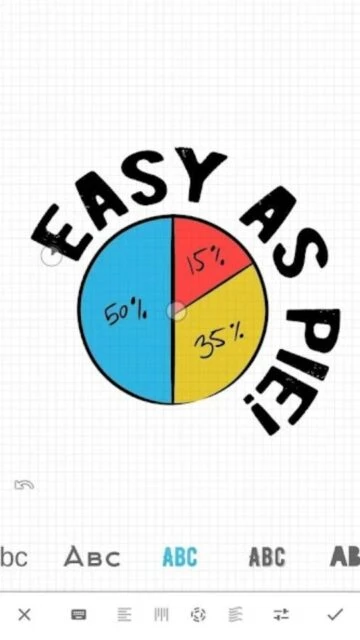
Infinite Design is a powerhouse for mobile vector artists, providing a desktop-class experience on Android devices. It completely bypasses the limitations of pixel-based drawing by using mathematical paths that scale infinitely without losing quality.
Beyond basic drawing, the app excels in technical illustration with tools like 3D perspective guides and precise path editing. Whether you are designing a corporate logo or a complex geometric pattern, the app's stability and extensive feature set make it a reliable choice for professional work.
Features Of Infinite Design
Infinite canvas with unrestricted zoom and pan
Intuitive path editing with bezier curves
Unlimited layers with split and merge options
Boolean operations for complex shape building
Five types of perspective guides for 3D drawing
Advanced color picking and palette management
Automatic shape detection for perfect forms
Rotate and flip canvas for better angles
Premium Features in the Paid Plan
Unlimited undo/redo history slider
Export to scalable SVG format
Gradient and pattern fills for shapes
3D Cityscapes perspective tools
Text tool with custom font support
Import and edit existing images
Advanced transform and distort tools
No advertisements in workspace
Free trial / $9.99 Lifetime
Free vs Premium Comparison
Feature
Free
Premium
Canvas Size
Infinite but limited export
Infinite with full export
Export Format
JPEG only
SVG, PNG, PSD
Layers
Limited (3 layers)
Unlimited layers
Tools
Basic pen and shapes
Gradient, Pattern, 3D
Undo History
Last 10 steps
Unlimited scrubbing
Commercial Use
Restricted
Allowed
Frequently Asked Questions
Is Infinite Design truly free?
It offers a 7-day free trial with full features, after which it reverts to a limited free version unless you purchase the full unlock.
Can I export to Adobe Illustrator?
Yes, the premium version allows you to export as SVG, which can be opened and edited directly in Adobe Illustrator.
Does it support pressure sensitivity?
Yes, it fully supports pressure sensitivity for active styluses like the S-Pen and specialized Wacom tablets.
Can I use custom fonts?
The premium version includes a text tool that allows you to import and use your own TTF or OTF font files.
Is an internet connection required?
No, Infinite Design works completely offline, making it perfect for working while traveling or commuting.
Infinite Design reimagines mobile creativity by offering a robust vector graphic engine that rivals desktop software. With its clutter-free interface and powerful toolset, it allows artists to create intricate designs anywhere without sacrificing precision or quality.
Why Choose Infinite Design?
Unlike raster-based apps, Infinite Design uses vectors, meaning your artwork remains crisp at any size. It features an infinite canvas that lets you pan, zoom, and rotate freely, ensuring you never run out of space for your ideas. The advanced path editing tools give you total control over every curve and line.
Infinite Canvas: Pan, zoom, and rotate without boundaries or pixelation.
Boolean Operations: Combine shapes with union, difference, and intersect tools.
Advanced Symmetry: Create complex patterns with four types of symmetry.
How It Works
Select the pen tool to start drawing smooth, editable paths instantly. Use the layer manager to organize elements, and apply gradients or patterns with a simple drag-and-drop. When finished, export your project as an SVG for further editing on a desktop or as a high-res PNG.
Who Should Use It?
Ideal for graphic designers, illustrators, and technical artists who need professional-grade vector tools on the go. It’s perfect for logo design, concept art, and creating scalable illustrations for print or web.
User reviews and ratings for Infinite Design
See what users think about Infinite Design. Read honest reviews and ratings from real users.
4.3
★★★★★
3 reviews
Best vector tool on Android
by Marcus J.
★★★★★
2025-11-12
Finally, a real vector app for Android. The path editing is just like Illustrator. Worth every penny for the SVG export alone.
Great features but crashes
by Sarah L.
★★★★★
2025-10-05
The tools are amazing, especially the symmetry and perspective guides. However, it crashes sometimes if I add too many layers on my tablet.
Steep learning curve
by David K.
★★★★★
2025-09-22
It's powerful but takes time to learn. The interface is clean but hides some tools. Once you get it, it's indispensable.
Write a Review
Infinite Design Screenshots & Photos
Browse through screenshots and photos of Infinite Design to see how it looks and works.
Infinite Design Videos
Watch videos to see how this app works and learn about its features.

 44
44