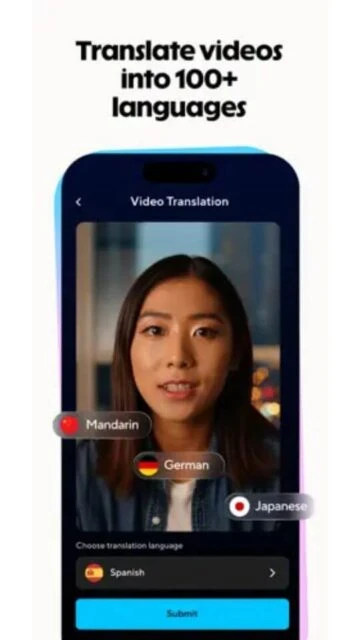
HeyGen is an AI-powered video platform designed to transform text and media into presenter-style videos without cameras or studios. By automating avatars, voice synthesis, and multilingual delivery, it enables businesses, educators, and content teams to produce consistent, branded videos at scale. While it prioritizes speed, templates, and automation over fine-grained manual editing, HeyGen stands out with high user ratings and a large library of realistic AI avatars, making professional video production accessible without traditional production costs.
How to Get Started with HeyGen
HeyGen’s onboarding centers on a web‑first experience with mobile support, where you sign up via email or Google, claim free credits, and jump into the dashboard to pick avatars or templates right away. The process feels intuitive: AI guides script input, previews generation, and lets you tweak before export, though mobile limits advanced edits to desktop.
- Create account – Visit heygen.com or download the app on iOS/Android; sign up with email or Google to access free credits and the dashboard immediately.
- Choose input type – Select text script, image, or audio upload; the AI suggests templates and avatars tailored to your content goal.
- Customize video – Pick from 1000+ avatars, voices in 175 languages, add brand elements like logos; preview lip-sync and gestures in real time.
- Generate and edit – Hit create for a 1080p/4K video in minutes; use Studio Editor for refinements, then export or share directly.
- Manage credits – Track usage in settings; upgrade plans for more via app (US only) or web for unlimited access.
Who Should Use HeyGen
HeyGen suits professionals aged 25-55 who create videos often, like marketers and educators needing quick, avatar-driven content without filming gear. Its AI handles scaling for teams, but demands comfort with templates over raw editing freedom.
Ideal users
- Marketing teams in small businesses; they produce personalized ads and demos fast, saving hours on shoots while hitting 175+ languages for global campaigns.
- E-learning creators and corporate trainers; they build interactive modules with consistent avatars, boosting engagement without actor hires.
- Content creators for social or YouTube; they generate hype videos or reviews on the fly, using free credits to test before scaling.
Not ideal for
- Film editors seeking granular control; HeyGen’s template focus skips deep timeline tweaks, frustrating pros who need DaVinci Resolve-level precision.
- Budget users avoiding subscriptions; free tier limits to 3 short videos monthly, pushing frequent creators to paid plans quickly.
- Offline video workers; it relies on cloud processing, useless without stable internet for generation or exports.
HeyGen Platform Compatibility
HeyGen prioritizes web access for full editing power, with iOS and Android apps for quick creation; desktop runs via browser wrappers like WebCatalog, but lacks a native app. Mobile shines for on-the-go generation yet caps advanced features like full AI Studio, pushing complex work to web.
| Platform |
Minimum Version |
Unique Features |
Limitations |
| iOS |
17.5 |
Photo-to-video, voice-to-avatar, shortcuts |
No workspace switching; fewer voices/accents than web |
| Android |
10 |
Text-to-video, captions, b-roll AI |
Many features “desktop only”; limited reviews/uptake |
| Web |
Modern browsers |
Full AI Studio, 100+ languages, Brand Kit |
Requires internet; no offline mode |
| Desktop |
N/A (browser) |
Team collab, advanced edits |
No native app; relies on web performance |
HeyGen Integrations and Ecosystem
HeyGen builds its ecosystem around Zapier for no-code automations and an API for custom workflows, linking AI video generation to CRMs and content tools without deep coding.
- Zapier automation – Triggers video creation from forms or emails, shares outputs to Slack/HubSpot, streamlining sales outreach across 8000+ apps.
- Canva partnership – Imports designs directly into videos, turning static graphics into talking-head explainers with synced avatars.
- HubSpot CRM sync – Converts blog posts to video summaries, auto-posts to social channels for marketing amplification.
- API for developers – Embeds video gen in apps, supports webhooks for real-time events like lead-triggered personalization.
- YouTube translator – Direct integration pulls videos, dubs in 175 languages, exports compliant clips without re-uploads.
Best Alternatives to HeyGen
HeyGen excels in AI avatar videos، but Google Play alternatives offer mobile-native editing with similar AI tools – focusing on offline exports, unlimited free use and social-ready features for Android creators avoiding cloud credits.
- CapCut – Features AI auto-captions in 100+ languages, background removal, 4000+ effects and templates; supports unlimited 4K exports offline, perfect for TikTok-style avatar clips without HeyGen’s limits. Ideal for quick social videos.
- VN Video Editor – Includes AI smart cut that auto-edits clips to music beats, stabilization, multi-layer timelines; full 4K offline exports with no watermarks, great for dynamic HeyGen-like narratives on mobile.
- PowerDirector – Packed with AI anime avatar effects, object removal, speech-to-text dubbing, chroma key; unlimited HD exports free on Android 7+, suits pro edits beyond basic avatar gen.
- KineMaster – Offers AI voice changer, chroma key for virtual presenters, massive asset store; 4K exports with pro trial, direct HeyGen competitor for layered mobile videos.
- InShot – AI stickers, text-to-speech voices, pro effects pack; unlimited 1080p exports offline, simple for HeyGen users wanting fast, avatar-free video polish.
HeyGen vs Top Competitors
This table contrasts user ratings, AI capabilities, export freedoms and offline reliability using Play Store metrics and reviews – revealing why mobile apps often outpace HeyGen for Android daily use.
| Feature |
HeyGen |
CapCut |
VN Editor |
PowerDirector |
| Core AI Tools |
Text-to-avatar, 175 langs dubbing, lip-sync |
AI eraser, captions 100 langs, effects gen |
Smart auto-cut, stabilization, beat sync |
Anime avatars, body remove, STT dubbing |
| Free Export Limits |
3 videos (1min each)/month HD |
Unlimited 4K videos |
Unlimited 4K full edits |
Unlimited HD pro effects |
| Offline Capabilities |
No generation, web/cloud only |
Partial edits + full exports |
Full editing/export pipeline |
Full suite + exports |
Power User Tips for HeyGen
Power users squeeze more from HeyGen by chaining API calls, custom prompts and multi-platform hacks – turning basic avatars into production-grade assets across web/mobile.
- On web, chain templates with Brand Kit for consistent logos/colors; upload custom fonts via API to match enterprise styles without per-video tweaks.
- Mobile iOS shortcut integration lets you feed Google Docs scripts directly to app gen; expect 30% faster previews on iPhone 15+ with A17 chip.
- Use Zapier to auto-generate videos from CRM leads, adding dynamic names/faces; test with free credits first to refine prompts for 95% lip-sync accuracy.
- Export drafts to CapCut for fine audio layers; HeyGen’s 175 languages shine post-dub, saving translation costs by 70%.
- Track credits via API dashboard scripts; batch low-res previews overnight for Android teams, upgrading only finals to 4K pro.
HeyGen Support and Community
HeyGen blends self-serve docs with active forums for troubleshooting AI quirks, plus social channels for tips – responsive for paid users, basic for free.
Official Help Center – Comprehensive articles on API, mobile setup, templates; search covers 90% issues like dubbing fails, with video guides updated monthly.
Community Forum – HeyGen Community hub for templates shares, prompt tips; 10k+ members discuss avatar hacks, though moderation lags on weekends.
Social Media – Active on X/LinkedIn with weekly updates; respond to queries in hours, showcase user videos for inspiration.
Contact Support – Priority tickets for Creator+ plans via dashboard; expect 24h replies, live chat for Enterprise with dedicated reps.

 49
49