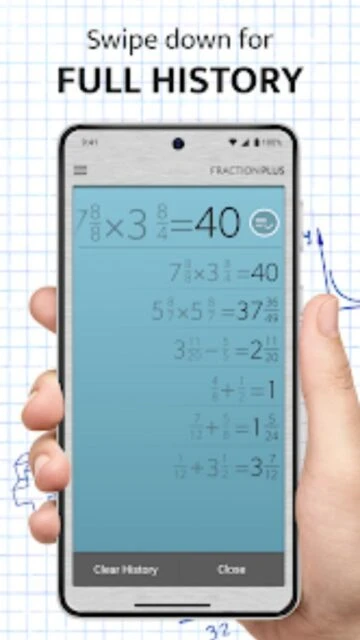
Fraction Calculator Plus stands out as a specialized calculation tool designed for anyone handling everyday fractions—from helping students with math homework to assisting professionals in construction and woodworking. Unlike generic calculators that treat fractions as decimal conversions, this app preserves fractional notation throughout operations and automatically reduces results to simplest form. Updated to version 6.1.4 in December 2025, it integrates a new Photo Calculator feature powered by AI for image-based problem recognition. The platform’s triple keypad system accelerates data entry, making mixed numbers like 3 3/4 accessible in just three taps instead of multiple steps. This guide explains how to maximize the app’s features, understand its competitive advantages, and leverage its specialized tools for precision calculations.
How to Get Started with Fraction Calculator Plus
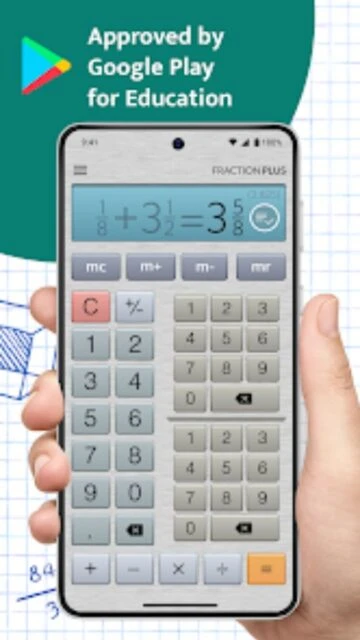
The onboarding experience in Fraction Calculator Plus eliminates the learning curve typical of scientific calculators. First-time users can begin solving problems immediately without navigating complex menus. The interface organizes input controls into three dedicated sections for intuitive operation.
- Download and Install – Access the free app from Google Play Store (Android 5.0+) or Apple App Store (iOS 15.0+), which installs the ad-supported version with 23.73 MB file size on Android and 127.7 MB on iOS.
- Enter Your First Fraction – Use the left keypad to input whole numbers, then tap the numerator field (top-right keypad) and denominator field (bottom-right keypad) for mixed numbers; for example, entering 2 1/4 requires just three taps total.
- Select Your Operation – Choose from addition (+), subtraction (−), multiplication (×), or division (÷) buttons displayed at the bottom of the calculator interface below the keypads.
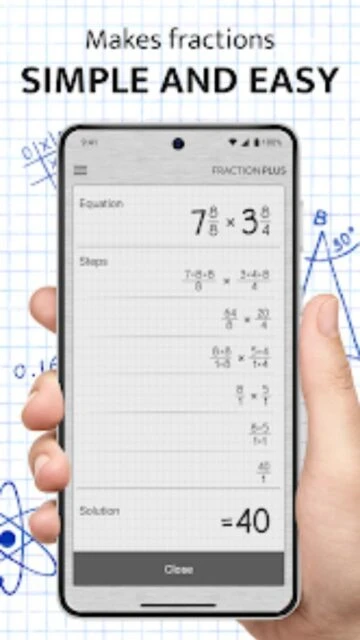
- View Results in Dual Format – Every calculation displays automatically reduced fractions alongside decimal equivalents; step-by-step solution buttons appear above results to reveal the mathematical process behind each answer.
Who Should Use Fraction Calculator Plus
While fraction calculators serve niche purposes, Fraction Calculator Plus identifies four distinct user categories where its specialized features deliver measurable value. Each persona benefits from different feature sets within the same application.
- Students (Ages 5-18) – The step-by-step explanation feature provides learning reinforcement, making it invaluable for verifying homework answers in mathematics classes covering fractions, ratios, and decimals simultaneously.
- Home Cooks and Recipe Scalers – Converting ingredient quantities when adjusting recipe servings from 4 people to 6 becomes immediate calculation rather than manual conversion; measuring cup and teaspoon conversions integrate with fraction results.
- Professional Woodworkers and Carpenters – The PRO version ($24.99 lifetime) rounds measurements to standard denominators (2nds, 4ths, 8ths, 16ths, 32nds, 64ths of an inch) critical for lumber sizing, which standard fraction calculators cannot provide.
- NOT ideal for – General calculation needs, currency conversions, or anyone exclusively using decimal measurements; apps like Calculator Plus or Mathway better serve users needing broad mathematical functionality beyond fractions.
Fraction Calculator Plus Platform Compatibility
Cross-platform support ensures you access Fraction Calculator Plus on the device you’re holding—whether mobile, tablet, or desktop. Platform-specific optimizations and limitations affect feature availability and user experience quality across environments.
| Platform |
Min. Version |
Unique Features |
Limitations |
| Android |
5.0+ |
Photo Calculator for capturing math problems; Material Design 3 interface; integration with system clipboard for quick copy-paste operations |
Photo Calculator recognition works best on printed problems; older Android 5.0-6.0 devices may experience slower photo processing |
| iOS |
15.0+ |
VoiceOver accessibility integration; native Apple ecosystem optimization; Support for iPad multitasking modes; Mac app via Apple Silicon (M1+) |
Requires modern iOS versions; iPhone 11 or later recommended for optimal Photo Calculator performance |
| Web |
Chrome 90+, Safari 14+, Firefox 88+ |
Access calculations without installation; Cloud sync of calculation history across devices (premium feature) |
Limited to browser window; Photo Calculator feature unavailable; offline mode not supported |
| Desktop |
Windows 10+ / macOS 12.0+ (M1) |
Larger display for complex calculations; keyboard navigation for rapid input; History panel permanently visible |
Desktop versions available only as web apps; native Windows/Mac binaries not currently offered |
Fraction Calculator Plus Integrations & Ecosystem
Integration capabilities extend Fraction Calculator Plus beyond isolated calculations into broader productivity workflows. Connected tools enhance efficiency when combining fraction mathematics with recipe management, measurement documentation, or educational platforms. Native integrations remain limited, but workarounds through export functions provide data portability.
- Google Drive Export (Premium) – Save calculation histories as spreadsheets directly to Google Drive with timestamp records, enabling collaborative homework verification between students and tutors.
- System Clipboard Integration – Copy calculation results directly into Notes, Google Docs, or Microsoft Word; paste fractions from documents to auto-parse and solve within the calculator.
- Email Support for Calculation Sharing – Send calculation steps via email with formatted screenshots; useful for tutors documenting work samples or professionals archiving material measurements.
- Calculation History Sync – Premium subscriptions sync calculation history across Android and iOS devices through authenticated accounts, preventing duplicate calculations when switching devices.
Best Alternatives to Fraction Calculator Plus
While Fraction Calculator Plus specializes in fraction-only calculations, several competing applications expand functionality beyond pure fraction mathematics. Choosing alternatives depends on whether you need broader mathematical capabilities or deeper educational scaffolding than Fraction Calculator Plus provides.
- Photomath ($14.99/month) – Best for camera-based problem solving with photographic recognition of handwritten and printed math problems; includes AI tutoring but costs significantly more and lacks woodworking-specific rounding features.
- Mathway ($19.99/month) – Best for comprehensive mathematics across algebra, geometry, trigonometry, and calculus; significantly broader scope than Fraction Calculator Plus but less specialized for woodworking measurements.
- Desmos Graphing Calculator (Free) – Best for visual fraction representations and graphing; lacks step-by-step fraction simplification explanations but excels when visual learning complements calculation.
- Symbolab ($14.99/month) – Best for detailed mathematical explanations and step-by-step derivations; more educational depth than Fraction Calculator Plus but slower interface and unnecessary complexity for simple operations.
Fraction Calculator Plus vs Top Competitors
Direct comparison reveals distinct positioning: Fraction Calculator Plus optimizes for focused efficiency in fraction operations, while competitors broaden scope across mathematical domains. The pricing differential and feature specialization help users select based on their primary calculation needs and budget constraints.
| Feature |
Fraction Calculator Plus |
Photomath |
Mathway |
| Pricing |
Free (ad-supported) / $24.99 lifetime or $11.99/year premium |
Free with ads / $14.99/month subscription |
Free with limited features / $19.99/month full access |
| Core Strength |
Specialized fraction calculation with woodworking rounding (PRO only); step-by-step simplification |
Camera-based problem recognition; AI tutoring through photos; broad mathematical coverage |
Comprehensive mathematics across seven subjects; equation solver for complex problems |
| Target Users |
Students, carpenters, recipe scalers, woodworkers, DIY enthusiasts |
Students needing homework verification; those with handwritten problem photos |
Advanced students; professionals in STEM fields; those solving complex equations |
| Unique Feature |
Triple keypad design for rapid mixed-number entry; professional rounding to 64ths inch |
Photo recognition with handwriting detection; interactive tutoring interface |
Graphing capabilities; symbolic computation; equation solving beyond arithmetic |
| Offline Mode |
Full offline operation; all features available without internet |
Premium requires internet; offline recognition limited |
Offline support not available; requires internet connection always |
Fraction Calculator Plus Privacy & Security Overview
Privacy practices in Fraction Calculator Plus balance functional data collection with user protection. Unlike broader educational platforms, this calculator collects minimal personally identifiable information. Understanding data flows helps users make informed decisions about premium account setup and calculation history storage.
| Security Aspect |
Implementation |
User Control |
| Data Encryption |
All data transmitted via HTTPS encryption in transit; data at rest uses AES-256 encryption for premium account data |
No user configuration needed; encryption enabled by default for all transmissions |
| Authentication |
Optional email/password account creation for premium features; supports biometric authentication (fingerprint, face recognition) on iOS/Android |
Users choose whether to create accounts; biometric login optional even with premium subscription |
| Data Collection |
Free version collects app usage analytics and device identifiers for crash reporting; premium accounts store calculation history on secure servers |
Free users can disable analytics in Settings; premium users can delete calculation history anytime from History panel |
| Third-Party Sharing |
No sharing with external advertisers; analytics aggregated through Firebase (Google); no sale of personal information |
Privacy Policy allows users to opt-out of non-essential analytics; analytics remain limited even when opted-in |
Fraction Calculator Plus Accessibility Features
Accessibility commitment ensures users with visual, motor, and hearing differences can operate Fraction Calculator Plus effectively. Platform-specific implementations follow WCAG 2.1 AA standards where applicable, though comprehensive accessibility varies between iOS, Android, and web versions.
- Screen Reader Support – VoiceOver (iOS) and TalkBack (Android) fully compatible; all buttons, results, and explanations read aloud with natural language descriptions; numerator/denominator structure announced clearly.
- Visual Enhancements – Font scaling from 100% to 200% without loss of functionality; high-contrast dark mode available; white text on black background meets WCAG AAA standards for color contrast ratios.
- Motor & Input Accessibility – Full keyboard navigation without touchscreen requirement; voice input supported on Android (through system accessibility features); all multi-tap operations have keyboard shortcuts.
- Language Support – Interface available in 44 languages with right-to-left (RTL) support for Arabic, Hebrew, and Persian; calculation results always display in standard mathematical notation regardless of language selection.
Power User Tips for Fraction Calculator Plus
Advanced techniques unlock efficiency gains beyond basic fraction entry. Expert users combine features strategically to accelerate complex calculations and leverage hidden capabilities documented minimally in official resources. These tactics transform the calculator from basic tool into workflow accelerator.
- Chain Calculations Using Memory Functions – Tap M+ to accumulate individual calculation results, then M- to subtract; this workflow prevents intermediate number entry errors in sequential operations like adding multiple measurements.
- Triple Keypad Shortcuts with Precedence – Enter fractions with decimals in numerator or denominator (e.g., 2.5/4) and the app auto-computes to simplest form (5/8), eliminating manual conversion steps in complex measurements.
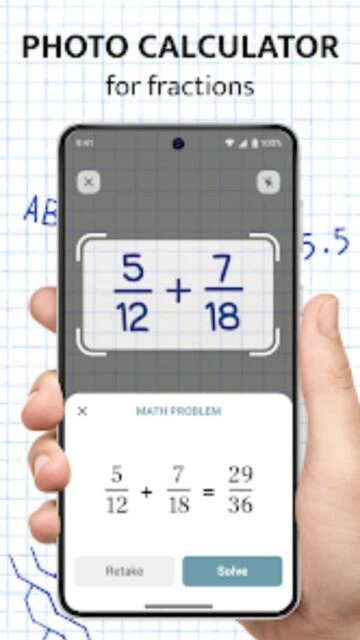
- Photo Calculator Speed Optimization – Capture problems in good lighting with straight angles (45°-90° to page surface) for 95% recognition accuracy; blurry or skewed photos reduce recognition below 60%.
- History Panel Time Navigation – Premium users can access calculations by date; filtering calculations by type (additions, subtractions, divisions) reduces search time from minutes to seconds in long calculation sessions.
- Decimal/Fraction Toggle for Verification – Convert results between fractions and decimals immediately after calculation by tapping the format toggle; useful for double-checking work or comparing against textbook answers provided in decimal form.
Fraction Calculator Plus Support & Community
Official support channels remain minimal compared to broader educational platforms. Digitalchemy, LLC prioritizes direct email support over community forums. Users seeking peer assistance should reference broader math communities rather than app-specific resources.
- Official Support Email – Contact [email protected] for technical issues, feature requests, or subscription problems; average response time 24-48 hours.
- In-App Support Messages – Settings menu includes “Send Feedback” button triggering automatic bug reports with app logs and device information; ideal for crash reporting and technical troubleshooting.
- Social Media Updates – Follow Digitalchemy LLC on X (formerly Twitter) and Facebook for version release announcements, though no dedicated Fraction Calculator Plus community accounts exist.
- No Community Forum – Unlike apps with active Reddit communities, Fraction Calculator Plus lacks official forums; users troubleshoot through broader educational subreddits like r/learnmath or general calculator support communities.
Fraction Calculator Plus Latest Updates & Roadmap
December 2025 update (version 6.1.4) introduces Photo Calculator functionality enabling AI-powered problem recognition from photographs. This addition addresses the app’s historical limitation of manual number entry, expanding accessibility for users with dexterity challenges or those solving problems from textbook images. Minor bug fixes addressed user-reported crashes on Android 15 devices. The roadmap suggests future integration with Google Drive for automatic history backup, though official timelines remain unconfirmed. Woodworking PRO features remain stable without major revisions, indicating developer prioritization toward broader mathematical capabilities over specialized construction features.